


 Analysis byWeUseApps
I use WhatsApp most when I need a conversation to reach someone without asking which service they prefer. It works well for everyday messages, quick calls, family groups, and sharing updates with people in different places. Its familiar layout keeps the basics easy to find, though the app’s convenience does not remove the need to think carefully about privacy, group boundaries, and what I choose to share.
Convenience is part of the trust question
WhatsApp Messenger is a communication app from WhatsApp LLC, and its reach is a practical advantage: it has more than 10 billion installs and an average rating of 4.6 from around 246 million ratings. Those numbers suggest how widely it is used, but popularity is not a privacy guarantee. I treat it as a useful way to contact people, not as a reason to send every kind of information through a chat.
The app is free to download and is rated Everyone. It first appeared on October 18, 2010, and the current version is 2.26.41.77. In-app purchases are listed from about $0.40 to $199.99 per item. I would not let the presence of purchases distract from the central decision: whether the people I need to reach are there, and whether I am comfortable using a messaging app for the conversations I have in mind.
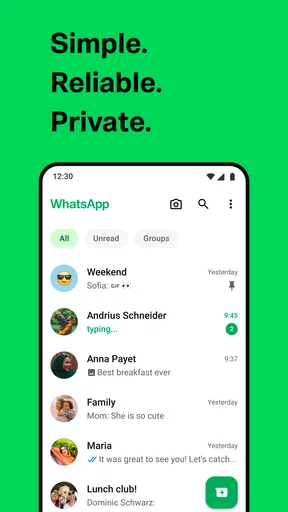
For most people, the strongest case is simple: messages and calls are gathered in one familiar place, so a household, group of friends, or small team can coordinate without maintaining a separate contact channel for each person. The same reach can also make the app noisy. A busy group may generate more interruptions than useful information, and convenience can encourage people to forward messages or share sensitive details before considering the audience.
What I check before relying on it
I make a distinction between three things that are easy to blur together: the app’s visible controls, the information I decide to send, and the people who can see it. A privacy control can help narrow an audience, but it cannot make a recipient handle a message responsibly. Likewise, a comfortable interface is not proof that every communication is appropriate for this channel.
That is why I recommend approaching WhatsApp with ordinary account hygiene rather than treating it as a private diary. I review the settings that govern who can see account details and how people can contact or add me, and I reconsider them when my circumstances change. If a setting is unclear, I avoid assuming that it provides a protection beyond what its wording actually says.
Small controls that make daily use calmer
One useful habit is to decide who should be able to add me to groups instead of accepting every invitation by default. Group membership affects more than the number of notifications: it changes who can see my participation and can bring unfamiliar people into the same conversation. When a group is for a short-lived task, I also leave or mute it once it no longer needs my attention rather than letting it quietly become a permanent source of noise.
I use conversation-level choices as a way to manage attention. Muting a chat can preserve access to it without requiring an immediate response to every message. That is especially helpful for neighborhood, school, or event groups where a few useful updates are mixed with casual chatter. I still check the conversation when I choose; muting is an attention tool, not a substitute for deciding whether the group should remain in my life.
Before sending something to several people, I pause and check the destination. A message meant for one person can feel very different in a large group, and a quick tap is an easy way to create an awkward mistake. For a sensitive update, I prefer a direct conversation with the intended recipient and keep the wording limited to what they need to know. The most meaningful privacy choice is often deciding what not to send.
Privacy depends on the moment, not just the setting
Everyday chats often mix low-stakes material with information that deserves more care. A photo from a gathering, a child’s school detail, a travel plan, or a document can reveal more than the sender intended, especially when it is shared in a group. I consider the audience first, then ask whether the detail needs to be sent at all. If it does, I choose the narrowest conversation that makes sense.
Group conversations deserve particular attention because membership can change and messages can be read in a different context from the one I had in mind. I avoid putting account credentials, financial details, or private identification information into a casual group chat. For information that needs a formal record or controlled access, another channel may be better. WhatsApp is convenient for coordination; that does not automatically make it the right place for every document or decision.
A realistic example is arranging a family pickup. I can send a short message with the time and meeting point, then use the same chat to handle a change of plan. That is more practical than calling several people individually. But if the conversation includes a child’s location, I keep the audience tight and avoid adding unrelated details. The same app can be perfectly suitable for a routine update and a poor choice for broadcasting information widely.
Account choices and the limits of user control
I find it useful to separate control over an account from control over other people. I can make choices about how I use the app, whom I contact, and which groups I remain in. I cannot guarantee that a recipient will keep a message confidential or that a group will stay unchanged. If I would be uncomfortable with a message being retained or shown beyond its original audience, I reconsider sending it.
When changing phones or reorganizing how I use messaging, I take time to inspect the available account and privacy settings instead of assuming my old choices still fit. I also make sure I can recognize the conversations that matter, particularly when family or work coordination depends on them. These are modest habits, but they reduce the chance that a useful channel becomes a source of confusion or unwanted exposure.
WhatsApp’s familiar interface makes it easy to start chatting, but that ease can obscure the fact that account settings and audience choices matter. I would encourage a new user to look through the privacy and group controls before joining lots of conversations. Then, when an invitation arrives, the choice to join feels deliberate rather than automatic.
Where it sits among messaging alternatives
Compared with the usual alternatives, WhatsApp’s main strength is practical reach: many people already know how to use it, which lowers the effort of getting a group started. A phone’s built-in text messaging may be simpler for someone who wants only basic one-to-one contact, while a work-focused service can be a better fit when a team needs structured project conversations and organizational boundaries. The right option depends on the people involved and the kind of information being exchanged.
I would not choose an app solely because a large number of friends use it. If your priority is a tightly managed work environment, a dedicated workplace tool may offer a more suitable workflow. If you rarely message groups and prefer the built-in services on your device, WhatsApp may feel like an unnecessary extra. On the other hand, if relatives, friends, or community contacts already use it, its low-friction conversations can save a lot of coordination.
The store records 1.9 million written reviews, another sign that the app is a familiar part of many people’s routines. That scale can be reassuring when you need a common meeting point, but it does not settle whether the app suits your own privacy expectations. I judge it by the controls I can see, the audience I choose, and the sensitivity of the material I send, rather than by its popularity alone.
My cautious recommendation
WhatsApp Messenger is a sensible choice for people who want a widely used place for everyday messaging and calls, especially when their contacts already rely on it. I value the convenience of keeping ordinary coordination in one familiar app, and I think its group and conversation choices can make that routine more manageable when used intentionally.
I would be more cautious if I needed a channel for highly sensitive records, strict workplace administration, or communication with people who do not want another messaging app. In those situations, a more suitable service—or a direct, non-digital conversation—may be preferable. I also would not join every group or treat a private chat as a promise that a recipient will keep its contents to themselves.
My advice is to install it if it solves a real communication problem, then spend a few minutes reviewing the account, privacy, and group choices before relying on it heavily. Keep sensitive sharing limited, check recipients before sending, and use another channel when the consequences of disclosure are high. With those boundaries, it can be an effective everyday messenger without asking you to confuse convenience with trust.
What we like
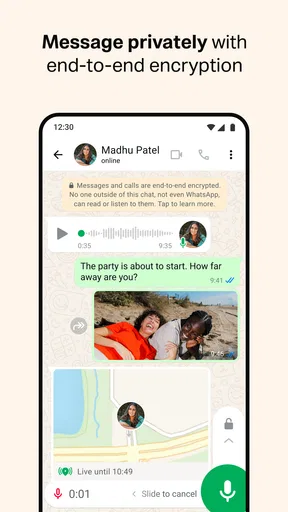
- End-to-end encryption protects personal messages and calls.
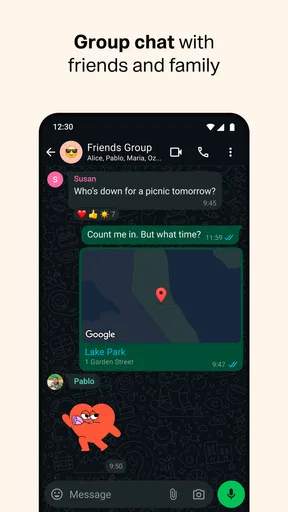
- Group chats make it easy to keep in touch with several people.
- Voice messages offer a quick alternative to typing.
- Message reactions let users respond without adding extra messages.
- Linked devices support access from a computer or tablet.
What could be better
- A phone number is required to create an account.
- Backups may need separate encryption settings for added protection.
- Large groups can generate frequent and distracting notifications.
- Some features may differ between iOS and Android.
- Using mobile data for calls can consume a substantial data allowance.




