



 Analysis byWeUseApps
When a conversation starts in Facebook and then turns into a plan, a photo exchange, or a quick call, I like having a place to carry it forward without switching to a separate messaging service. Messenger is built for that kind of everyday handoff: it keeps chats close to the social connections many people already have, while offering more than plain text. That convenience is its strongest point, though it also means the app makes most sense if your friends and family are there too.
From a social connection to an ongoing conversation
Messenger is a free communication app from Meta Platforms, Inc., with an Everyone age rating. Its reach is hard to miss: it has over five billion installs, a 4.7 average from around 115 million ratings, and about 2.5 million written reviews. Those numbers suggest a familiar role in many people’s routines, but they don’t guarantee that it will suit every group. The useful question is whether the people you want to contact are already reachable through it.
I find the app most natural when a conversation begins with an existing social connection rather than a phone number. For example, if someone shares a post or sends a message through Facebook, continuing the discussion in Messenger can feel more direct than asking them to join a new service. The same applies to keeping up with relatives or coordinating with friends who already check the app. If your regular contacts use a different messenger, however, its broad popularity won’t remove the need to persuade them to switch.
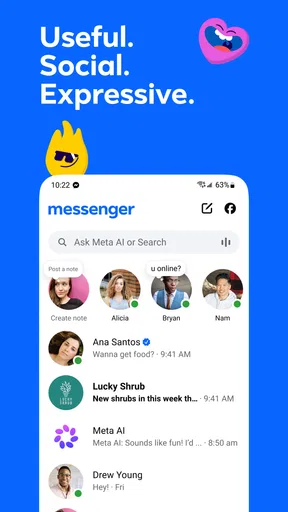
The basic flow is easy to understand: open a conversation, write a message, and keep the thread going as the subject changes. Text is only one part of the exchange. You can also use the chat for media and calls, which makes it practical when typing is awkward or a quick visual explanation is clearer than a long description. I see that flexibility as more useful than any single feature; it lets a conversation change shape without requiring everyone to start again somewhere else.
Keeping a plan moving without losing the context
Imagine a friend asks whether you can meet after work. You can answer in the chat, send a photo to show which entrance you mean, and move to a call if the details become confusing. When the call ends, the conversation remains the place to pick up the practical follow-up. That sequence is a small but valuable advantage: the decision, the explanation, and the next message stay connected instead of being scattered across text messages, a separate calling app, and a social feed.
A good habit is to put the essential detail in writing even when a call seems faster. If the time or meeting point changes, a short follow-up message gives everyone something to check later. I would not treat a busy chat as a formal record, but it can be a convenient shared thread for casual plans. For anything important, I still make the key information unmistakable rather than assuming every participant caught it during a fast-moving exchange.
The same approach works for family coordination. One person can ask about dinner, another can reply when free, and someone else can add a photo or clarify a detail. The practical benefit is not that Messenger magically organizes a household; it is that different kinds of communication can happen in a familiar conversation. The drawback is equally concrete: if several people reply at once, the thread can become noisy, and a useful detail may be buried beneath newer messages.
Moving between text, media, and calls
For me, the strongest workflow is to begin with text and switch modes only when there is a reason. A written message is easy to send while someone is busy. A photo can resolve a question that would otherwise take several back-and-forth messages. A call is better when tone matters or when a quick discussion would be more efficient than typing. Messenger’s value comes from making those handoffs feel like parts of one conversation, not from insisting that every exchange use every format.
There is a useful trade-off here. A call can settle a question quickly, but it may not suit someone who is at work, travelling, or simply unable to answer. Text is less demanding but can create misunderstandings when a message is brief or the subject is sensitive. I try to choose the format around the other person’s situation, then return to a clear written note if the conversation ends with a decision that needs to be remembered.
Media sharing is especially handy when words alone are imprecise: a picture can identify an item, show what needs attention, or make a location easier to recognize. Still, I avoid sending a string of images without explaining why they matter. A little context keeps the recipient from having to guess what I want them to notice. That is a small workflow improvement, but it makes a casual chat feel much more useful.
Where the handoff is genuinely convenient
Messenger compares favorably with standard SMS when a conversation needs richer exchanges than basic text, especially if the people involved already use the app. Compared with a messaging service centered on phone contacts, its appeal is more closely tied to social connections on Facebook. That distinction matters: SMS can be simpler for reaching someone whose app habits are unknown, while a dedicated alternative may be a better fit for a group that has already settled on it.
I would choose Messenger for an informal group that wants to share messages, pictures, and calls without constantly changing apps. I would not choose it as the only way to reach someone who rarely uses Facebook, or as the default for a group that values a different service’s particular approach to privacy, organization, or notifications. The best messenger is often the one the whole group will actually check. Installing another app alone cannot fix a mismatch in habits.
There is also a social handoff to keep in mind: being able to contact someone through a familiar platform can make the first message feel easy, but it can blur the line between social browsing and direct conversation. If you prefer to keep those activities separate, Messenger may feel like an extension of a wider social environment rather than a clean, standalone inbox. I would consider that before making it the center of every conversation.
What the day-to-day experience asks of you
Messenger is free to download, but it includes in-app purchases ranging from five cents to $7,999.99 per item. That wide range is worth noticing if you share a device with a child or review purchases carefully; I would check the purchase flow rather than assume every option is relevant to ordinary messaging. The app’s Everyone rating describes its broad age classification, but families should still make their own decisions about communication habits and purchase access.
The app is actively versioned, with the current release identified as 584.1.0.61.98. In practical terms, I would keep expectations flexible around interface details: buttons and layouts can change as software is updated. If you are helping a relative, it is more useful to explain the outcome—open the conversation and choose how to reply—than to rely on a memorized set of screen positions that might not stay the same.
Notifications are another place where the workflow can either help or interrupt. A prompt can bring you back to a time-sensitive plan, but frequent chat activity can pull attention away from whatever you are doing. I recommend deciding which conversations deserve immediate alerts and which can wait, using the controls available in the app. That keeps Messenger useful as a communication channel without turning every group reaction into a reason to check your phone.
When a conversation starts to break down
The main weakness I notice is not a lack of ways to communicate; it is the possibility of too much activity in one place. A group chat can mix decisions, jokes, photos, and side discussions until the original question is hard to find. When that happens, I restate the decision plainly and ask the group to confirm the next step. For complex coordination, a shared calendar or task tool may be a better destination than continuing to add messages to the thread.
Another friction point is that convenience depends on participation. If one person ignores Messenger, a plan may split between the app and another channel, which defeats the advantage of keeping everything together. Before relying on it for a group, I would check that everyone is comfortable using it. For reaching people across different habits, ordinary texting or a service the group already uses may be more dependable.
I also would not assume that a chat is the right place for every sensitive or consequential exchange. It is excellent for everyday contact, quick coordination, and casual media sharing, but users should make deliberate choices about what they send and where they keep important information. A conversation that feels private simply because it is one-to-one is not automatically the right home for every personal detail. Matching the channel to the subject is part of using any communication app well.
My recommendation for the right kind of user
Messenger is a strong practical choice if your friends, relatives, or community already use it and you want text, photos, and calls within familiar conversations. I especially like it for plans that evolve during the day: begin with a quick message, add visual context, and switch to a call only if typing stops being efficient. That connected flow is the reason I would recommend it to someone who wants a flexible everyday messenger rather than a tool for one narrow task.
I would skip it if you want a messaging app entirely separate from Facebook, if your contacts are firmly committed to another service, or if constant group chatter would become a distraction. Meta Platforms, Inc. has built a communication app with enormous reach, but reach is not the same as a perfect fit. Since Messenger has been available since January 30, 2014, many people already know its basic role; the decision is less about learning a new idea and more about whether its social starting point suits your habits.
My bottom line is that Messenger works best when it follows a real conversation from first message to outcome without making every step feel like a separate task. It can make everyday coordination easier, especially when a chat needs to move naturally between text, media, and a call. I would use it for the people who are already there, keep important details clear, and choose another channel when the group or the subject calls for one. That makes it a useful part of a communication routine, not a reason to force every conversation into the same app.
What we like
- Free voice and video calls are available with other Messenger users.
- Message reactions make it easy to respond without typing.
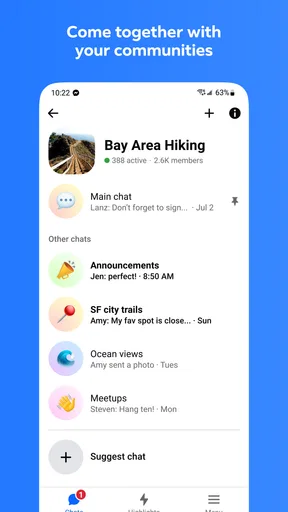
- Group chats help keep conversations with several people in one place.
- You can share photos videos and files in chats.
- Message delivery and read indicators show when a message has been seen.
What could be better
- A Facebook account may be required to access some features.
- Notifications can feel excessive if you join many group chats.
- Some features are unavailable in certain regions or on older devices.
- The app can use substantial storage as shared media accumulates.
- End-to-end encryption availability may vary by chat or feature.