
 Analysis byWeUseApps
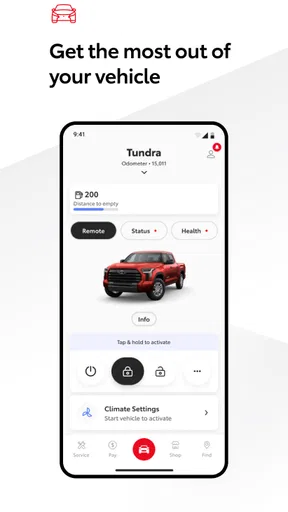
I think of the Toyota app less as a general-purpose car app and more as a convenient digital front desk for Toyota owners. It is free to download, and its Auto & Vehicles focus is clear: it is meant to connect an owner with Toyota-related information and services rather than replace every driving, navigation, or maintenance tool on a phone. That distinction matters. If you drive a compatible Toyota and want one place to start when handling ownership tasks, it may be useful; if you want a universal dashboard for any make of car, it is not aimed at you.
What free access is worth
The app is made by Toyota Motor North America, Inc., and its access price is free. That makes trying it a low-commitment choice, but “free” should not be confused with a promise that every service or vehicle capability is included at no cost. I would judge its value by whether the tools available for your particular vehicle save you effort, not by assuming the app unlocks every connected-car feature.
For a sense of its place among owners, it has a 4.7 average from around 188,000 ratings, with more than 5 million installs. Those figures suggest that many people find a reason to keep it, but they cannot tell you whether your own Toyota supports the functions you care about. Compatibility is the practical first check: Toyota currently supports vehicles from 2010 onward, with a newer cutoff of 2018 for Hawaii.
That regional exception is easy to overlook when you are deciding whether to install it. If you live in Hawaii and have an older Toyota, check eligibility before building a routine around the app. Elsewhere, the stated model-year range is broader, though a compatible year alone does not guarantee that every feature will be available on every vehicle. I would treat the app as a vehicle-specific companion, not as a uniform package with identical capabilities for all owners.
Where the value can show up
The strongest case for a manufacturer’s own app is continuity. Instead of starting with a generic motoring service, you are using Toyota’s own channel for Toyota ownership. That can be helpful when you want to keep vehicle-related tasks together and avoid searching through unrelated apps or old messages. The benefit is less about flashy technology and more about having an obvious place to begin.
In everyday use, I can see the appeal after a busy week: you are preparing for a trip, want to check what the app makes available for your particular vehicle, and would rather not dig through a glovebox or try to remember which service channel handles an ownership question. A manufacturer app can make that first step more straightforward. The key is to use it as a hub for the things it actually supports, while keeping your usual alternatives for anything outside that scope.
A useful habit is to check the app soon after installing it, rather than waiting until you urgently need something. Confirm that your vehicle is recognized and look through the options shown for it. This simple test separates general availability from your car’s actual capabilities. It also helps you decide whether the app merits a place on your home screen or is better kept as an occasional reference.
There is also a practical trade-off in using the Toyota channel instead of a broad third-party service. A make-specific app is naturally more relevant to a Toyota owner, while a general vehicle app may be a better fit if you manage cars from several manufacturers. If you only need directions or traffic information, your existing navigation app will usually remain the more direct tool. I would not install this expecting it to replace those everyday driving apps.
Compatibility and day-to-day friction
Vehicle age is the first limitation to consider. Toyota’s support range begins with 2010-or-newer vehicles in most cases, but the Hawaii requirement starts at 2018. That may rule out a perfectly dependable older car, even if its owner would enjoy having a digital companion. Before spending time setting things up, compare your vehicle’s model year and location with that eligibility rule.
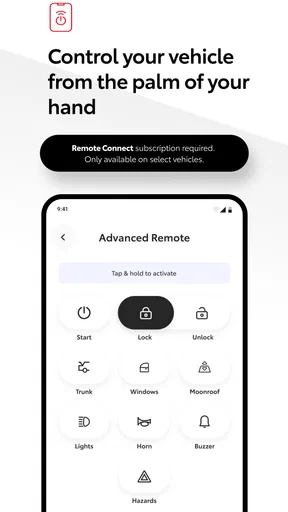
The second limitation is that a supported vehicle does not necessarily mean every owner gets the same experience. Connected-car apps can depend on the particular vehicle and the services available for it, so I would avoid making a purchase or changing a routine on the assumption that a feature seen by another owner will appear for you. Treat what the app presents for your own car as the useful answer, and keep a dealership or the owner’s manual in mind when you need authoritative vehicle-specific guidance.
That leads to a sensible workflow: use the app for convenient access to Toyota-related ownership tasks, but do not make it the only place you store important information. Keep essential documents and maintenance records in a form you can reach independently. This is not a criticism unique to Toyota’s app; it is simply a good safeguard whenever a phone app is part of managing a car.
The app is rated for Everyone, which makes its intended audience broad, and it is currently at version 3.6.0. The broad audience rating is not a substitute for checking whether the app fits your specific car or habits. Someone who rarely uses a phone for vehicle tasks may see little reason to add another app, while an owner who likes keeping manufacturer-related tools close at hand may appreciate the convenience.
Who is most likely to benefit
I would recommend giving it a try if you own an eligible Toyota, prefer dealing with the manufacturer’s own tools, and want a convenient starting point for ownership-related tasks. It is especially worth considering if you already use your phone to organize practical errands and are comfortable checking which options apply to your own vehicle. Since access is free, the decision can be based on usefulness rather than an upfront app purchase.
It is less compelling for someone with an older vehicle outside the supported range, particularly a Hawaii owner whose Toyota predates the local cutoff. It is also not the right answer for a household that wants one app to manage multiple makes equally, or for a driver whose main need is navigation, roadside information from another provider, or a comprehensive maintenance log. In those situations, a dedicated service or the tools already built into your routine may be more suitable.
If you share a car, think about whether one person will manage the app or whether each driver needs access to the same information. I would check the app’s current setup options directly before relying on a shared workflow, rather than assume that every household arrangement is supported. That small bit of planning prevents the common frustration of discovering, on a rushed morning, that the useful information is tied to someone else’s phone.
A practical way to decide
My advice is to install it only after confirming that your vehicle falls within Toyota’s supported model-year range. Then spend a few minutes seeing what is available for that particular car. If the options match tasks you already perform, keep it and make it part of your routine. If the app offers little that you need, there is no reason to force it into your daily driving setup just because it is the official Toyota app.
For owners comparing it with alternatives, the choice comes down to scope. Toyota’s own app is the natural place to explore Toyota-specific support; a general-purpose car app makes more sense when you want to track several brands together; and navigation apps remain better for route planning. None has to exclude the others. I would use each for the job it handles best rather than expect one app to be a complete ownership system.
Its broad adoption and strong average rating are reassuring signals, but I would still make the vehicle check the deciding factor. The app’s value is personal: it depends on your Toyota, your location, and whether the available tools remove a real bit of friction from your day. Free access makes that trial easier, while the compatibility limits make a quick eligibility check worthwhile.
My verdict for Toyota owners
The Toyota app is worth trying when you have an eligible Toyota and want a manufacturer-specific companion without paying to download it. I see its appeal in convenience and relevance, not in replacing every car-related app or service. Toyota Motor North America, Inc. has built an ownership-focused option with a large audience, but the best reason to keep it is simple: it needs to help with something you actually do.
For an eligible owner, I would install it, check what it offers for my own vehicle, and keep it if those options fit my routine. For a driver outside the supported years, someone in Hawaii with an earlier model, or anyone looking for a universal multi-brand tool, I would skip it and use a better-matched alternative. That is a fair way to judge a free app: try it when the fit is plausible, but let your car and your needs—not the download count—make the final call.
What we like
- Toyota offers a broad lineup for different budgets and driving needs.
- Many Toyota models have a strong reputation for long-term reliability.
- Hybrid options are available across several popular model ranges.
- Toyota vehicles often retain their resale value well.
- The brand has an extensive dealership and service network.
What could be better
- Some Toyota models feel less refined than similarly priced rivals.
- Infotainment features can vary widely between model years.
- Popular models may have long wait times or limited availability.
- Entry-level trims can omit comfort features found in competitors.
- Toyota's advanced driver assistance systems may need adjustment to suit some drivers.




