
 Analysis byWeUseApps
I find Waze most useful when the road itself is changing faster than a printed plan can keep up. A sudden queue, a blocked turn, or a hazard ahead can make a familiar drive feel uncertain; this navigation app is built around giving drivers current guidance and alerts while they travel. In my experience, its central strength is not simply drawing a route but helping me adjust when conditions shift. That strength comes with a practical catch: the experience depends on staying connected, so I treat it as a live driving companion rather than a complete substitute for preparation.
When live information changes the drive
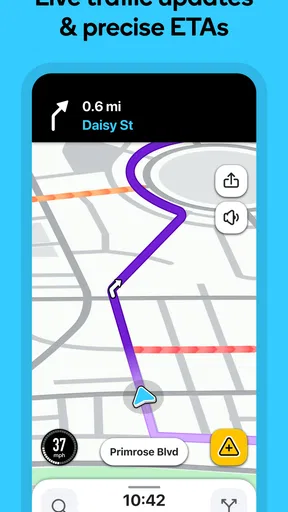
Waze is a free maps and navigation app from Waze, with GPS directions, traffic updates and safety alerts at its core. Its approach makes most sense on routine trips where congestion is unpredictable: commuting across town, driving to an unfamiliar appointment, or choosing between several plausible roads. Instead of assuming that the usual route is always best, I can let current road conditions influence the journey.
That is valuable in a way a static map often is not. A map can show where streets go, but it cannot by itself tell me whether a slowdown has formed on the route I was about to take. When Waze has a connection and current information to work with, I can make a more informed choice before committing to a jam. The app is at its best when fresh information can still change what I do next.
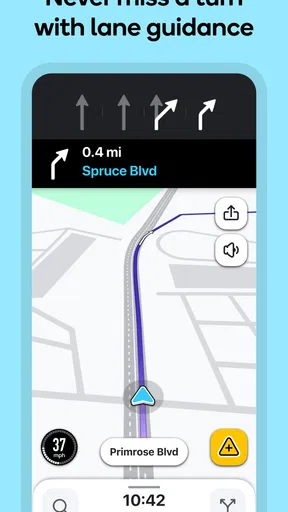
There is a difference between a route being technically available and a drive being easy to follow. In busy areas, I want directions that account for the way traffic is moving, not just the shortest-looking line on screen. Waze is designed for that live-navigation role. I would still pay attention to the road and signs, especially where a suggested turn feels confusing or local restrictions are involved; a navigation prompt is guidance, not permission to ignore what is happening around me.
The app’s scale is reassuring to a new user: it has over 500 million installs, an average rating of 4.4 from around 8.9 million ratings, and roughly 641,000 written reviews. Those figures do not guarantee that every route will be perfect, but they suggest that Waze is a familiar choice for a large number of drivers. It is rated for Everyone and requires Android 10 or later on Android devices, making it accessible to a broad range of users with compatible phones.
What a connected trip feels like
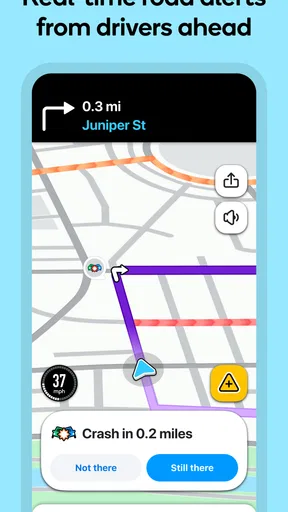
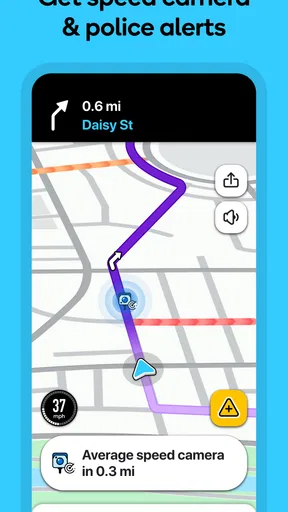
Connectivity matters most before and during a change in plan. If traffic is building while I am approaching a busy junction, timely guidance can help me avoid entering a slow stretch in the first place. Safety alerts add another useful layer: they can draw attention to conditions ahead, although I would never treat an alert as a replacement for looking carefully at the road or responding to official signs and instructions.
A practical everyday example is a weekday drive to a meeting across town. I know the destination, but not whether the normal route is still sensible at that hour. I can start navigation with enough time to review the proposed direction, then follow updates as the trip unfolds. If the road slows or an alert appears, I can reassess rather than stubbornly following the first route I saw. The useful habit is to make route decisions while safely stopped or before setting off, not to fiddle with the phone in moving traffic.
That last point is easy to overlook. Live routing invites attention because conditions can change, but a driver’s attention belongs on driving. I recommend setting the destination and checking the route before departure, then using voice guidance and brief glances only when it is safe and lawful. If a reroute arrives at a complicated intersection, it is better to continue safely and reconsider than to make a sudden maneuver just to obey the screen.
Mobile situations where it helps—and where it does not
Waze suits drivers who regularly travel through traffic-heavy areas, take unfamiliar roads, or want alerts to supplement their awareness. It can also be handy when a familiar commute varies from day to day: the route that works on a quiet morning may be a poor choice during a disruption. For these users, the app’s live character is the point, not an optional extra.
It is less compelling if I mainly need a calm reference map for walking, exploring a place on foot, or studying a destination before a trip. Waze is built around driving, so I would choose a broader mapping tool when I need a general-purpose atlas, detailed place research, or a map-first experience that does not depend so heavily on live driving conditions. A built-in phone navigation app may also be simpler for someone who only wants basic turn-by-turn directions and already finds it reliable.
For a long drive through areas where mobile service may be inconsistent, I would not make Waze my only preparation. The live information that gives it an edge also makes the quality of the experience sensitive to connectivity. Before leaving, I would study the broad route, know the key road names and major turns, and keep a sensible alternative in mind. That is not a criticism unique to this app; it is a sensible trade-off whenever navigation depends on current online information.
One useful workflow is to distinguish between planning and monitoring. I use the route preview to understand the general direction before starting, then rely on live guidance for changing traffic rather than repeatedly reopening the map to inspect every detail. This reduces distraction and makes reroutes easier to judge: I can compare a new suggestion with the overall trip instead of reacting to a single instruction in isolation.
What happens when the connection falters
The main limitation is straightforward: Waze’s live value relies on a working connection. If coverage drops, updates may be delayed or unavailable, and I should not assume that traffic conditions or hazard information are current. Navigation can become less reassuring at exactly the moment I want certainty. For that reason, I would check that the route is loaded and the phone is ready before entering a remote stretch, while remembering that a live app cannot promise uninterrupted service.
When the experience becomes uncertain, I would avoid making a rushed turn based on an old instruction. First, keep driving safely and follow visible road signs. If it is practical, pull over in a safe place to check the route and connection, then resume once the map is responding sensibly. This simple recovery routine matters more than trying to force the app to update while moving. If the phone has lost service for an extended period, a prepared paper map, familiar road knowledge, or another available navigation option can be a useful backup.
There is also a human side to recovery. A reroute may propose a road that looks unfamiliar, and the fastest-looking option is not automatically the one I prefer. I consider whether the suggested turn is safe, understandable and appropriate for the vehicle and conditions. If not, I would stay on a safe route and let navigation recalculate when possible. Waze can help me see options, but I remain responsible for choosing a sensible one.
Compared with traditional turn-by-turn navigation, Waze’s distinctive appeal is its emphasis on current traffic and alerts rather than simply guiding me from start to finish. Compared with a general map app, it feels more focused on the experience of driving through changing road conditions. The trade-off is that a driver who values offline confidence, broad map exploration, or minimal dependence on a network may prefer a different tool or use another source as backup. No single navigation app is the right answer for every trip.
Using it thoughtfully on a phone
Because the app is meant to accompany a moving vehicle, I think the best setup is one that minimizes interaction. Enter the destination while parked, confirm that it is the right place, and take a moment to understand the first part of the route. If someone else is riding along, they can handle adjustments or look into alternatives when conditions change. That division of attention is safer than asking the driver to manage the screen.
Connectivity also has a practical cost in how a phone is used. Live navigation means the app is working with changing information while the trip is underway, so I would keep an eye on battery readiness and avoid starting a long journey with a nearly depleted phone. A car charger or other suitable power source is sensible preparation. I would also avoid assuming that a navigation session will be equally convenient on every device or in every vehicle; the screen should be positioned so it does not obstruct the view or invite prolonged glances.
For someone trying to be careful with mobile data, the key decision is whether live updates are worth using on that particular drive. Waze’s appeal is tied to current conditions, so limiting connectivity can also limit the information that makes it useful. I would use it when traffic or road changes matter, and choose a less connection-dependent way to prepare when I expect a long stretch without service. I would not count on a live traffic tool to provide the same experience in a weak-signal area as it does in a well-connected city.
Another small but useful habit is to treat alerts as prompts to reassess, not as commands. A warning may be helpful, but road conditions can change between the moment information is available and the moment I reach the location. I keep a safe following distance, watch for signs and other road users, and avoid sudden reactions. This makes the app’s extra information more useful without handing over judgment to the screen.
Who I would recommend it to
I would recommend Waze to drivers who regularly face variable traffic and are comfortable using a connected phone for navigation. It is especially suitable when a route is familiar enough to judge but unpredictable enough that live updates can save time or reduce uncertainty. Its free price makes it easy to try, and the large community of users may make it a natural option for someone comparing driving-focused apps.
I would suggest looking elsewhere, or keeping a backup, if dependable guidance without a network is the priority. It is also not my first pick for people who want a general map for walking, transit, or detailed destination browsing. Drivers who dislike frequent changes to a planned route may prefer a more conventional navigator with a steadier, less traffic-centered feel. The right choice depends on whether live road awareness is worth the reliance on connectivity.
My overall impression is that Waze is a practical specialist rather than an all-purpose map. Its strongest moments come when it can use current conditions to help me reconsider a drive, and its weakest moments arrive when the connection is poor or I expect certainty from information that can change. Used with a little preparation, safe phone habits and realistic expectations, it can be a helpful companion for everyday driving. I would start a trip connected, understand the route before moving, and keep another way to orient myself for journeys where service may be unreliable.
My verdict: I would choose Waze when traffic, alerts and changing road conditions matter more than having a navigation tool that works independently of a live connection. It is a strong fit for connected urban and suburban driving, but not a substitute for attention, road signs or backup planning. If that balance sounds right to you, it is worth trying; if offline resilience or broad map use matters more, a different navigation option will likely suit you better.
What we like
- Live reports help drivers spot hazards and slowdowns ahead.
- Community updates can reveal road closures and changing conditions.
- Automatic rerouting can help avoid unexpected traffic delays.
- Clear voice guidance makes following routes easier while driving.
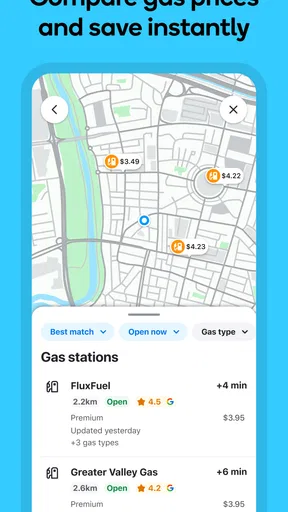
- Drivers can compare fuel prices at nearby stations.
What could be better
- Crowd-sourced reports may be outdated or inaccurate.
- Frequent alerts can distract during busy drives.
- Navigation depends on a reliable mobile data connection.
- Battery use can be high during long trips.
- Routes may favor shortcuts that are less comfortable to drive.




