

 Analysis byWeUseApps
Getting from one place to another sounds simple until timing, pickup points, and the next step of a journey all come into play. Uber brings ride-hailing and taxi options into a single app, aiming to make those everyday trips and airport journeys easier to arrange. I find its appeal clearest when I think of it as a practical travel workflow: enter a destination, review the ride choices, request a trip, and follow the journey through to arrival.
From travel need to destination
The starting point is usually a straightforward one: I need a ride, but I don’t want to organize the whole trip by phone or guess how to get a vehicle. Uber is designed for that moment. It brings rideshare services and taxi cabs together in a mobile experience, so the same app can be relevant for a routine local trip or part of a longer journey through an airport.
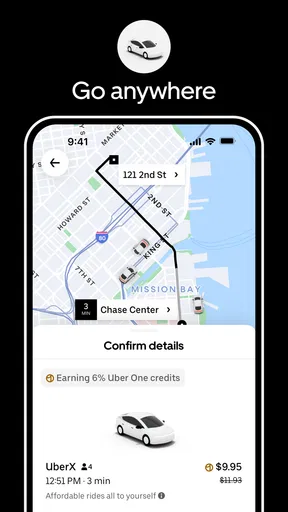
To begin, I enter where I want to go and look over the choices shown for the trip. That destination-first approach is useful because it frames the request around the actual journey rather than leaving me to work out every detail before opening the app. In a familiar area, the process feels quick and direct. In a less familiar place, having the trip organized around a destination can make the first decision feel less daunting.
The app is free to download, and Uber Technologies, Inc. is the developer behind it. For a navigation and transport app, the important question is not simply whether it can arrange a ride; it’s whether the steps between deciding to travel and reaching the destination feel manageable. Uber’s central strength is that it gives those steps a common place to begin.
Choosing a ride and placing the request
Once the destination is set, I can consider the available ride options and decide what fits the occasion. The exact choices can depend on where a person is using the app, so I wouldn’t assume that every option appears in every location. Still, the general idea is handy: compare the choices presented for the trip, select one, and move on to the request instead of treating the ride search as a separate task.
This is where ride-hailing feels most convenient. The app turns a broad intention—“I need to get there”—into a sequence of smaller actions. I can focus on the destination first, then on the ride, rather than juggling several ways of arranging transport. For a short everyday journey, that can make planning feel refreshingly uncomplicated.
Airport travel shows why this workflow can matter. An airport trip often has a clear endpoint but less flexibility around timing and coordination. Uber is positioned for those journeys as well as ordinary travel, giving riders a familiar starting point when they need to arrange a ride to or from an airport. I’d still plan ahead and pay attention to the pickup instructions shown in the app; the convenience of requesting a ride doesn’t remove the need to be in the right place at the right time.
Following the trip through its handoffs
A ride request is only one part of the experience. After choosing a ride, the next practical handoff is from the app to the person providing the trip. That transition is where clear attention matters: I need to check the information shown, make sure I’m connecting with the ride I requested, and head to the indicated pickup point. These are small steps, but they’re what turn an on-screen plan into an actual journey.
Pickup coordination can be the most sensitive part of the workflow, particularly in busy areas. Airports, crowded streets, and large buildings can make it less obvious where a vehicle can meet a passenger. I find it helpful to treat the pickup point as part of the trip rather than a minor detail after the request. Checking the app again as plans unfold can prevent avoidable confusion and make the handoff smoother.
Once the ride is underway, the experience shifts from arranging transport to completing the journey. The app’s role is to keep the trip connected to the original destination and provide a place to manage the ride. That continuity is valuable: I don’t have to think of the request as a one-off action disconnected from the reason I opened the app. The destination remains the thread tying the stages together.
Arriving and moving on
The desired outcome is simple: get to the destination without making transport arrangements the main event of the day. For everyday trips, Uber can be a convenient option when I want to organize a ride from my phone. For airport travel, it can help connect one leg of the journey to another, especially when I already know where I’m headed and can follow the pickup details carefully.
That doesn’t mean every ride is effortless. A well-organized app can simplify the request, but the result still depends on real-world conditions, including how easy it is to reach the pickup point and how smoothly the rider and driver connect. I see the app as a tool that reduces some of the coordination work, not as a promise that every journey will unfold exactly as planned.
It also helps to keep the context of the trip in mind. If I’m heading somewhere familiar, I may be able to move through the steps quickly. If I’m arriving in an unfamiliar area or dealing with a tight airport connection, it’s worth slowing down enough to verify the destination and pickup arrangement. The app can organize the process, while I remain responsible for making sure the plan fits the situation around me.
When the flow gets awkward
The workflow can break down when the pickup location is difficult to identify, when a busy setting makes coordination confusing, or when I rush through the choices without checking that the destination is right. These aren’t unique to one ride app; they’re common friction points in connecting a digital request with a vehicle in the real world. Uber makes the arrangement more structured, but it can’t make every street or airport pickup area straightforward.
Another point to bear in mind is that availability and the options presented can vary by location. That makes it sensible to open the app with a little flexibility, especially when planning an airport trip or traveling somewhere unfamiliar. I wouldn’t build a tight plan around an assumption that every ride type will be available wherever I happen to be. Instead, I’d review what the app actually offers for the journey in front of me.
There’s also a difference between a quick request and a well-managed trip. Moving through the screens rapidly may feel efficient, but a moment spent checking the destination and pickup details can save confusion later. That balance is central to my experience of using a service like this: the app shortens the organizing process, while careful attention makes the handoffs work.
A familiar option for everyday travel
Uber has a substantial presence among mobile travel apps, with over a billion installs and around twenty million ratings. It holds a 4.7 average, and the app has accumulated around 438,000 written reviews. Those figures suggest that it’s a familiar choice for many people, though my practical assessment comes down to the workflow: it offers a recognizable way to request rideshare or taxi transport and keep the trip organized around a destination.
The app is free and has an Everyone content rating, which makes it broadly accessible as a travel tool. Its focus is easy to understand: request a ride for an airport journey or an everyday trip. I like that straightforward purpose. Rather than trying to make the transport decision feel complicated, the app centers the experience on getting a ride arranged and moving toward the intended destination.
For me, the strongest reason to use Uber is the way it brings trip planning, ride selection, and pickup coordination into a single process. The most useful habit is to work through that process deliberately: set the destination, review the available choices, check the pickup details, and stay attentive as the ride begins. When those handoffs are clear, the app can make getting around feel more manageable.
Overall, Uber is a practical option for people looking to arrange rideshare or taxi trips through a phone, whether they’re heading across town or organizing airport transport. It doesn’t eliminate the small uncertainties that come with real-world travel, but it gives the journey a clear starting point and a familiar sequence of steps. If convenience and a destination-focused ride request are what I need, it’s an easy app to consider for the trip.
What we like
- Upfront fare estimates help you plan the cost before booking.
- Live trip tracking lets you follow your driver on the map.
- You can share trip details with trusted contacts.
- Multiple ride options suit different budgets and group sizes.
- Cashless payment makes checkout convenient in supported locations.
What could be better
- Availability and ride options vary by city and time.
- Fares can rise during periods of high demand.
- Driver arrival times may change with traffic or cancellations.
- Some trips may include extra tolls or other fees.
- Using location services can affect your phone's battery life.