


 Analysis byWeUseApps
I judge an event-ticket app less by how polished its first screen looks than by whether it helps me make a calm decision before plans become urgent. TickPick is built around browsing live events and comparing tickets for concerts, sports, and theater, with saving money as its central appeal. My overall impression is that it is most useful when I have a little time to compare options—not when I need a guaranteed shortcut through every last-minute purchase.
As an events app from TickPick LLC, it is free to download and is rated for Everyone. It has an average rating of 4.8 from around 61,000 ratings, alongside about 7,400 written reviews and over five million installs. Those figures suggest a widely used service, but they do not tell me whether a particular event, seat, or purchase will suit you. The practical value comes from how carefully you use the app to narrow down a real outing.
Browsing feels best when you start before the rush
The basic appeal is straightforward: open the app when you are considering a concert, game, or show, then use the event options to explore what might fit your plans. I find that kind of browsing more valuable than opening a ticket app only after friends have chosen a date. Starting early gives you room to compare events and think about the whole evening, rather than reacting to whichever seats happen to be left.
For example, imagine a friend suggests going to a game next month, but nobody has settled on a day. I would use TickPick to look through the available event choices first, then bring a small set of plausible options back to the group. That is a better use of a discovery app than sending everyone a vague message asking what they feel like doing. It turns browsing into a practical planning step, even before anyone is ready to buy.
Speed is difficult to judge in the abstract because it depends on a phone, a connection, and what is happening in the service at that moment. I would not promise that every screen will feel instant. Still, the app’s role is clear enough that I can approach it efficiently: search with a specific performer, team, or show in mind when I have one, and browse more broadly when I am genuinely deciding what to do. A focused search is usually a better starting point than aimless scrolling.
The current release is version 6.0.25. That identifies the version, not a guarantee about loading time or stability on every device. I would keep the app updated through the store, particularly if I were relying on it to plan a time-sensitive outing, and I would avoid leaving a purchase decision until the moment a group is already waiting for an answer.
Comparison is useful, but the ticket itself still deserves attention
Compared with the familiar habit of searching the web for an event and opening several ticket pages, TickPick offers a more event-centered place to browse. That can make the early stages of planning feel less scattered. Its money-saving focus is a useful reason to compare, but I would not treat a low-looking figure or an attractive seat location as the whole decision. Before committing, I would review the final order details carefully and make sure the event, date, and selection match what I intend to buy.
That caution matters because tickets are not interchangeable just because they are for the same performance. The date, section, view, and group’s seating needs can change whether an option is actually worthwhile. If I were buying for several people, I would first agree on the event and a realistic seating preference, then compare suitable choices. Otherwise, the group can spend more time debating options than deciding whether to go.
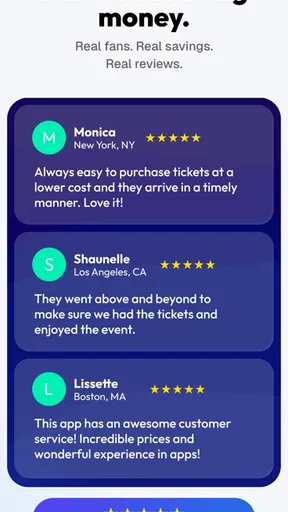
TickPick’s 4.8 average is encouraging, but I would use it as a broad signal rather than a substitute for checking the details of a specific transaction. A large app can serve many kinds of events and buyers; one person’s smooth experience does not guarantee that every event has the same range of options. The most useful habit is to compare the complete choice in front of you, not to assume that the app’s general reputation settles the question.
Busy planning moments call for a simple workflow
The app is especially handy when plans are still flexible. If I am choosing between a concert and a theater night, I would browse each type of event separately, note the dates that work, and then compare the options with my budget and travel plans in mind. I would not try to make every decision in one long session. A quick pass to identify promising events, followed by a more careful review before buying, is less tiring and reduces the chance of overlooking a detail.
For a last-minute outing, the trade-off is different. You may care more about finding something available on the right date than about exploring every possible alternative. In that situation, TickPick can help with discovery, but I would keep my expectations measured: a ticket app cannot make an event with limited availability suddenly offer the exact seats or group arrangement I want. If timing is tight, decide the must-haves first and be ready to walk away if the remaining choices do not meet them.
One useful, less obvious planning tip is to separate “Is this event appealing?” from “Is this specific ticket right for us?” I would shortlist the event first, then assess the ticket and total commitment as a second step. That prevents the excitement of finding a show from pushing me into a rushed choice. It is particularly helpful when coordinating with friends, because agreement on the event does not automatically mean agreement on where to sit or how much to spend.
Another practical point is to treat discovery as ongoing rather than as a single search. If I know I want to attend something but have not picked a date, checking back while plans are still flexible gives me more room to choose. I would not assume that an option seen during one browse will remain unchanged, so I would verify the details again when ready to act. That is ordinary caution for ticket shopping, not a reason to avoid the app.
Reliability is about recovering your place, not just opening quickly
When I use a ticket app, I care about more than whether it launches. I want to be able to return to the event I was considering, keep the decision clear, and avoid losing track of which date or seats the group discussed. A sensible personal workflow helps: note the event and date outside the app if you are comparing several possibilities, then reopen the relevant choice when you are ready to decide. That small habit is useful in any busy planning session.
I would also avoid treating a browsing session as proof that a purchase is complete. Take a moment to confirm the order state and retain whatever confirmation the app presents after a transaction. If the app seems slow or a screen does not respond, I would pause rather than repeatedly tapping a purchase control. Check the current status before trying again, so you do not create confusion about whether an action went through.
Those are precautions, not claims that TickPick is unstable. No app can be judged reliably across every phone and network from a general description, and performance can vary with conditions beyond the app itself. What I can say is that an event purchase has enough real-world consequences—plans, travel, and other people’s time—that I would use a deliberate checkout routine rather than rushing through it on any service.
The same goes for recovery after an interruption. If a call, a weak connection, or a change of plans pulls you away, return to the event and verify the details again instead of relying on memory. I find that particularly important when several similar dates or performances are involved. The app can support the search, but keeping track of the decision is still part of being a careful buyer.
Phone limits and the people who may prefer another route
TickPick requires Android 8.0 or later. That is a useful compatibility check before installing it on an older Android phone; if your device does not meet that requirement, the app is not a practical choice on that handset. The listed requirement says nothing about how fast it will run on a particular model, so I would not assume that an older phone meeting the minimum will feel as responsive as a newer one.
I cannot responsibly promise a particular battery, storage, or data footprint. If you are using a phone with little free space or a limited connection, it is sensible to check your device’s own storage and data settings rather than assume every event app has the same demands. For a planned purchase, I would browse while connected reliably and leave enough time to review the order, instead of trying to compare tickets during a hurried commute.
This is also not the right choice for everyone. If you already know exactly where you want to buy, prefer a particular venue’s own sales channel, or need a specific support arrangement, going directly to that source may be simpler. Likewise, if you want a fully settled itinerary rather than an event-discovery tool, TickPick will not replace the rest of your planning: you still need to coordinate transport, timing, and the preferences of anyone joining you.
For people who like comparing several outings before choosing one, though, a dedicated ticket app is more convenient than keeping a patchwork of searches open. TickPick’s focus on concerts, sports, and theater makes the browsing purpose easy to understand. Its value is less obvious for someone who only buys tickets rarely and already has a trusted route for a specific venue; in that case, installing another app may add little.
My verdict: a useful comparison tool, not a reason to rush
I would recommend TickPick to a friend who enjoys live events and wants a convenient place to explore ticket options before committing. It is free, has a broad audience, and is designed for the kinds of outings people often plan with others. The strongest use case is a flexible search: find a few possible events, compare the details, and make a considered choice rather than settling on the first result.
I would be more cautious about recommending it as the only answer for a time-critical purchase. A high average rating and millions of installs are reassuring signs of reach, not a promise of identical performance or availability in every situation. If the group has strict seating requirements, a narrow budget, or a fixed schedule, decide those constraints first and compare only options that genuinely fit. When one detail matters more than convenience, a venue’s own channel or another familiar seller may be the better route.
TickPick was released on November 6, 2014, and its current version is 6.0.25. Those details place it as an established app, but my recommendation comes down to the task it handles: helping me explore live-event choices without turning the whole process into a pile of disconnected searches. I would use it with patience, verify the final ticket details, and keep a record of the choice when coordinating with friends.
For me, the best reason to install TickPick is not a promise that every ticket will be cheaper or every session flawless; it is having a focused way to discover and compare events before making plans. If you enjoy concerts, games, or theater and are willing to check the details rather than buy on impulse, it is worth trying. If you want a guaranteed seat arrangement, a particular seller, or a completely hands-off booking experience, I would look elsewhere for that specific need.
What we like
- Shows the full price upfront with no added buyer fees.
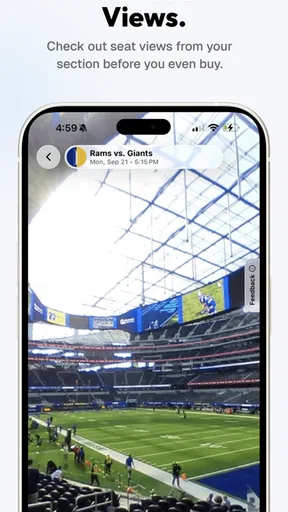
- Offers interactive seat maps to compare views and prices.
- Includes a price-match guarantee for eligible tickets.
- Supports mobile ticket delivery for many events.
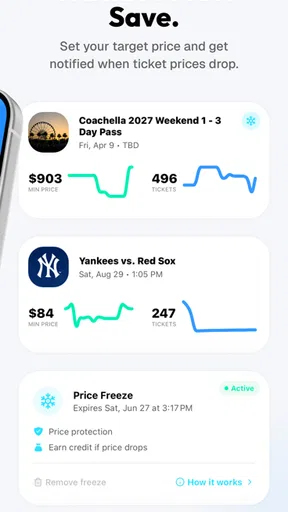
- Lets users track events and save favorite teams or performers.
What could be better
- Ticket availability can change before checkout is complete.
- Some listings may have limited seat or view details.
- The app depends on internet access for browsing and purchases.
- Refunds are generally limited when an event is not canceled.
- Customer support response times may vary during busy periods.




