

 Analysis byWeUseApps
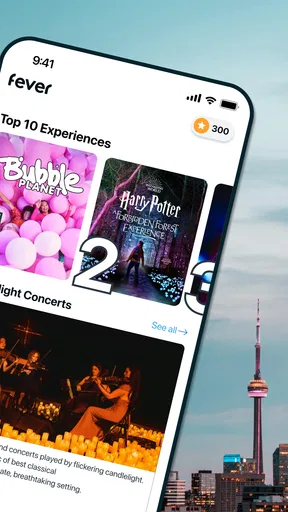
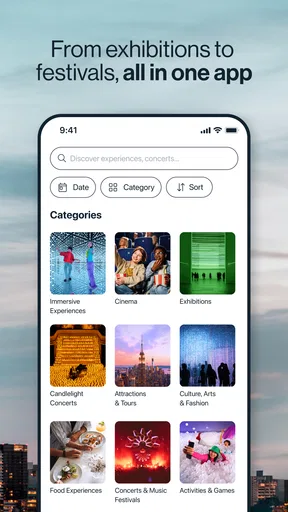
I like Fever best when I know I want to go out but have no idea what to do. Rather than starting with a venue and searching around it, I can browse experiences by city and see options I might not have thought to look for. That makes it useful for filling an open evening, planning a weekend with friends, or finding something different to do while visiting a city. It is an events app, but its real appeal is discovery: it puts a range of outings in one place and gives me a starting point for making a plan.
Finding an idea without a long search
Fever: Events & Tickets is a free app from Fever Labs, focused on events and experiences in cities including New York, Los Angeles, Chicago, Washington, D.C., and Miami. Its reach is broader than those examples, so it can be relevant both to residents and to travelers checking what is happening where they are headed. The experience is aimed at Teen users, and the app has a 4.7 average rating from around 144,000 ratings, with over 10 million installs.
What I value about this kind of city-first browsing is that it changes the question from “Which venue should I check?” to “What sounds appealing?” That is a meaningful difference when I am open to several kinds of plans. I might be looking for a cultural outing, a lively evening, or something to share with someone who does not want the usual dinner-and-a-movie routine. Fever is most useful when I am willing to explore rather than when I have already chosen a specific event and simply need its organizer’s official details.
The first decision is to make sure the city shown is the one I care about. Then I can scan the available experiences, compare the general feel of the choices, and save the most promising options for a closer look. I would treat that browse-and-narrow-down process as the app’s main strength: it can help turn a vague intention into a shortlist without requiring me to know the local events scene in advance.
How it fits into a real plan
Imagine that a friend messages on Thursday asking what to do over the weekend. Instead of sending a string of searches, I can use Fever to explore options in the relevant city, share a few candidates, and decide together which one fits our mood and schedule. The practical gain is not merely fewer searches; it is having a common set of possibilities to discuss. That works especially well when the group has not agreed on a type of outing yet.
I would still check the details of any candidate carefully before committing. Event discovery is a useful first step, but a listing is not the same thing as a complete plan. Consider the date and time, location, ticket conditions, and whether the experience suits everyone going. This is particularly important for a group: a plan that looks appealing to one person may not work for someone with a different schedule or preference.
For a traveler, I would use the app before arriving as well as during a visit. Browsing early can help shape an itinerary around an experience instead of leaving every evening to chance. At the same time, plans can change, so I would avoid building a packed trip around one listing without checking its current booking details. Fever is a discovery aid, not a substitute for thinking through transport, timing, and the rest of the day.
Speed when inspiration strikes
Fever’s value depends on being able to move from browsing to a decision without making the process feel like work. In ordinary use, I would expect the most noticeable “speed” to come from finding relevant ideas quickly, rather than from any special performance claim. A city-based events app can save time when its range gives me useful alternatives in one place; it can also slow my decision-making if I keep scrolling without first deciding what kind of outing I want.
My tip is to set a simple constraint before browsing: choose a day, a neighborhood or travel radius that makes sense, and the sort of mood you are after. Even a loose preference can turn an open-ended search into a manageable shortlist. If I am planning with others, I would ask each person to pick one candidate rather than sending them a large batch to review. That small change makes Fever more helpful as a planning tool and less like an endless catalogue.
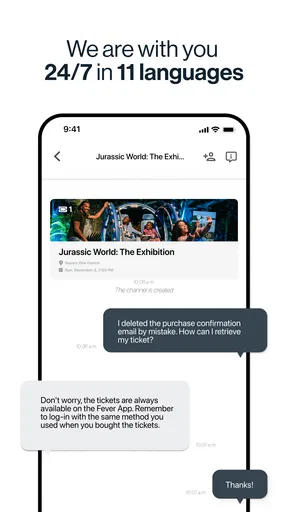
When I already know the name of a particular show or venue, I would compare the app’s listing with the organizer’s own information before buying. A dedicated venue or organizer channel may be the faster route for a precise question, while Fever is better suited to browsing across options. These uses are complementary: one helps me discover, the other can help me confirm the details that matter for a specific event.
Busy browsing and booking moments
The app is likely to be most demanding in terms of attention when I am trying to compare several possibilities at once, especially while coordinating a group or making a last-minute plan. That is a planning challenge more than a reason to assume the app itself will struggle. I would keep the process deliberate: shortlist a few options, compare their practical details, and make sure everyone agrees on the date and location before moving ahead.
Last-minute browsing has a trade-off. It is convenient to look for something spontaneous, but a promising event is only useful if its timing and availability fit the group. I would not treat a striking image or a concise description as enough to make a purchase decision. Read the event information closely, then confirm the checkout details before proceeding. That habit matters in any ticketing app, and it is especially helpful when excitement is making everyone rush.
For a shared plan, I would also avoid having several people independently make separate purchases before agreeing on the same event and session. First settle on the exact option, then have one person handle the booking while the others confirm the details. This is a simple way to reduce the risk of a group ending up with mismatched plans. It is a practical workflow rather than a special feature, but it makes the app’s discovery strengths easier to use.
Reliability means checking the details
I judge an events app not just by whether it presents appealing choices, but by whether I can use it sensibly when plans are real. Fever can make the discovery stage more convenient, yet reliability also depends on the event information and the decisions I make from it. Before buying, I would verify the date, time, location, and ticket terms shown for the specific experience. If anything is unclear or important to the plan, I would check with the event organizer rather than rely on an assumption.
That caution does not cancel out the app’s usefulness. It simply reflects the difference between browsing and confirmation. A listing can help me notice an experience; the final decision should be based on the details that affect whether I can attend. For example, if I am fitting an event between other commitments, I would make sure its timing leaves enough room for travel and does not depend on an optimistic estimate of how long the rest of the day will take.
If an app session is interrupted while I am planning, I would return to the relevant event and review the details again before completing anything. This is a sensible recovery habit for a purchase flow, especially if I have switched apps, lost connectivity, or become unsure whether I finished a step. I would not assume that an earlier screen or an unfinished checkout guarantees a booking. Taking a moment to verify the status helps avoid confusion.
Device fit and everyday use
The current version is 5.251.1, and the listed minimum operating-system requirement is version 7.0. That makes compatibility worth checking on an older device before relying on the app for a trip or time-sensitive plan. I would also install or update it while I have a stable connection, rather than wait until I am outside a venue and need to look something up quickly.
I cannot infer how much storage, battery, or mobile data the app uses from its purpose alone, so I would not choose it based on a promised resource footprint. In practical terms, I would keep routine browsing to a Wi-Fi connection when convenient and avoid leaving a long planning session open if I do not need it. Those are general device habits, not claims about Fever’s measured performance. If a phone is older or already short on space, checking its available storage and software compatibility is a sensible first step.
For a visitor with limited data or an unreliable connection, I would review the event details and booking information before heading out, rather than assume everything will be easy to retrieve at the last minute. The same advice applies to anyone organizing a group: share the essential plan in advance so the outing does not depend on every person being able to browse at the door.
Where Fever beats ordinary searching—and where it does not
Compared with searching the web one venue at a time, Fever’s advantage is the chance to discover a broader mix of local experiences from a single starting point. Compared with a venue’s own app or ticketing channel, it may be less direct when I already know exactly what I want. And compared with asking friends for recommendations, it can widen the range of ideas, though friends may know better which options suit a particular group.
I would choose Fever when the destination is set but the activity is not, or when I want a fresh idea without researching every local venue separately. I would choose a specific organizer’s channel when I need authoritative information about an event I have already picked. If I am highly selective about a narrow interest, a specialist community or dedicated local guide may give me more focused recommendations than a broad events app. The right choice depends on whether I need discovery, confirmation, or deep expertise.
There is also a personal-preference trade-off. A wide selection can feel exciting to someone who likes browsing, but it can be distracting if I simply want the quickest route to one known event. In that case, I would search directly for the organizer or venue first. Fever is not automatically the best tool for every ticket purchase; its strongest role is helping me notice possibilities I might otherwise miss.
Who should give it a try
I would recommend Fever to people who regularly make plans in cities it serves, enjoy trying unfamiliar experiences, or often find themselves responsible for suggesting a group outing. It is particularly useful when the hardest part is generating ideas rather than deciding how to get to a known destination. Since it is free to download, it is easy to try as a discovery tool without treating it as the only source for event information.
I would be less enthusiastic about it for someone who rarely goes out, lives somewhere it does not serve well, or prefers to plan entirely through a familiar venue or organizer. It may also frustrate people who want a narrow, expert-curated list and do not enjoy scanning a broad range of options. Those users are better off starting with a trusted local guide, a venue they already like, or a direct search for a particular activity.
The app has been available since March 19, 2014, and its scale is reflected in around 4,100 reviews as well as its large install base. I take that as a sign that many people use it to find events, not as a guarantee that every listing will match my taste or every city will feel equally useful. For me, the deciding question is simple: do I want help discovering what to do, or do I already know?
My performance verdict
Fever is most convincing as a city-based discovery companion, not as a universal replacement for event organizers or every ticketing service. Its broad browsing approach can make a free evening or a visitor’s itinerary easier to shape, and its reach across major cities gives it a clear practical purpose. The best results come when I browse with a rough plan, compare a short list, and verify the event details before paying.
I would keep it installed if I often look for new things to do in a supported city. I would not depend on it blindly for last-minute logistics or assume that a listing answers every question about an outing. Used with that balance, Fever feels like a worthwhile way to turn “we should do something” into a real set of options, while leaving the final checks and the final choice where they belong: with me.
What we like
- Discover concerts and local events based on your interests.
- Event pages make it easy to check dates and venue details.
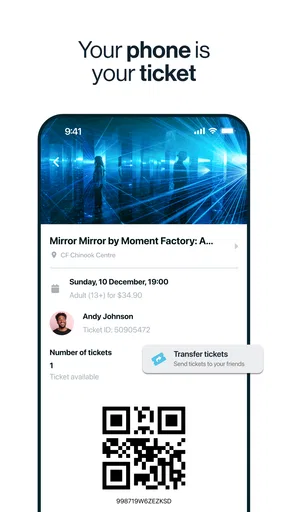
- Digital tickets are convenient to access on your phone.
- Curated recommendations can help uncover new activities.
- The app covers a wide range of entertainment experiences.
What could be better
- Event availability varies by city and date.
- Popular events may sell out quickly.
- Some tickets include service fees at checkout.
- Refunds and cancellations depend on each event's policy.
- Recommendations may feel less useful until you set preferences.




