
 Analysis byWeUseApps
I like the idea behind Super HomeScreen: make the Android home screen useful at a glance, rather than treating it only as a place to park app icons. That focus makes this personalization app an option worth considering if you want a quicker route to everyday information and prefer a practical launcher over a heavily decorated one. Its promise is appealing, but the right fit depends on what you expect your home screen to do—and on how much you value customization compared with speed and simplicity.
A home screen built around quick checks
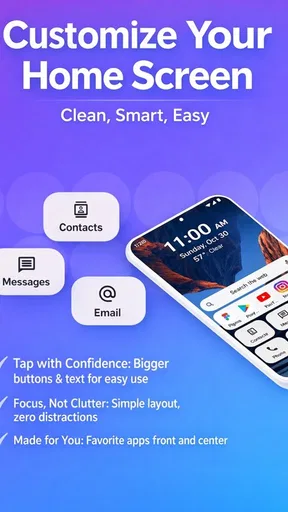
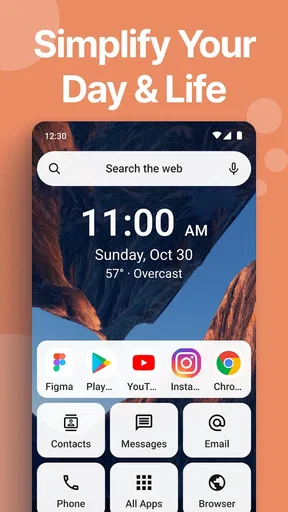
Super HomeScreen is an efficient launcher from lighten apps, aimed at bringing essential information closer to the moment you need it. I see its strongest case in the small interruptions of a normal day: checking something before leaving home, glancing at the phone between tasks, or trying to get to a frequently used app without navigating through several screens. The value is not just a different look; it is the possibility of making the first screen more useful.
That distinction matters because many Android launchers are judged mainly by appearance. They invite you to adjust icons, themes, grids, gestures, and other visual details. A launcher centered on information and speed has a different job: help the user orient quickly and move on. If your current home screen is mostly decorative, this change in emphasis may feel refreshing. If you already rely on a carefully tuned layout, the switch may feel like giving up control.
The app is free and rated for Everyone, which makes it easy to consider without a purchase decision getting in the way. It has a 4.0 average from around 5,600 ratings, and more than a million installs. Those figures suggest a substantial audience, but they do not guarantee that its particular approach will suit every Android routine. Launchers are personal tools: a layout that saves one person time can feel cluttered or restrictive to another.
Where it fits among Android launchers
Compared with a standard launcher, Super HomeScreen’s appeal is the emphasis on quick access to information. Compared with a customization-first alternative, its identity is less about endlessly shaping the interface and more about making the home screen serve a practical purpose. I would look at it if I open my phone repeatedly for brief checks and want those checks to feel less like a sequence of app launches.
That does not automatically make it better than the launcher already on your phone. A default launcher may be the sensible choice if it already gives you a clear layout and reliable access to the apps you use. A more configurable alternative is a better match if you enjoy building a precise visual arrangement or depend on specialized layout options. Super HomeScreen makes the most sense when you want to change the role of the home screen, not merely its appearance.
A useful everyday test
Picture getting ready to leave for work. You pick up your phone to check what you need, then open a messaging app, then look for another piece of information, and finally return to the home screen to launch a navigation tool. A launcher designed around at-a-glance use could reduce that stop-and-start feeling by making the first screen a more useful starting point. The practical question is whether the information it brings forward is information you actually consult often.
That is why I would judge it over several ordinary days rather than by a quick first impression. Notice whether you reach the app you need sooner, whether the home screen helps you decide what to do next, and whether you still find yourself opening separate apps for the same checks. If it makes a repeated routine more direct, the change is meaningful. If it adds visual activity without replacing any steps, the benefit is harder to justify.
What its current version tells you
The current release is version 3.2.7, and the app was released on August 28, 2025. Those are useful points of reference for someone deciding whether to try it now, but they do not by themselves reveal a feature-by-feature history. I would treat the version number as a sign of the present product state, not as proof of particular changes or a promise about what will come next.
This separation is important with launchers. A new version can matter greatly if it changes a workflow you rely on, while a version number alone cannot tell you whether a particular layout, setting, or behavior has changed. Existing users should review the app after updating and check that their preferred home-screen routine still feels natural. New users can approach it as the current experience rather than assuming it works exactly like an earlier release.
The developer is lighten apps. For people already using the launcher, the most useful way to assess its evolution is through the things they can directly observe: whether the current version still supports their daily habits, whether the first screen remains easy to scan, and whether moving between home and apps feels smooth in their own use. I would avoid making a major home-screen change in the middle of a busy day; trying it when there is time to restore a familiar setup is a more comfortable way to evaluate any launcher.
How to evaluate it without disrupting your routine
Before changing launchers, take a moment to notice what occupies your existing first screen and what you reach for most. That quick inventory gives you a fair comparison: you can tell whether Super HomeScreen improves access to the things you use, rather than confusing novelty with usefulness. It also helps identify what you would miss if the new arrangement does not suit you.
For a practical trial, focus on one recurring task rather than trying to redesign your entire phone at once. If you check information before a commute, use that routine as your benchmark. If you mostly launch a handful of apps throughout the day, see whether the launcher makes those transitions feel more direct. A focused test is more revealing than judging the app by how different its opening screen looks.
Another useful tip is to separate visual preference from functional benefit. A home screen can look cleaner while still requiring the same number of taps, and a busier screen can be worthwhile if it removes a repeated detour. I would ask myself, “Did I get to what I needed with less effort?” rather than “Does this look more impressive?” That is especially relevant for an app whose central appeal is speed and information.
Who is likely to benefit—and who may not
I would recommend giving it a try if you want your home screen to do more than hold shortcuts, prefer quick checks to deep visual customization, and are comfortable judging a launcher by how it changes your daily flow. It may be particularly appealing to people who pick up their phone many times for brief tasks and want a more purposeful first screen.
I would be more cautious if your current launcher is already arranged around a precise set of habits, or if you enjoy fine control over every visual detail. It may also be the wrong choice if you expect a launcher to replace the apps you use for information: its role is to shape the home-screen experience, not to eliminate the need for those apps. People who want the least possible change should stay with a familiar default launcher unless they can identify a specific frustration Super HomeScreen might solve.
Device support is another practical consideration. The minimum operating-system requirement is Android 8.0, so people using an older Android version should not plan around it. If your device meets that requirement, I would still judge the experience on the phone you actually use; a launcher can feel different depending on screen size, existing habits, and how much content you want visible at once.
Remaining trade-offs to keep in mind
The central trade-off is focus. A launcher that prioritizes speed and information may feel more purposeful, but that emphasis may not satisfy someone who wants broad personalization. I would not choose it simply because its name sounds comprehensive or because a new launcher seems like an easy way to refresh a phone. Choose it because you want to change how you use the first screen.
There is also a personal threshold for how much information belongs on a home screen. Some people appreciate seeing useful details immediately; others find that a screen with too much to scan becomes another source of distraction. During a trial, pay attention not just to how quickly you notice what matters, but also to whether your eyes have more to sift through than before. A genuinely helpful glance should shorten a task, not create a new one.
For users who depend on a familiar layout, switching can bring a brief adjustment cost even when the new approach eventually works better. That is not a unique flaw, but it is a real reason to avoid changing launchers casually. Give yourself time to learn the new starting point, and do not assume that an unfamiliar first impression is either a failure or a success.
What I would watch for next
If you are considering the app, the best evidence will be what you notice in your own routine: does the information-first approach reduce unnecessary navigation, and does the screen remain comfortable to scan after the novelty wears off? For current users, changes between versions are worth judging by their practical effect on familiar tasks, rather than by a number alone. I would also look for clear improvements that preserve the app’s central purpose instead of adding complexity for its own sake.
My overall view is cautiously positive. Super HomeScreen has a clear reason to exist: it treats the Android home screen as a practical starting point for quick information and everyday actions. Its free availability and Everyone rating make it approachable, while its 4.0 average shows that users have a generally favorable, though not unanimous, response. The strongest recommendation I can give is to try it against a real habit, not as a cosmetic experiment.
If the first screen becomes a place where you can orient yourself and move on faster, it may be a worthwhile replacement for a more conventional launcher. If you value detailed visual control, already have an efficient setup, or would rather keep your home screen quiet, another launcher—or the one already installed—may suit you better. I would choose Super HomeScreen for a more informative starting point, then keep it only if that change makes the phone feel easier to use in everyday life.
What we like
- Offers a convenient way to access favorite apps from the home screen.
- Can make everyday phone navigation feel more personalized.
- Provides a quick alternative to opening apps through the app drawer.
- May help keep frequently used shortcuts within easy reach.
- Home screen customization can give a device a refreshed look.
What could be better
- Some features may depend on the Android version or device launcher.
- Customization options may be limited compared with dedicated launchers.
- A third-party home screen app may need extra permissions.
- Switching launchers can change familiar navigation habits.
- Compatibility may vary across Android devices.




