



 Analysis byWeUseApps
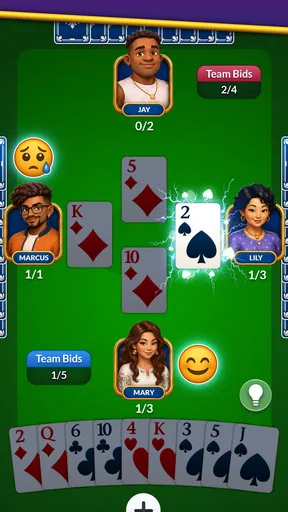
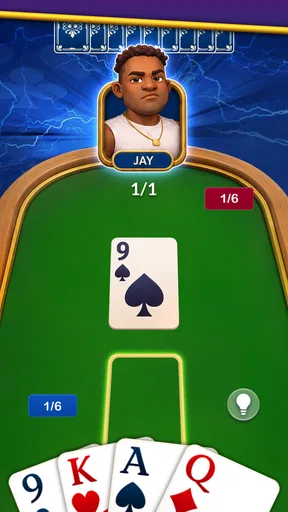
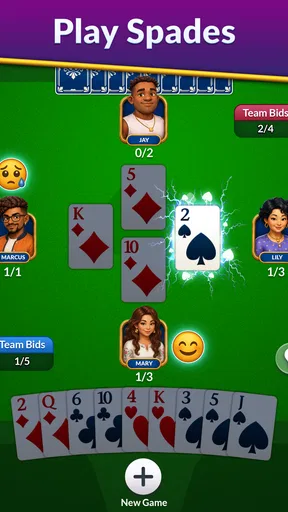
I like a card game that can fill a short break without asking me to learn a complicated interface or commit to a long session. Spades - Classic Cards is built around that familiar appeal: it brings the partnership-based trick-taking game to a phone, where I can play a hand when there is a quiet moment at home. Its straightforward focus is a strength, though it also means this is a better fit for people who already enjoy Spades than for anyone looking for a broad collection of card games.
How it fits into a shared household
On a shared device, a casual card game can be easy to pick up and put down, but it helps to think of the phone itself as the boundary. I would treat each play session as belonging to the person holding the device rather than assume that separate household members have distinct profiles or private histories. If another person wants a turn, agree on that before handing it over; this is a simple way to avoid confusing one person’s play with another’s.
That practical distinction matters more than it might seem. Spades involves choices that build on the current hand, so a player returning mid-session benefits from being able to focus without someone else tapping through the game. I find it works best as a one-player-at-a-time activity: pass the phone after a hand or a natural stopping point, rather than during play. That keeps the experience relaxed and avoids accidental moves.
The game is made by Tripledot Studios Limited and is listed as a free card game. That makes it easy to try without paying upfront, but free access is not the same as an entirely purchase-free experience: optional in-app purchases range from $0.99 to $99.99 per item. On a shared phone, I’d make sure everyone understands that purchases can exist before letting someone else browse or play. A household can also agree that only the device owner handles any purchase decisions.
Keeping turns and expectations clear
Spades depends on partners reading the hand in a similar way, even when each person is making their own decisions. If you are playing near someone else, it is tempting to discuss what they should play or to reach for the screen. I’d keep those conversations separate from the active hand if the goal is for the person playing to make their own choices. That is less about a special game setting and more about making shared use fair and enjoyable.
A useful routine is to decide in advance whether a session is for one person to play quietly or for others to watch and chat. Spectating can be part of the fun, especially when someone is teaching a relative the basics, but too much advice can turn a casual game into a test. I’d start with short, low-pressure turns and let the newer player make mistakes; in a trick-taking game, noticing why a choice worked or failed is often how the rules become intuitive.
There is also a small coordination trade-off with any phone-based version of a traditional card game. A physical deck makes it obvious whose turn it is and invites a whole table to participate. A mobile game is more convenient when nobody has a deck nearby, but the screen naturally centers the person holding it. If your household wants everyone making decisions together, a real deck or a group-friendly multiplayer option may be a better fit.
Learning the rhythm without rushing
For someone new to Spades, I’d approach the game as a sequence of decisions rather than try to memorize every possible strategy before starting. Pay attention to what you think your hand can take, then compare that expectation with what happens as the tricks unfold. Over time, you begin to see the tension between bidding confidently and avoiding a promise your cards cannot support. That basic habit is more useful than playing quickly.
One practical tip is to take a moment before each hand to look at the whole set of cards, not just the strongest ones. A hand with a few high cards can still be awkward if its other suits leave you exposed. Likewise, a run of promising cards may be more valuable when considered alongside the likely partnership plan. This is the kind of thinking that makes Spades engaging, but it also explains why the game may feel less relaxing than a simple matching or solitaire game.
I would not use a quick session as a measure of whether I am good at the game. Card play involves uncertainty, and one result does not tell the whole story. If a decision goes badly, I find it more helpful to ask whether the reasoning made sense at the time than to blame the outcome alone. That mindset keeps the game enjoyable for beginners and makes repeated hands feel like practice rather than a string of wins and losses.
What to expect from the app
The appeal here is concentration on one recognizable card game rather than variety. The store description identifies it simply as Spades, and that narrow focus is useful if you want to get straight to the game you already know. It is less compelling if your usual alternative is a card app that bundles several games, because this one does not present itself as a general-purpose card table.
Its audience response is strong: the game has a 4.8 average from around 53,000 ratings, with about 3,800 written reviews, and it has been installed over a million times. I take that as a reassuring sign that plenty of players find the basic proposition appealing, not as proof that every household will enjoy it. Spades has a particular rhythm and depends on partnership play, so someone who prefers solo puzzles or fast, low-stakes rounds may still find a different card game more comfortable.
The game is rated for Everyone, and its current version is 1.16.00. It was released on August 23, 2024, and requires Android 7.1 or later. Those details make it easier to check whether an older Android device is suitable before installing. The age rating is helpful context for families, but it should not be treated as a substitute for an adult’s decision about device access, purchases, or how much screen time is appropriate.
Because optional purchases are available, I would be especially clear about account boundaries on a shared device. Letting someone play does not automatically mean they should use the device owner’s account to make a purchase. If a child or guest is using the phone, keeping purchase decisions with the account holder is a sensible habit. I would also avoid promising that play history or preferences will remain separate unless the person managing the device has checked how the app behaves on that specific phone.
When this is—and isn’t—the right choice
I’d recommend it to someone who already knows Spades, wants a focused way to play on Android, and enjoys thinking through bids and tricks at their own pace. It can also suit a household where one person plays while another watches, explains a rule, or takes over at a natural break. The low commitment of a free download makes trying it straightforward, while the purchase range is a reason to set expectations before sharing the device.
I’d skip it if you are looking for a social table where several people can comfortably play together around one screen, or if you want a variety of card games in a single app. A physical deck is better for face-to-face group play and makes shared turns more natural. A broader card collection is better for a household whose members want different games. And if you do not enjoy bidding or partner-oriented strategy, a solitaire-style game is likely to be a more soothing choice.
My household verdict is that Spades - Classic Cards makes sense as a focused, easy-to-share-in-turns option, not as a complete family card-night replacement. I would keep the device and purchase account boundaries clear, agree on who is playing before passing the phone, and let newer players learn at their own pace. With those expectations, it offers a convenient way to enjoy a traditional trick-taking game; without them, the shared-device experience can become more about whose turn it is than the cards.
What we like
- Familiar trick-taking rules are easy to learn for new players.
- Computer opponents make solo play possible without a partner.
- Short rounds suit quick gaming sessions.
- Card play gives clear feedback on tricks and scores.
- A traditional theme keeps the focus on the game.
What could be better
- Computer opponents may feel predictable after repeated games.
- Solo play lacks the social feel of a live table.
- Random card deals can make some rounds feel uneven.
- Players seeking varied gameplay may find the format repetitive.
- The classic rules may not suit fans of modern card games.




