




 Analysis byWeUseApps
Rhythm games are easiest to enjoy when the music, touch controls, and difficulty feel in sync. Music Piano 7: Rush Song Games is a free music game from Melodya Muses that aims for quick piano-style play, with K-pop and EDM among the musical styles highlighted for it. I see its strongest appeal in short sessions: it gives you a focused way to test your timing without needing a real keyboard or a long commitment.
It has an average rating of 4.8 from around 472,000 ratings, and more than 50 million installs. Those figures suggest that plenty of people are willing to try it, though they cannot tell you whether its pace or song selection will suit your hands. The game is rated for Everyone, and its current version is 3.10.0. My practical advice is to approach it as a casual rhythm challenge, not as a piano-learning tool or a substitute for a music player.
When the first session feels harder than expected
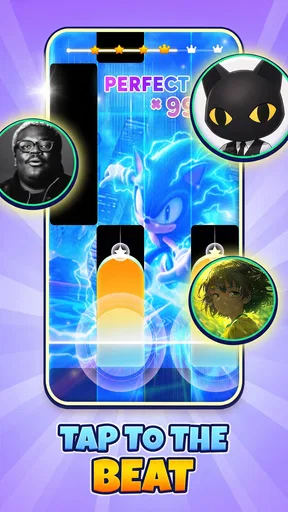
The main early hurdle in a tile-based rhythm game is often not understanding what to do, but getting comfortable with the timing. A song can feel straightforward while you are listening, then suddenly become difficult when you have to watch the screen and tap in time. I would start with a track that feels manageable rather than choosing one just because I recognize the style. Familiarity with a song does not automatically make its on-screen rhythm easy.
There is also a small but important difference between tapping to the beat and reacting to tiles as they arrive. If I focus only on the sound, I can miss what is happening visually; if I stare only at the tiles, I can lose the musical pulse. A useful first-session habit is to keep my attention near the part of the screen where the next action matters, while letting the beat guide my timing. That can reduce frantic eye movements and make mistakes easier to understand.
When a run goes badly, I would avoid changing several things at once. Try the same selection again with a steadier grip and a little less pressure on the screen. If the problem persists, take a short pause and return with fresh attention. Rhythm games reward consistency, and repeatedly tapping harder or faster usually adds tension rather than control.
Make the play area comfortable before chasing a high score
Small setup choices can change how a touch game feels. I prefer holding the device securely and keeping my tapping hand relaxed, especially during a quick song. If I am playing one-handed, I make sure the screen is positioned so my thumb can reach comfortably without covering too much of the action. With two hands, I try to keep both wrists loose rather than leaning on the device.
These are general touch-game adjustments, not special settings that I can promise the game provides. They are useful because a cramped grip can make a perfectly reasonable sequence feel unfair. If you are playing on a phone while walking or juggling other tasks, stop and find a stable place first. A rhythm challenge needs attention, and an awkward posture makes precise taps harder.
Sound can help establish a pulse, but it should not be your only cue. If you are somewhere noisy or prefer not to play with sound, pay close attention to the visual rhythm and choose a calmer moment to learn a track. Conversely, if the music is distracting you from the taps, lower the surrounding noise or pause between attempts. The goal is to find a comfortable balance, not to force yourself to play in one particular way.
Recover from a rough run without turning it into a settings hunt
If the game seems unresponsive, first distinguish between a missed tap and a broader touch issue. Try a deliberate tap in a quiet moment, then resume when you can watch the screen without interruptions. A rushed gesture, a finger landing near an edge, or a device that is moving in your hand can all make a tap feel less reliable. Cleaning the screen and drying your hands are simple checks worth making before blaming the game.
For a performance or loading hiccup, I would close other active apps, make sure the device has enough battery, and restart the game. If the trouble continues, restarting the device is a sensible next step. These are basic troubleshooting measures rather than a guarantee that every problem will disappear, but they help separate a temporary device issue from a repeatable game issue.
One useful workflow is to change only one condition between attempts. For example, keep the same song and grip but move to a quieter spot; if the result improves, distraction was likely part of the problem. If it does not, try a fresh run after a break. This is more informative than switching tracks, moving your hands, and changing your environment all at once, because you can tell which adjustment actually helped.
Offline play is handy, but plan around the session
The game is presented as playable offline, which makes it a plausible choice for a commute, a waiting room, or another place where a connection may be unreliable. I would still open it before leaving home if I knew I wanted to play, so I could confirm that the app starts and the experience I want is available on my device. That is a practical precaution, not a claim about any particular download or connection requirement.
Offline use also makes the game easier to fit into brief breaks: you can focus on a rhythm session without turning the moment into a browsing session. But it is not a great choice when you need to stay alert to announcements, conversation, or your surroundings. I would avoid playing while crossing streets, driving, or doing anything that demands your eyes and hands.
For a relaxed everyday scenario, imagine having ten quiet minutes before an appointment. I would open the game, pick a track that does not feel intimidating, and treat one or two attempts as a break rather than trying to grind through repeated failures. If the timing feels off, I would stop instead of letting a short diversion become frustrating. That kind of session is where a compact rhythm game makes the most sense.
Know when the issue may be outside the game
Not every disappointing run points to a defect. A screen protector, a device being held at an angle, background interruptions, or fatigue can affect how accurately you tap. If the same finger placement works inconsistently across different apps, the issue may be with the device or your touch technique rather than this game specifically. Testing a few simple taps elsewhere can help you make that distinction.
Sound can also mislead you. A song may feel out of step because the room is noisy, the device is playing quietly, or your attention is split. Before deciding that timing is broken, try a focused attempt in a calmer setting. If the same problem happens repeatedly under stable conditions, note what you were doing and whether it affects one track or the whole experience. That kind of observation is more useful than making a broad judgment after one difficult run.
There is a limit to what these checks can establish: they can help narrow down the cause, but they cannot prove that a particular issue is fixed. If you need precise technical support, use the support options available through the app store or the game itself. For ordinary play, though, a stable grip, a clean screen, and fewer distractions solve many of the problems that feel like timing trouble.
How it fits beside other music games
Compared with a traditional piano-learning app, this is better approached as a game about quick reactions and rhythm than a lesson in notation, fingering, or musical technique. If your goal is to learn songs on a keyboard, choose a tool designed for instruction. If you want an interactive way to keep your fingers busy while following music, this game is a more natural fit.
It also differs from simply playing a playlist. Listening is passive; a rhythm game asks you to coordinate attention and touch with what you hear and see. That interaction is the appeal, but it is also the trade-off. When I want to relax without concentrating, I would choose music playback. When I want a short challenge, the game has a clearer purpose.
Its focus on K-pop and EDM gives it a more specific feel than a general-purpose instrument app, but that will not make it the right choice for every listener. If you want a broad music library, detailed composition tools, or a realistic piano experience, look elsewhere. If you enjoy energetic tracks and simple, immediate interaction, its direction is easier to appreciate.
Who should give it a try—and who should pass
I would recommend it to someone who likes rhythm games, wants a casual activity between tasks, or would enjoy tapping along to energetic music without setting up an instrument. The Everyone age rating also makes its broad intended audience clear, though younger players may still benefit from a comfortable device setup and sensible screen breaks. Since it is free, it is easy to consider as a low-commitment download; I would not assume that “free” means every possible part of the experience works in the same way for every player.
I would skip it if you dislike fast visual challenges, find repeated attempts stressful, or expect music instruction. It is also a poor fit for situations where you cannot give the screen your attention. A slower music game may suit someone who wants a gentler pace, while a dedicated piano app is a better choice for learning. Choosing the right alternative depends on whether you want reaction-based play, relaxed listening, or structured practice.
Music Piano 7: Rush Song Games was released on October 12, 2023, and requires Android 7.0 or later. The version and device requirements matter most when you are deciding whether it can run on your phone; they do not say much about whether you will enjoy its rhythm. I would check compatibility in the app store before installing, then begin with a short session rather than expecting to master it immediately.
My practical verdict
I see Music Piano 7: Rush Song Games as a straightforward choice for quick, hands-on music play, especially if K-pop or EDM appeals to you and you like testing your timing. Its biggest strength is that the idea is easy to grasp: listen, watch, and tap. Its main limitation is equally clear: the same focus can feel demanding if you want a laid-back experience or a genuine piano lesson.
Melodya Muses has built a game with a broad audience, reflected in its average rating and large install count, but those numbers should be a starting point rather than a promise. My recommendation is simple: try it when you have a few uninterrupted minutes, use a comfortable grip, and judge it by whether the rhythm feels satisfying to you. If you want active musical play in short bursts, it is worth a look; if you want calm listening or structured learning, another kind of app will serve you better.
What we like
- Quick rhythm gameplay makes short sessions easy to enjoy.
- A range of songs helps keep each run feeling fresh.
- Tap-based controls are simple to learn.
- Song challenges can help improve timing and coordination.
- Bright visuals make the rhythm cues easy to follow.
What could be better
- Fast sections may feel difficult for beginners.
- Some songs or features may require an internet connection.
- Ads can interrupt play between songs.
- Repeated tracks may become less engaging over time.
- Touch controls may feel imprecise on smaller screens.




