



 Analysis byWeUseApps
I like solitaire best when it gives me a familiar puzzle with just enough personality to make another round feel inviting. Disney Solitaire takes that approach: it is a card game built around short challenges and a Disney-themed sense of collecting and discovery. Its appeal is less about reinventing solitaire than about giving each session a light, storybook frame. I would recommend it to someone who already enjoys card puzzles and wants a more playful alternative to a plain deck.
How a typical session feels
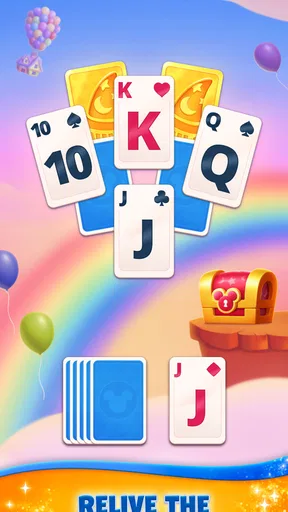
The basic rhythm is easy to understand: start a card challenge, work through the layout, and make progress toward unlocking themed memories. That gives a round a purpose beyond clearing cards, while keeping the central attraction familiar. I can see the format fitting into a coffee break or a quiet stretch while waiting, because the game asks for attention without demanding a long commitment to follow a complicated plot.
That simple loop is also a useful way to judge whether the game suits you. If you enjoy looking for a sensible next move and adapting when the cards do not fall neatly, the challenge structure should feel comfortable. If you mainly want an uninterrupted, no-frills solitaire table, the Disney presentation and progression may feel like extra layers rather than a benefit.
One practical habit is to treat each round as a small decision-making exercise instead of tapping rapidly through available moves. Before committing to a move, I would check whether it opens space or exposes a card that could give me more options. That pause is especially useful when more than one move looks immediately attractive: the move that clears something now is not always the one that leaves the best route afterward.
Make the challenge work for your routine
For a quick break, I would start a round only when I have enough time to finish it without rushing. For a longer session, I would use the game’s challenge-and-memory loop as a reason to play a few rounds in sequence, stopping when the card decisions start to feel automatic. This keeps the experience relaxing rather than turning every session into a push to make progress.
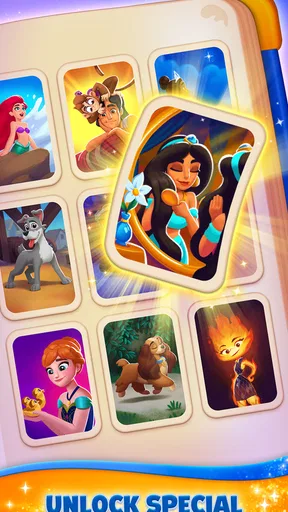
The memory-unlocking idea gives completion a small emotional payoff, particularly for players who enjoy Disney worlds and familiar visual themes. It is a different sort of motivation from a traditional score chase: the draw is not just solving a layout, but seeing the collection grow. That can make a repeated card format feel more personal, though players who do not care about Disney-themed rewards may find the added framing less compelling.
As a card game, it belongs to a category with plenty of straightforward alternatives. A conventional solitaire app is likely the better choice if you want the cards and nothing else. This one is more appealing when you want the familiar puzzle paired with a recognizable theme and a sense of ongoing discovery. The distinction matters: the theme is part of the reason to choose it, not a replacement for enjoying solitaire itself.
Settings and habits worth checking
I would begin by looking through the available settings before settling into a routine. In a card game, small presentation or control choices can change how comfortable a session feels, especially on a phone where the playing area is compact. It is worth checking what can be adjusted and choosing the clearest, least distracting setup for your screen rather than assuming the default will suit every player.
I would also take a moment to notice how the game responds to taps and how clearly it distinguishes cards that can be moved from those that cannot. That observation helps prevent avoidable mis-taps and makes it easier to build a consistent pace. I would not assume there are particular shortcuts or advanced controls; the useful approach is to learn the controls actually shown in the game and use them reliably.
A repeatable routine helps more than frantic tapping. I would scan the full layout first, identify any move that reveals a covered card or opens a useful space, then revisit the remaining choices. If a move does not improve access or flexibility, I would consider whether another option is better before committing. This is not a secret trick, but it is a disciplined way to avoid spending a promising turn on the most obvious-looking move.
When I am playing casually, I would avoid turning every loss or difficult layout into a reason to spend. The game is free to download, but it includes optional in-app purchases priced from $0.99 to $149.99 per item. That range makes it sensible to check purchase prompts carefully and decide in advance whether I want to spend anything. Players who prefer a strictly no-spend experience should be comfortable ignoring optional offers rather than treating them as part of the core card challenge.
Where experience helps—and where it cannot
Experienced players can get more from the game by making decisions in a stable order: inspect the layout, prioritize moves that reveal information, and avoid using a limited opportunity simply because it is available. The point is not to rush. It is to preserve choices until there is a clear reason to narrow them. That habit transfers well to solitaire generally and is particularly useful when a challenge encourages one more attempt.
Still, thoughtful play cannot make every round feel equally smooth. Card puzzles involve uncertainty, and a careful player may sometimes reach a position with few attractive choices. If you expect every challenge to be solvable through perfect planning alone, that can be frustrating. I would approach a difficult round as a puzzle to read rather than proof that I played badly, and take a break if repeated attempts stop being enjoyable.
The game’s progression is another trade-off. Unlocking memories can make a familiar activity feel more rewarding, but it also means the experience is not simply a blank table and a deck. People who prefer to choose their own pace without collection goals may find a minimalist solitaire game more comfortable. Conversely, players who like a visible reason to continue after a round are more likely to appreciate the structure here.
It is also worth being realistic about what “casual” means. The rules may be approachable, but a challenge can still ask for patience and attention. I would not pick it when I need to keep half an eye on a conversation or switch tasks every few seconds. It works better when I can give the cards a little focus, even if the session itself is short.
Who should give it a try
SuperPlay’s card game has a strong audience in people who already like solitaire, enjoy Disney-themed presentation, and want a gentle progression loop around their rounds. It is rated for Everyone, and the free entry point makes it easy to try before deciding whether its style fits. Its average rating is 4.8 from around 883 thousand ratings, while its install total is over 10 million. Those figures show broad interest, but the more useful question is whether the mix of card play and themed collecting matches your own taste.
The game was released on April 16, 2025, and its current version is 1.26.3. It supports Android 7.1 and later. I would check that compatibility before installing on an older device, then make sure the game feels comfortable to play on the screen I use most often. Card layouts are easier to assess when the cards are clear and taps feel dependable, so a quick hands-on trial is more informative than deciding from the theme alone.
It is not my first recommendation for someone who dislikes solitaire, wants a deep competitive card game, or prefers an entirely unadorned puzzle. Nor would I suggest spending money just to make the game feel worthwhile: the core reason to keep playing should be that the challenges are enjoyable. The optional purchase range makes a little restraint useful, particularly for families sharing a device or anyone who prefers to keep mobile gaming free.
My verdict after settling into its rhythm
I see Disney Solitaire as a friendly, themed take on a familiar card pastime rather than a radical change to the genre. Its strongest quality is the way challenges and unlockable memories give ordinary rounds a light sense of direction. The most useful player habit is simple: scan before moving, value opportunities that reveal more of the layout, and play at a pace that leaves room to think.
I would choose it over a plain solitaire app when I want Disney flavor and a reason to return after finishing a round. I would choose a simpler alternative when I want fewer distractions, or a different kind of card game when I am looking for deeper competition. For the right player, it is an easygoing way to bring a bit of themed discovery to a familiar puzzle. My recommendation is to try it for the card play first, then let the collecting element decide whether it earns a regular place in your routine.
What we like
- Familiar Disney characters make the card game welcoming for fans.
- Short rounds suit quick breaks throughout the day.
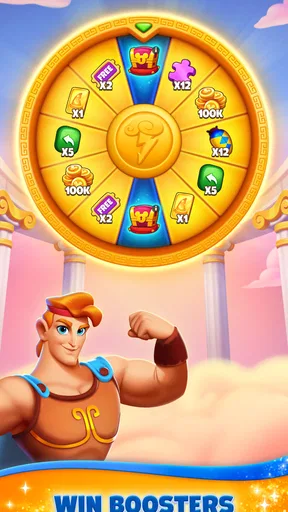
- Power-ups can help clear challenging layouts.
- New levels provide a steady sense of progress.
- The rules are simple for solitaire newcomers to learn.
What could be better
- Some levels can feel repetitive over time.
- Progress may slow when lives run out.
- Power-ups can be limited without extra purchases.
- Frequent offers may interrupt the play experience.
- The game requires an internet connection for some features.




