

 Analysis byWeUseApps
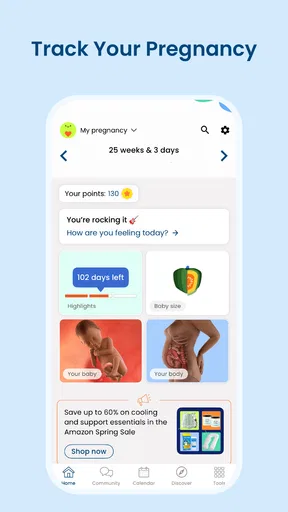
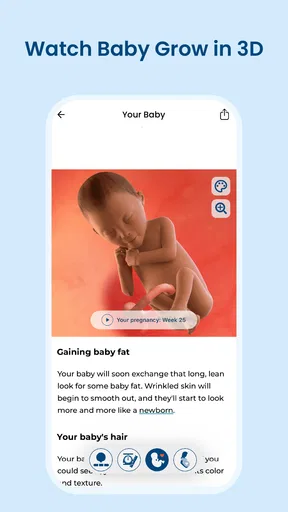
Pregnancy can make time feel oddly uneven: one week brings a new question, while the next seems to pass in a blur of appointments and ordinary routines. BabyCenter is a pregnancy app built around following that changing timeline, with week-by-week development and growth as its central idea. I find that focus more useful than a general parenting feed when what I want is a simple way to understand where I am in pregnancy and what may be relevant now.
Made by BabyCenter, this free parenting app is aimed at expectant parents. It has a 4.9 average from around 1.5 million ratings and more than 10 million installs, which suggests that many people find the format worth returning to. It is rated Teen, so it is not presented as a children’s app; the intended reader is the parent or caregiver seeking pregnancy information.
Why the week-by-week view matters
The central strength is not merely that the app discusses pregnancy, but that it organizes the experience by week. That changes how I would use it: instead of searching through broad articles and trying to decide whether they apply to me, I can begin with the point in the pregnancy I’m currently thinking about. The timeline gives the material a sense of sequence and makes it easier to return without starting from scratch each time.
This is especially helpful when a question is prompted by a small change in routine or a conversation with someone else. A week-based structure offers context: it can help a reader frame what to ask at a prenatal visit or identify which topic is worth exploring further. It should not be treated as a personal medical assessment, though. Pregnancy differs from person to person, and a general explanation cannot replace advice from a clinician who knows the individual circumstances.
I also like the psychological side of this format. Pregnancy can produce a long list of things to learn, and an undifferentiated library can make that list feel even larger. A staged view gives the reader a narrower starting point. The useful effect is orientation, not certainty: the app can help make a week feel more understandable without promising that every experience will match a typical description.
Using the timeline without turning it into a checklist
In everyday use, I would open the app when I had a few minutes and read the material connected to the current week, rather than treating it as a daily assignment. That keeps the timeline manageable. If something feels unfamiliar, the content can serve as a prompt for a note to bring to an appointment or a discussion with a partner. If nothing feels urgent, there is no need to keep tapping through future weeks just to stay ahead.
A practical example: imagine checking the app during a quiet moment after work, then noticing a topic that would be useful to discuss at the next prenatal visit. The value is not that the app answers every personal question on the spot; it is that it gives the question a place in the larger pregnancy timeline. I would jot down the concern separately or bring it up with a healthcare professional, rather than relying on a general app article to decide what action to take.
That distinction matters because week-by-week content can be easy to overread. A description of what may be happening is not a schedule that every pregnancy must follow. If a particular week’s material does not match someone’s experience, that alone does not establish that anything is wrong. In my view, the best way to use the app is as a guide to topics and context, not as a test of whether pregnancy is progressing “correctly.”
A calmer way to keep a partner in the loop
The timeline can also help a partner or family member understand what the pregnant person is currently reading about. Rather than forwarding a random article with no context, a person can explain that a subject came up while looking at the current stage. This gives a conversation a shared starting point and may make it easier to talk about questions that otherwise get lost in a busy day.
I would still let the pregnant person decide how much to share. An app can support a conversation, but it should not become a reason for someone else to monitor another person’s pregnancy or insist that they follow every suggestion. A useful approach is to read together when invited, then use the material to identify questions rather than issue instructions.
Where this approach fits among alternatives
Compared with a generic search engine, a week-based pregnancy app has an advantage in organization: the reader begins with a stage rather than a blank search box and a flood of unrelated results. Search can still be better when the question is very specific, when a clinician has used a term that needs explaining, or when someone wants to compare several reputable sources. The two approaches solve different problems, and I would not use the app as a substitute for careful medical research.
Compared with a paper calendar or a basic note-taking app, BabyCenter offers pregnancy context rather than just a place to record dates and reminders. A paper planner may be preferable for someone who wants a private, low-distraction record or prefers to manage appointments and personal notes in one place. The app makes more sense for someone who wants the week-by-week educational framing alongside a pregnancy-focused experience, rather than simply a digital notebook.
It also differs from asking friends or family for advice. Personal stories can be comforting, but one person’s pregnancy is not a reliable template for another’s. A structured app can offer a more organized starting point for learning, while a clinician remains the better source for individual concerns. I would use personal stories for companionship, the app for general orientation, and professional care for decisions that affect health.
Tradeoffs: useful context, but not a personal care plan
The same week-by-week organization that makes the app approachable can also feel too prescriptive for someone who dislikes pregnancy being divided into milestones. Some readers may prefer to explore subjects in their own order, without being directed by a timeline. Others may find that reading ahead creates unnecessary worry. If that happens, I would stick to the current stage or take a break rather than treating every piece of content as something that needs immediate attention.
Another limitation is that general educational material cannot account for every medical history, complication, or personal circumstance. It can help someone prepare a question, but it cannot decide whether a symptom is harmless or urgent for that specific person. If a reader needs individualized guidance, the right next step is a healthcare professional, not more scrolling. This boundary is important for any pregnancy app, and it is particularly important when the timeline makes information feel personally targeted.
There is also a difference between information being convenient and information being necessary. A person who already has trusted prenatal resources and prefers not to add another app may not gain much from installing it. Likewise, someone who feels anxious after reading pregnancy material may do better with a smaller, clinician-guided set of resources. I would not recommend using an app simply because pregnancy content is available; the format should make the experience clearer, not more stressful.
BabyCenter is free, which makes it easy to try as a supplementary resource without treating it as a paid commitment. Its current version is 6.17.0, and it is listed for devices running Android 8.0 or later. Those details are useful when deciding whether an existing device can run it, but compatibility alone is not a reason to use it. The more important question is whether a week-by-week reading habit suits the person’s style.
Who is most likely to benefit
I think the strongest fit is someone who wants a gentle structure for learning as pregnancy progresses, especially if they prefer short, relevant starting points over searching for every topic independently. It can also suit a first-time expectant parent who is trying to make sense of new terminology and wants material organized around the current stage. The app’s value is clearest when it helps a person arrive at a conversation with a more focused question.
It may be less suitable for someone who wants a clinical monitoring tool, individualized medical recommendations, or a highly customizable journal. It is also not the best choice for a person who knows that frequent pregnancy reading will increase their anxiety. In those cases, a clinician’s guidance, a private paper record, or a carefully chosen reference may be a better match. The point is not to use every available pregnancy resource, but to choose one that supports rather than overwhelms.
For an expectant parent deciding whether to try it, I would start with a simple test: read the material for the current week and notice whether it helps you understand what you want to ask or learn next. If it provides useful context without making you feel that your experience must follow a script, keep it as a companion. If the timeline feels restrictive or prompts more worry than clarity, there is no need to force the habit.
Overall, BabyCenter works best as a calm, week-by-week guide to pregnancy topics, not as a substitute for prenatal care or a complete record of someone’s health. I would recommend it to a person who wants an organized way to follow the changing stages and use that structure to have better-informed conversations. Its most useful contribution is modest but meaningful: it can turn a broad, sometimes overwhelming subject into a manageable starting point for the week at hand.
What we like
- Tracks pregnancy milestones by week.
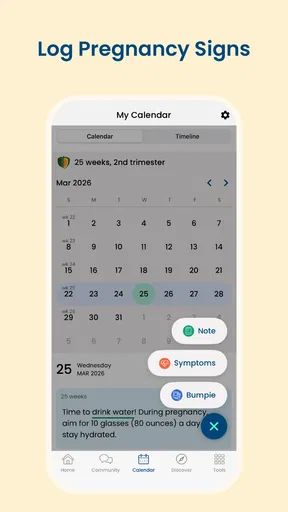
- Includes tools for logging symptoms and appointments.
- Offers a baby movement counter.
- Provides a place to record pregnancy notes.
- Can help users keep important pregnancy details together.
What could be better
- Some features may require a subscription.
- Health information is not a substitute for medical advice.
- Personalized content may depend on accurate profile details.
- Frequent reminders may feel distracting.
- Tracking features require regular manual updates.




