


 Analysis byWeUseApps
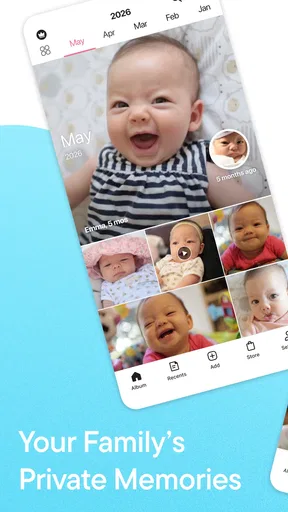
Family photos and videos often end up scattered across phones, chat threads, and camera rolls. FamilyAlbum aims to give those memories a more focused home, with a private space for relatives to share and revisit pictures and videos. I find that idea appealing because the value of a family album is not just in storing a moment; it is in making it easy to find again and enjoy together. FamilyAlbum is built around that simple purpose, rather than trying to be a general-purpose social network.
A private space for family memories
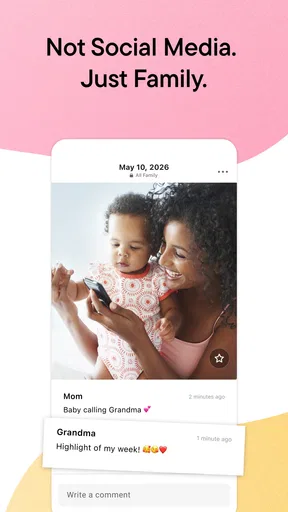
The app’s central promise is clear: make family memories private, organized, and easy to share. In practice, that focus gives the experience a different feel from posting photos to a broad social feed. The intended audience is a family circle, where everyday snapshots and short videos can matter as much as major celebrations. For parents, that can make the app a convenient place to collect moments they want loved ones to see and return to.
FamilyAlbum sits in the parenting category, and its appeal is easy to understand. Parents frequently capture small milestones, funny expressions, and ordinary days that can otherwise disappear into a crowded camera roll. Bringing those images together can turn a stream of uploads into a more meaningful record. I like that the app’s purpose is easy to grasp from the start: keep family media together and share it with the people who matter.
The app is free to download, with optional in-app purchases listed from $0.99 to $109.00 per item. That range is worth keeping in mind before making any purchase, especially if you prefer to keep family apps on a no-cost plan. The presence of optional purchases does not change the core idea of the service, but it does make it sensible to review any purchase choices carefully and decide what fits your household.
Trust begins with clear expectations
When an app handles family photos and videos, trust deserves more attention than it might for a casual utility. These files can include children, relatives, home life, and moments that families would not want to share broadly. The private-sharing focus is therefore an important part of the product’s appeal. Still, a description of an app’s purpose is not a substitute for checking its actual privacy terms and choices before uploading personal media.
I would approach FamilyAlbum with a practical mindset: first decide who should be included in the family space, then take a moment to understand the app’s current account and sharing controls. That is a sensible habit for any private family photo sharing app, because the comfort level of each household differs. Some families are happy sharing many everyday moments, while others prefer to keep uploads limited to a few selected photos.
FamilyAlbum has been available since April 14, 2015, and it has reached more than ten million installs. It holds a 4.8 average from around 366,000 ratings, with roughly 6,300 written reviews. Those figures suggest that many people have tried the app and rated their experience positively, but popularity alone cannot answer personal questions about how a family should manage its images. I see the numbers as useful context, not as a reason to skip a careful look at the choices inside the app.
Making sense of the sharing experience
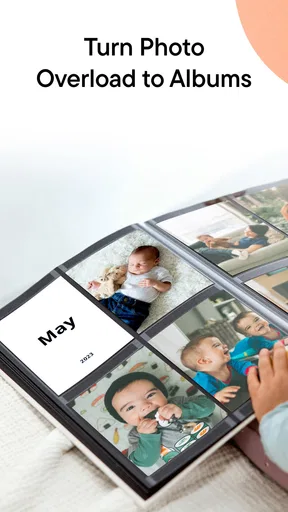
The organizing angle matters just as much as sharing. A family album is more useful when memories remain easy to revisit instead of being buried beneath newer uploads. FamilyAlbum’s emphasis on organizing pictures and videos speaks to that everyday problem. Rather than treating every image as a one-off post, the app is positioned as a continuing collection that can grow alongside family life.
That can be particularly helpful when relatives do not live nearby or when family members use different devices and habits for keeping photos. A shared destination may reduce the need to resend the same files through multiple conversations. It can also give grandparents, parents, and other invited relatives a common place to look back at moments they might otherwise miss. The benefit depends on whether the people in your family are comfortable using one shared service, but the concept is straightforward.
I also appreciate that the app’s core purpose is specific. Many services compete for attention with public posting, broad discovery, and constant social interaction. FamilyAlbum is presented instead as a place for family media. That narrower focus may feel more welcoming to people who want to preserve memories without turning each upload into a public performance. It makes the app easier to evaluate: does it help your family keep pictures and videos together in a way everyone finds comfortable?
Controls matter more than assumptions
For a family-focused app, user agency is central. Before sharing, I would check the available account settings and the choices the app presents for managing access. I would also make sure that everyone who is invited understands the purpose of the shared space. These are not dramatic steps, but they help set expectations and avoid accidental oversharing.
It is important not to assume that the word “private” answers every privacy question. Privacy depends on the specific settings, account practices, and decisions a user makes. I recommend reading the app’s current privacy information and reviewing its visible controls before adding sensitive pictures or inviting a large group. If a setting is unclear, choosing a more limited sharing approach is a reasonable way to start.
Account access deserves attention over time, too. Families change: people get new phones, relatives join or leave a group, and a child’s comfort with old photos may change as they grow. A quick review of who can access a shared album can be a useful routine. Where the app offers account-management choices, use them deliberately rather than assuming that an old invitation still suits everyone.
Think carefully about sensitive moments
Not every family memory needs to be shared, even within a trusted circle. Photos can reveal more than their subject: a location, a daily routine, a school event, or details about someone who did not expect to be included. I suggest pausing before uploading images that show private information or involve children in situations they may later consider personal. A little discretion protects the dignity of the people in the picture as well as the family’s comfort.
It can help to agree on simple household boundaries. For example, family members might decide which kinds of photos are appropriate to share, whether images should be discussed before being added, and how to handle pictures of relatives who are not using the app. These conversations are useful regardless of the platform. FamilyAlbum can provide a shared place for media, but the family still sets the social rules around what belongs there.
When relatives have different expectations, start small. A limited group and a few everyday pictures can help everyone get used to the idea before the album becomes a long-running archive. This approach also gives users a chance to explore the app’s visible options and decide whether the experience feels right. I would avoid treating convenience as a reason to upload everything automatically; selectivity is part of responsible sharing.
Who may enjoy FamilyAlbum?
FamilyAlbum is likely to suit parents and relatives who want a dedicated place for family photos and videos, especially if they value a shared collection over scattered messages. Its purpose is simple enough for a range of family members to understand, and the focus on private family memories may appeal to people who are not looking for a public-facing social network. The app’s Teen content rating is also a reminder that households should consider age suitability and discuss appropriate use with younger family members.
It may be less compelling for people who already have a family photo routine that works well, or for anyone who prefers not to place personal images in an additional service. There is no need to move every memory at once. You can decide whether a dedicated album solves a real problem for your household, and whether its sharing approach matches your expectations. That keeps the decision grounded in your own needs instead of following a trend.
The developer is MIXI, Inc., and the app has built a substantial audience over time. That history and its strong average rating offer useful reassurance that it is an established product, while user reviews can provide additional perspectives on the experience. I would still read recent feedback with a critical eye, looking for comments that relate to your own priorities rather than assuming that every family will use the app in the same way.
A thoughtful choice for shared keepsakes
What stands out most to me is the combination of a clear purpose and an emotionally meaningful use case. FamilyAlbum is not trying to make family photos feel complicated; it is meant to help people collect, organize, and share them. For households that regularly exchange pictures, a dedicated space can make those memories easier to revisit and less likely to get lost among unrelated conversations and files.
The most cautious way to use it is also the most practical: review the current privacy information, understand the available account choices, and share only what feels appropriate for your family. Be especially thoughtful with children’s images and anything that could expose personal routines or details. These habits do not diminish the fun of sharing. They help make the experience more comfortable for everyone involved.
Overall, I see FamilyAlbum as a focused option for families who want a private-feeling home for pictures and videos, with organization and sharing at the heart of the experience. Its large audience and positive average rating make it worth considering, while its optional purchases and the sensitivity of family media call for a little attention before getting started. If your family wants one place to revisit everyday moments together, it is a sensible app to explore—provided you make deliberate choices about access and what you share.
What we like
- Private sharing keeps family photos away from public social feeds.
- Invited relatives can view and contribute to the shared album.
- Automatic organization makes it easier to browse photos by date.
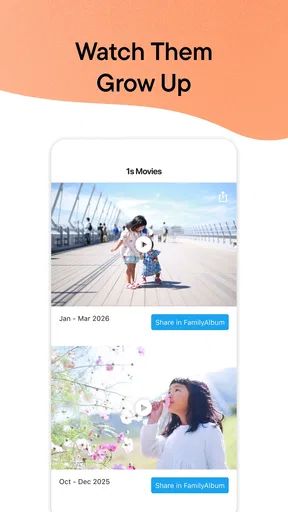
- Video clips can be saved alongside photos.
- Commenting helps relatives respond to shared moments.
What could be better
- Some useful printing and storage features require a paid plan.
- Inviting less tech-savvy relatives may take extra guidance.
- Shared albums can become cluttered with frequent uploads.
- Uploading large videos may take time on slower connections.
- Members may need notifications adjusted to avoid frequent alerts.




