


 Analysis byWeUseApps
The first thing I notice about AppClose is that its appeal depends less on novelty than on whether both parents will actually use it. It is a parenting app built around the practical work of co-parenting: keeping plans and communication from getting scattered across texts, calendars, and memory. That focus can make a real difference when coordination is a regular source of friction. It also means the app is most useful when both households are willing to build a habit around it.
AppClose, developed by AppClose, Inc, has been available since May 17, 2016. It is free to install, rated for Everyone, and currently at version 3.4.7.8, with Android support starting at version 6.0. Its average rating is 4.3 from around 30,000 ratings, and it has more than a million installs. Those figures suggest a well-established option, but they cannot tell you whether its approach fits your family. The more important question is whether a shared place for parenting logistics will reduce daily confusion rather than create one more inbox to check.
Useful from the first week, if both parents participate
In the first week, the strongest reason to try AppClose is simple: co-parenting details are easier to manage when they have a dedicated home. A change to a pickup, a question about an upcoming commitment, or a reminder about what needs to go between homes can quickly disappear in a long text thread. A purpose-built co-parenting app gives both adults a clearer reason to keep those conversations and arrangements together.
That does not make the app a shortcut to agreement. It can help structure communication, but it cannot make an unresponsive co-parent reply or resolve a disagreement about what is best for a child. I would treat it as a shared workspace, not a mediator. If conversations are already calm but poorly organized, that distinction is encouraging: the app has a manageable problem to solve. If the core difficulty is distrust or conflict, adopting a new tool may add another point of contention unless both parents agree on how to use it.
A realistic first-week test is to choose one recurring coordination task rather than move every family conversation at once. For example, use the app for the next handoff and the related schedule discussion. If both parents can find the relevant details without searching old messages, that is a concrete improvement. If one parent keeps sending updates elsewhere, the benefit fades quickly. Shared participation is the condition that makes the organization valuable.
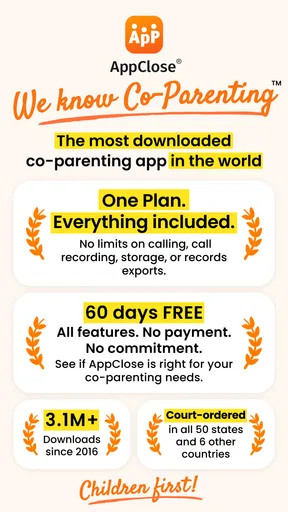
The developer describes a plan with everything included, no upsells, and a 60-day free period. That makes it reasonable to explore the workflow before deciding whether it earns a permanent place in your routine. Still, “free” needs a little care: in-app purchases are listed at $8.99 to $98.99 per item. I would check what an optional purchase covers before committing to it, and I would not assume that every household will need one. The basic decision is whether the shared routine helps, not whether to buy extras.
Start with one repeatable workflow
One practical way to judge the app is to agree on a small rule: use AppClose for a particular kind of planning, and keep urgent changes in the channel both parents already notice. That prevents the app from becoming a dangerous single point of failure for time-sensitive information. Once the routine feels dependable, you can decide together whether more coordination belongs there.
This approach also gives you a fair test of the app’s real value. A shared tool can feel impressive on day one because everything is new and neatly arranged. The more meaningful test is whether the next ordinary schedule change is easier to handle. If the answer is yes, the app is solving a recurring problem. If not, adding more categories of conversation is unlikely to fix the underlying mismatch.
Month-to-month value is about fewer loose ends
After the first few weeks, the novelty disappears and the useful question changes: does AppClose help prevent the same avoidable mix-ups from happening again? Its value is likely to come from making parenting logistics more consistent, not from giving you a reason to open an app every day. Families with frequent schedule coordination, multiple handoffs, or ongoing questions about shared responsibilities may have more chances to benefit than parents who rarely need to coordinate.
A useful habit is to close each planning conversation with a clear next step: what has been agreed, who is handling it, and when it needs attention. This is not a special feature claim; it is a way to make any shared communication tool work better. When both parents use the same place and keep messages specific, future reference becomes easier. When messages are vague, emotionally loaded, or spread across several channels, the app cannot make them clear after the fact.
AppClose belongs to the parenting category, but its day-to-day role is narrower than a general family organizer. A shared calendar, text messages, or email can handle many of the same basics, especially for parents who communicate smoothly and have a simple schedule. The difference is that a dedicated co-parenting space is designed around the fact that two households need to coordinate about the same children. If you currently lose important details in ordinary messages, that distinction may matter. If your existing system is already reliable, switching may create work without enough return.
I would also avoid treating an app record as a substitute for a direct conversation when a decision is complex. It is well suited to keeping routine coordination from getting muddled; sensitive conversations may still need a more thoughtful setting. A short, practical message is easier to act on than a long thread in which logistics and unresolved feelings are mixed together. Using the app for the former, while choosing another appropriate way to handle the latter, is a sensible boundary.
Make the routine survive busy weeks
The most useful test of long-term value is a week when everyone is tired or plans change. Before that happens, agree on what belongs in the app and how quickly each parent is expected to check it. Without that agreement, one person may assume a message has been seen while the other has not looked. A tool reduces ambiguity only when the people using it share expectations about its role.
For handoffs, I would keep updates factual and action-focused: the change, the time it affects, and any response needed. This is a small habit, but it protects the app from becoming an archive of messages that are hard to scan. It also makes it easier to distinguish a routine update from something that needs a prompt reply. The benefit is not a clever feature; it is a communication practice that makes a shared space usable over time.
Maintenance is light, but consistency takes effort
AppClose does not remove the work of co-parenting; it relocates some of that work into a shared system. Parents still need to enter or discuss relevant details, notice messages, and keep their expectations aligned. That is a modest burden when the app replaces scattered conversations. It becomes a bigger burden if each parent must remember to update the app and separately repeat the same information in text messages.
For that reason, I would not move every conversation into AppClose on the first day. Start with the tasks that cause the most confusion, then review after a few weeks. Are fewer details getting lost? Are both parents checking the same place? Has the tool made handoffs clearer, or has it simply added another notification stream? Those questions are more useful than judging the app by how polished it feels during setup.
There is also a human maintenance cost. A shared system requires a degree of cooperation, even if the relationship between parents is strained. If one parent will not participate, the other may end up maintaining a private record while still coordinating through old channels. In that situation, a personal calendar and careful written notes may be more dependable than expecting a shared workflow to appear on its own.
As an app, it is free to download and has an Everyone age rating. Parents considering optional purchases should weigh their household’s actual needs rather than treating a paid item as an automatic upgrade. The listed in-app purchase range runs from $8.99 to $98.99 per item, so checking the purchase details before tapping through matters. I would first see whether the routine itself works during the free period and only then decide whether any added expense makes sense.
Where fatigue can set in
The main source of fatigue is duplication. If a parent sends the same update in AppClose, by text, and by email because they are unsure which channel will be checked, the app has not simplified communication. The solution is an explicit agreement about routine messages and an exception for urgent matters. That boundary is especially useful when schedules change at short notice, because no shared app can help if a parent assumes the other person has seen something without checking.
Another risk is turning a practical tool into a running argument. A dedicated place for co-parenting communication can make information easier to locate, but that does not mean every disagreement belongs in a written thread. When a conversation keeps circling, it may be better to pause and choose a more constructive way to make the decision. The app is a container for coordination, not a guarantee that communication will become kinder or more productive.
There is a trade-off between keeping a thorough record and keeping the experience easy to use. Parents may be tempted to put every minor thought into the shared space “just in case.” Over time, that can make important arrangements harder to spot. I would keep messages purposeful and make the agreed action obvious. This gives the app a better chance of remaining a tool rather than becoming another backlog that neither parent wants to review.
Who should skip it? A parent who already has a dependable shared routine, a co-parent who will not use the same system, or someone looking for the app to settle disputes may be better served by a simpler option or a different kind of support. A shared calendar and normal messaging can be enough for low-conflict arrangements. Conversely, if coordination is frequent and important details regularly vanish in personal inboxes, a dedicated space is worth testing.
My long-term verdict: earn its place through habit
My view is that AppClose is most convincing as a steady organizational aid, not as an all-purpose answer to difficult co-parenting. Its lasting value depends on repeat use: both parents need to know where routine plans go, check the space often enough, and keep messages clear. When those habits take hold, the app can reduce the mental effort of reconstructing what was agreed. When they do not, its purpose is undermined regardless of how useful the idea sounds.
I would recommend trying it to parents who have recurring coordination problems and a realistic chance of using one shared channel. The 60-day free period gives a household time to see whether the workflow survives beyond the first burst of enthusiasm. Make the trial practical: pick one or two recurring tasks, agree on how urgent updates will be handled, and evaluate whether the number of loose ends actually falls. That is a better measure than simply counting how often you open the app.
With an average rating of 4.3, a substantial audience has found enough value to rate it, but ratings cannot predict how well two particular parents will cooperate. The right choice depends on the problem you need solved. If you want a dedicated home for everyday co-parenting logistics, AppClose is a sensible candidate. If the main need is a general family calendar, a shared calendar may be lighter; if the main need is help resolving conflict, an organizational app alone is not the answer.
In the end, I would keep AppClose only if it makes ordinary weeks easier after the setup phase has worn off. That is the standard a co-parenting tool should meet: not constant engagement, but fewer missed details and less hunting through old conversations. If both adults can commit to that modest routine, it may earn a lasting place. If it produces duplicated messages or one-sided maintenance, I would move back to the simplest system both parents will reliably use.
What we like
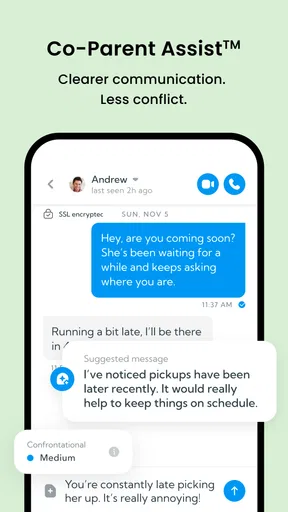
- Keeps co-parenting messages organized in one place.
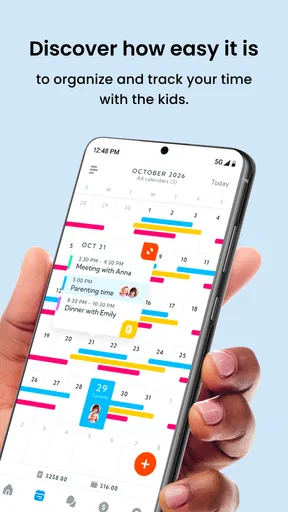
- Shared calendars help coordinate parenting schedules.
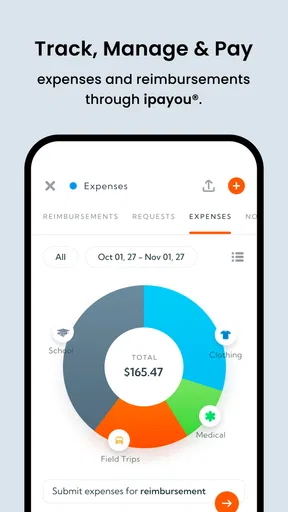
- Expense tracking makes child-related costs easier to follow.
- Supports document sharing between co-parents.
- Can help maintain a clear record of communication.
What could be better
- Both co-parents may need to adopt the app for shared features.
- Some features may require a paid subscription.
- Notifications can be missed if device settings restrict them.
- Entering expenses and schedules takes ongoing effort.
- The app may not replace formal legal communication tools.




