




 Analysis byWeUseApps
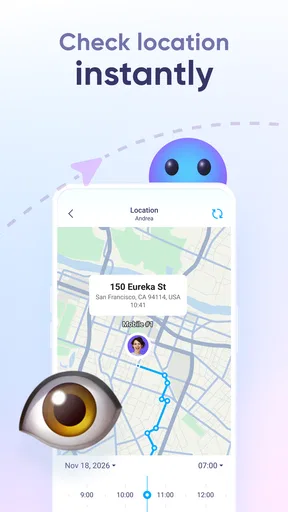
When I first try a family location app, I want to know two things quickly: what it can help me do, and what everyone involved needs to do before it becomes useful. Findio is a parenting app built around sharing live location, with the broader aim of helping people find friends and family. That makes it most appealing when a parent and child, or a small family group, want a straightforward way to check where one another are.
I would approach it as a shared convenience, not a silent tracking tool or a substitute for talking to someone. A location check can be reassuring when plans change, but it only works well when the people sharing their whereabouts understand the arrangement and agree on how it will be used. With that expectation in place, the app has a clear purpose rather than trying to be an all-purpose family organizer.
What to expect from a location-first parenting app
Findio is developed by Fortunex Limited and sits in the parenting category. Its focus is narrower than a full parental-control suite: the central idea is live location sharing. If your main question is whether a family member has reached a place, or where to meet up, that focus can be useful. If you are looking for a broad collection of tools for managing a child’s device, you should compare it with apps designed specifically for those wider needs.
The app is free to download, while in-app purchases range from $2.99 to $99.99 per item. I would treat that as a reason to check the purchase details in the app before committing to anything, rather than assuming every function or plan is included at no cost. The app is rated for Everyone, but an age label does not settle the more important family question: whether location sharing is appropriate for the person using it and how the family will handle it.
Findio has a 4.1 average from around 7,400 ratings, alongside roughly 483 written reviews, and it has passed over one million installs. Those figures suggest it has reached a sizeable audience, but they do not tell me whether it fits a particular household. For a first-time user, the more relevant test is whether the people who need to share location can get set up comfortably and whether the app answers a real everyday question without adding unnecessary checking.
I would not install it expecting a map to solve every communication problem. A location can show where a phone appears to be, but it cannot explain why someone is there, whether they are safe, or whether plans have changed. My best use for Findio is as a light-touch aid alongside normal messages and calls, not as a reason to stop asking the person directly.
Make the first setup a shared decision
Before opening the app, I would decide who actually needs access and what the arrangement is for. For example, a parent and teenager might use location sharing for the trip home from an activity, while two adults might want an easier way to coordinate a meeting. Keeping the group small and the purpose specific makes the tool easier to understand and less likely to feel intrusive.
After installing Findio, the practical first step is to follow its in-app setup and involve the family member whose location will be shared. I would avoid treating setup as something to do on another person’s behalf without explaining it. A quick conversation about when checking location is helpful, and when a direct message is better, can prevent a reassuring feature from becoming a source of mistrust.
For a useful first test, choose a low-pressure moment when everyone is together or already communicating. Confirm that the intended people have completed the app’s own sharing setup, then use the location view to understand how the information is presented. This small rehearsal is more useful than waiting until someone is late and discovering that a family member has not finished setting things up.
I would also make sure each person knows which device they are using for the arrangement and can open the app themselves. That matters because location sharing depends on the participating person’s device and app setup; it is not a magic way to find someone who has never joined the shared arrangement. Thinking through that dependency early avoids a common mismatch between what a parent expects and what the app can practically show.
The first meaningful success is a simple check-in
A realistic first success might be a child leaving a lesson and heading home while a parent is preparing dinner. Instead of sending repeated “Where are you?” messages, the parent can check the shared location and decide whether there is any reason to follow up. If the child is already on the expected route, the app has reduced uncertainty without requiring a conversation every few minutes.
Another good test is coordinating a family pickup. If two adults are trying to meet at a busy place, checking where each person is can help them choose a meeting point or avoid crossing paths. This is a small benefit, but it is the kind that makes location sharing feel practical rather than abstract. I would use the app to support a plan, not to assume that a person’s location automatically confirms the plan is still current.
One useful habit is to agree on a threshold for when a location check should lead to a message or call. If someone is where they said they would be, there may be no need to keep refreshing the map. If the location seems unexpected or the person is not responding, a calm direct check-in is more responsible than drawing conclusions from the screen. That keeps the app in its proper role: a prompt for communication, not a verdict.
For a first-time user, I would count success as being able to complete one clear, agreed-upon check-in—not as monitoring everyone throughout the day. That modest goal makes it easier to judge whether Findio genuinely helps your household. If it saves a little coordination effort while everyone remains comfortable with sharing, it is doing the job I would want from a location-focused family app.
Where first-time users can get confused
The most common misunderstanding with a live-location app is expecting it to work before the other person has joined the arrangement. Findio is about sharing among people, so the family members who need to appear in the experience must take part in the setup. If someone is missing, I would first check whether they have completed the app’s setup rather than assuming the map is broken.
A second source of confusion is treating “live” as a promise that every location display will always be perfectly current. Phones and apps can behave differently depending on their setup and circumstances, so I would not use a location screen as proof of someone’s exact actions. When timing matters, a message or call remains the sensible way to confirm what is happening.
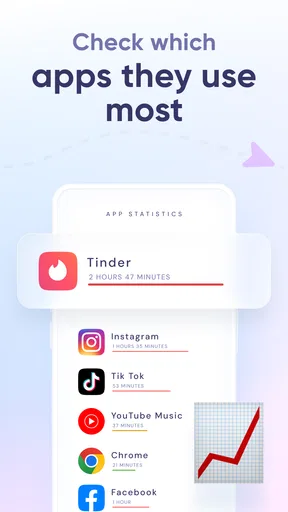
It is also easy to confuse location sharing with comprehensive parental controls. The app’s stated focus is finding friends and family through shared location; that is not the same as managing every part of a child’s phone use. If your priority is screen-time limits, content rules, or other device-management functions, compare dedicated parental-control options instead of assuming Findio covers them.
Purchases deserve a moment of attention, too. Because optional in-app items can span a wide price range, I would read the labels and terms shown at the point of purchase and make sure the person paying understands what is being bought. A free download does not mean every possible in-app option is free, and a family should decide together whether any paid item is worth it for its actual use.
Finally, location tools can create more checking than they prevent if a family has no shared expectations. Before relying on Findio, I would agree on who can see the location, what situations justify checking, and how to raise a concern without accusation. That conversation is not an extra feature, but it is essential to using this kind of app well.
How it compares with familiar alternatives
Compared with simply calling or texting, Findio can make a location check more immediate when everyone has already agreed to share. A message is still better for asking whether someone is delayed, changing a pickup plan, or confirming they need help. The two approaches serve different purposes: the app can reduce routine back-and-forth, while conversation explains the context a map cannot provide.
Compared with built-in phone location-sharing tools, the choice comes down to what feels clearest for your family. Those built-in options may be convenient if everyone already uses the same phone ecosystem and has location sharing set up. Findio may be worth trying if you specifically want a dedicated family-facing app, but I would not move an entire household to it without first checking that each person can use it comfortably and that its sharing approach suits them.
Against broader parental-control apps, Findio’s narrower location emphasis is both a strength and a limitation. It can be easier to explain when the only goal is coordinating whereabouts, but it is not the right choice if you want a single dashboard for many aspects of a child’s digital life. I would choose the simplest tool that matches the family’s actual need rather than paying for, or managing, features nobody plans to use.
Who I would recommend it to
I would suggest giving Findio a try to families who want a shared location option for practical moments: a child travelling between familiar activities, relatives meeting up, or household members coordinating a pickup. It is especially suited to people willing to make setup collaborative and to keep location checks occasional and purposeful.
I would skip it, or look at another approach, if the person being located does not agree to share, if your family needs a full set of device-management controls, or if a quick text already solves the problem. It is also a poor fit for anyone who expects a location display to provide certainty about safety or behavior. No map can replace a direct conversation when something seems wrong.
The current version is 2.0.1, and the app was released on April 1, 2022. It supports devices running Android 8.0 or later. Before installing, I would check that the device meets that requirement and make sure the intended family members are ready to participate, so the first session is about testing a real shared use rather than troubleshooting avoidable setup mismatches.
My overall view is that Findio is most convincing when a family treats it as a small coordination aid, not a surveillance routine. Set it up together, test it during an ordinary outing, and agree on when a check should become a call or message. If that first trial makes one everyday situation calmer without making anyone feel watched, it is probably a useful fit; if the household needs broader controls or more context than a location can offer, another option will serve it better.
What we like
- Location sharing can help families coordinate meetups.
- The tracker may help locate a misplaced phone.
- A map view makes shared locations easy to understand.
- Location updates can support safety check-ins.
- The app may be useful for keeping track of group members.
What could be better
- Location access must remain enabled for tracking to work.
- GPS accuracy can vary indoors or in dense areas.
- Frequent location updates may use extra battery power.
- Sharing location data raises privacy concerns.
- The app's usefulness depends on others agreeing to share their location.




