
 Analysis byWeUseApps
I would approach Learn English, Spanish: Learna as a place to build a regular speaking habit, not as a magic shortcut to fluency. Its focus on learning and practicing languages with AI makes it appealing if you want to do more than tap through vocabulary cards. The real value, in my view, is having a low-pressure way to try forming sentences and speaking, especially when you do not yet feel ready to practise with another person.
That distinction matters when deciding whether to install it. Learna is an education app from Deep Flow Apps, and English and Spanish are the languages highlighted in its store summary. It is free to download, with in-app purchases ranging from $0.99 to $199.99 per item, so I would treat the free experience as a chance to check whether its approach fits your routine before paying for anything. It is rated for Everyone, has a 4.6 average from around 861,000 ratings, and has passed 50 million installs. Those figures suggest wide interest, but your own first few practice sessions are a better test of whether it suits you.
What to expect from a speaking-focused language app
The promise here is not simply to collect words. The emphasis on speaking points toward practice that asks you to produce language, which can feel quite different from studying a list and recognizing a correct answer. Recognition is useful, but it can create a false sense of readiness: knowing what a phrase means when you see it is not the same as being able to say it when someone is waiting for a reply.
I would expect the most rewarding sessions to be the ones where I attempt a response, notice where I hesitate, and try again with a clearer sentence. That is a practical way to use an AI language tool: as a patient practice partner for rehearsing, rather than as a replacement for every other kind of study. The technology can make it easier to begin, but the learner still has to decide what to practise and remember useful expressions beyond the session.
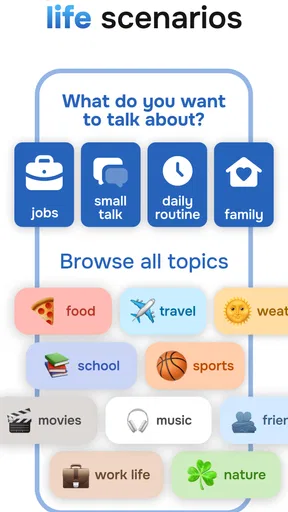
For a first-time user, the best initial goal is modest. Do not begin by trying to sound fluent or by testing every available part of the app. Pick one situation you genuinely encounter—introducing yourself, ordering food, asking for help, or making small talk—and use practice to prepare a few sentences you could actually say. A narrow goal makes it easier to tell whether the app is helping you move from understanding to speaking.
This is especially useful if nerves are the main obstacle. Practising alone can give you room to make mistakes without worrying about holding up a conversation. It is also helpful for someone who has learned English or Spanish in school but rarely speaks it now. On the other hand, if your priority is detailed grammar instruction, a structured textbook-style course, or live conversation with a human tutor, I would not assume that an AI speaking app alone will cover everything you need.
Start with a goal you can use today
Before opening a lesson, I would choose a real-life moment that is likely to happen soon. Someone planning a trip might want to ask for directions; a learner working with international colleagues might want to give a short update. Keep the first target small enough to practise in one sitting. The point is not to prepare a speech but to make one everyday exchange feel less unfamiliar.
That choice also helps you judge the practice. If a phrase feels too formal for your situation, or you cannot remember it later, that is useful information. A language app is more valuable when its exercises lead to words you can reuse than when you simply finish a session and move on. I would keep a short personal note of expressions that feel natural, then review those before practising a new topic.
Make the first setup decision deliberately
When you first open Learna, take a moment to choose the language you actually want to use and the kind of outcome you are working toward. English and Spanish are the languages foregrounded in the app’s description, but your own reason for studying is more important than a broad label such as “beginner.” A person preparing for travel needs different practice from someone trying to follow workplace conversations or speak more comfortably with family.
If the app asks you to select a level or describe your aim, answer honestly rather than choosing an ambitious option to get ahead. Starting too high can turn a confidence-building exercise into a string of guesses; starting too low can make practice feel pointless. You can use the first session as a calibration check. If you understand everything without effort, look for a more challenging next step; if you cannot form a response, scale the goal down.
I would also set expectations about time before beginning. A short session you can repeat is more likely to become a habit than an intense burst of study you cannot maintain. Try practising at a consistent point in your day—perhaps after breakfast or while waiting for a regular appointment—and decide in advance what counts as success. One useful sentence said aloud is a better first milestone than an arbitrary amount of screen time.
What a meaningful first success looks like
Your first win does not need to be a long conversation. It might be answering a simple prompt without translating every word in your head, or saying a prepared sentence with enough confidence that you would use it in a real exchange. I would count that as progress even if the phrasing is not perfect. The habit of retrieving and producing language is itself a different skill from reading it.
To make that win stick, repeat the same idea once after the exercise. Then try changing one detail: the person, place, time, or reason. For example, if you practise asking for a recommendation, try adapting the question to a different setting. This small variation tests whether you have learned a reusable pattern rather than memorized a single line. It is a simple workflow, but it makes AI practice more active and less like passive completion.
Another useful approach is to keep a “next time” list of moments where you wanted to speak but could not find the words. Add only a few items, such as greeting a neighbor or asking a colleague to repeat something. Bring one item into your next practice session. This turns Learna into preparation for your own life, rather than a separate activity whose lessons never leave the phone.
Where beginners can get confused
The biggest expectation to manage is the difference between a helpful response from an AI and a full explanation from a teacher. If a sentence is corrected or a suggestion seems unfamiliar, do not just accept it and move on. Ask yourself whether it matches the situation you had in mind, and whether you could explain its meaning in your own words. When something remains unclear, check it against a trusted learning resource or ask a fluent speaker if you have one available.
It is also easy to mistake speaking practice for pronunciation mastery. An app can give you a place to try saying things, but communication involves more than producing a sound that a tool accepts. Pace, context, listening, and the other person’s response all matter. I would use practice to get more comfortable making an attempt, then look for real conversations when you are ready to test how well your words work outside the app.
Another source of friction is choosing a goal that is too broad. “Improve my English” gives you no clear way to decide what to do next. “Explain what I do at work in three sentences” is much easier to practise and evaluate. If a session feels scattered, narrow it to one situation and one kind of response. That adjustment can make the experience feel more purposeful without requiring a longer study session.
Finally, do not assume that installing a free app means every useful option will always be free. Learna includes in-app purchases, and the listed items range from $0.99 to $199.99. I would check what a purchase offers and how it is charged before confirming anything, especially if you are installing it for a child or managing a shared device. The app is free to start, but that is not a reason to buy a plan before you know whether you enjoy its practice style.
How it compares with familiar alternatives
Compared with flashcard apps, a speaking-oriented tool is a better fit when your weak point is producing a sentence under pressure. Flashcards can be excellent for recall and vocabulary review, and I would not discard them if you need to build a base of common words. But they do not automatically make it comfortable to respond aloud. Learna’s AI emphasis gives it a different role: rehearsal and active use rather than just recognition.
Compared with a classroom course or private tutor, an app is easier to fit into small gaps and can feel less intimidating at the beginning. It cannot offer the same human judgment, shared cultural context, or natural unpredictability as a real conversation partner. If you need careful feedback on professional writing, exam preparation, or subtle social phrasing, a teacher or a course designed around that goal may be a stronger choice. I see Learna as a convenient practice companion, not a complete substitute for every learning method.
It may also be less suitable if you only want an offline reference book or a fixed grammar syllabus. People who prefer to study by reading explanations and working through explicit rules may find a speaking-first approach insufficient on its own. In that case, pair it with a grammar resource and use the app to test whether you can put the rules into everyday speech.
Build a routine without turning it into homework
Once the first session feels manageable, repeat a familiar topic before chasing novelty. Revisiting the same situation helps you notice whether you can respond with less hesitation. After that, add one new detail or a neighboring scenario. For example, practice a basic introduction, then prepare a follow-up question you could ask the other person. This gradual change keeps the challenge useful without making each session feel like starting over.
A simple weekly rhythm can combine three kinds of work: rehearse one practical exchange, review expressions you have already found useful, and try a slightly less familiar situation. You do not need to turn this into a rigid schedule. The purpose is to avoid the common trap of collecting completed activities without building recall. If you have only a few minutes, practise one response and say it again later from memory.
Use the app’s current version, 4.0.2, as the starting point for your experience, and remember that interfaces and available options can change as apps are updated. Learna supports devices running Android 7.0 or later. If you are installing it on an older phone, compatibility is worth checking before you plan a routine around it. The app’s age rating is Everyone, but for younger learners I would still help them set a sensible goal and understand any purchase prompts.
Who I would recommend it to
I would recommend Learna to an adult or older student who already has some exposure to English or Spanish and wants a less awkward way to practise saying things. It is particularly appealing if you understand more than you can comfortably speak, or if you want to prepare for predictable everyday situations before they occur. A first-time learner can also try it, provided they are willing to supplement practice when a concept needs a fuller explanation.
I would be more cautious about recommending it as the only resource for someone with a high-stakes target, such as a formal language exam or precise professional communication. Those learners benefit from a course with clearly defined coverage and feedback suited to the task. Likewise, anyone who finds speaking to a device unpleasant may get more value from a reading-based course, a small study group, or a human teacher. The best language app is not necessarily the one with the broadest promise; it is the one whose format you will actually use.
The app has a 4.6 average from around 861,000 ratings and has been installed more than 50 million times, which gives a sense of its reach. I would treat that popularity as reassurance that it is established, not proof that it will match your learning style. The more useful test is whether you finish a session with one phrase you can recall and a clear idea of when you might use it.
My take after weighing the fit
Learna’s strongest case is practical: it gives language learners a way to move from knowing words to attempting speech, while making the first attempt feel private and repeatable. That is a meaningful benefit for people who avoid speaking because they fear getting stuck. The most effective way to use it is to bring in real situations, keep goals small, revisit useful phrases, and treat AI feedback as guidance rather than unquestionable authority.
I would start with one short, personally relevant exchange, see whether the practice feels comfortable, and decide about paid options only after understanding what you would be buying. If you want a gentle route into speaking practice, that is a sensible first step. If you need a complete curriculum, human conversation, or specialist feedback, use Learna alongside a more suitable resource rather than expecting one app to do every job.
What we like
- Offers English and Spanish lessons in one app.
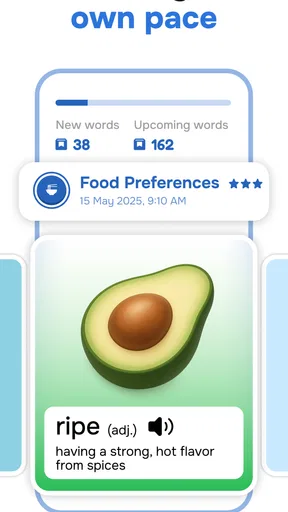
- Uses short lessons that are easy to fit into a busy day.
- Includes speaking practice to help build confidence.
- Provides a structured path for progressing through topics.
- Lets learners review material to reinforce new vocabulary.
What could be better
- Some lessons and features may require a paid subscription.
- Progress depends on maintaining a regular study routine.
- Speech recognition may not understand every accent clearly.
- The lesson approach may feel repetitive over time.
- It may not provide enough practice with real conversations.




