


 Analysis byWeUseApps
I can see why DoorDash - Dasher appeals to people who want delivery work to fit around an existing routine. It is a business app from DoorDash, built for drivers rather than customers placing food orders. In my view, its biggest value is not that it makes delivery effortless; it gives a Dasher a way to manage work through the same phone they use to plan the rest of their day. That can suit someone picking up occasional shifts, but it also makes clear boundaries important when a phone is shared at home.
Using a shared phone without mixing up work
Imagine a household where one person drives deliveries after another job, while a partner or relative sometimes borrows the same phone to check maps or messages. The Dasher app belongs to the person doing the delivery work, not to the household as a whole. I would treat it as a personal work tool and avoid leaving the account open for casual use. That simple boundary helps prevent someone else from interacting with an active work session or seeing account information unintentionally.
This is especially worth considering when the phone is passed around during a busy evening. A family member might need the device for a call just as the driver is checking a delivery task. Rather than handing over an unlocked phone, I would finish the immediate work interaction first, then lend the device only when it is safe to do so. Delivery work asks for attention, so a shared screen can become a distraction even if everyone has good intentions.
The app is free to download, and its Everyone age rating describes its store classification, not a suggestion that children should use a driver account. The work itself involves adult responsibilities such as driving, handling deliveries, and managing a work schedule. I would keep account access with the person who is actually doing that work, and explain to other household members that the app is not a shared ordering or entertainment app.
Keep setup personal and predictable
When setting up a work app on a device used by more than one person, I prefer to make the account boundary clear before the first shift. Use the driver’s own account details, keep the phone’s ordinary lock in place, and avoid asking another household member to take over app actions while a delivery is underway. Those are practical habits rather than special app features, but they reduce mix-ups and keep responsibility with the person driving.
It also helps to decide where the phone will be kept during a shift. A stable place in the car makes it easier to glance at directions when parked, while keeping the device out of reach during driving is the safer routine. I would not try to solve navigation or work notifications by having a passenger operate the app unless that arrangement is genuinely safe and the driver remains focused. The main test is whether the setup reduces distraction instead of adding another person to manage.
DoorDash was released in 2013, and the current version is 8.104.3. Since app screens and workflows can change over time, I would take a few minutes before a shift to see where the current work information appears rather than assuming an old walkthrough matches the present layout. That is a small but useful preparation step if a family member has borrowed the phone or if the app has recently been updated.
Coordinate schedules, not account access
For a household, coordination is most useful before the driver goes online. Agree on who needs the car, when the phone will be available, and whether the driver is expected home for a meal or pickup. That conversation is more dependable than relying on another person to monitor the Dasher app. I would not make a partner or child responsible for accepting work, following the route, or responding to app prompts; those decisions belong to the driver using the account.
A realistic example is a parent who plans to work deliveries after dinner while another adult handles bedtime. It can help to agree on a return time window and a backup plan for household needs before leaving. If the evening changes, a direct message or call between adults is clearer than expecting someone at home to infer the driver’s status from the phone. Keeping the work account personal also means the household does not have to untangle who tapped what if plans shift.
There is a trade-off here: flexible work can make family scheduling easier, but flexibility is not the same as guaranteed availability. A person may be able to choose when to work, yet still needs to consider travel, waiting, and the practical time needed to complete a delivery. I would avoid promising an exact return minute to someone at home. A realistic time range is kinder and more useful than a commitment that assumes every task will end on schedule.
For someone who wants a household member to see their location or coordinate pickups, I would use an ordinary communication method that both people already understand, rather than treating the driver app as a family dashboard. The distinction matters: the app is designed around the Dasher’s work, while household coordination is a separate need. Keeping those jobs separate makes the arrangement easier to explain and less likely to expose work information unnecessarily.
Who should use it, and who should look elsewhere?
I would recommend considering this app if you are the person who plans to make deliveries and want work that can fit around other commitments. It makes the most sense for someone comfortable using a smartphone while managing real-world driving tasks, and who can keep the account and device focused during a shift. It can also be a reasonable option for trying delivery work without paying to download the app.
It is a poorer fit if you want a shared household account, a way to place food orders, or a hands-off job that requires little attention while you are on the road. Customers looking to order meals need a customer-facing service, not the Dasher tool. Likewise, if your household depends on a single phone that must remain available to everyone at all times, the practical conflict may outweigh the convenience of flexible work. A separate work device or a different kind of part-time job may be better in that situation.
Compared with traditional shift work, the appeal is the ability to arrange delivery work around a personal schedule rather than fitting every commitment into a fixed rota. Compared with other delivery-driver apps, the choice is less about a universal winner and more about which service fits the areas and routines available to you. I would compare the actual opportunities you can access locally and think through transport, phone availability, and household duties before making this your main plan. The app alone cannot make a schedule compatible with every home situation.
Trust, age, and household expectations
The store marks the app as suitable for Everyone, but I would not read that as an invitation for a child to operate a Dasher account. A delivery driver is responsible for work decisions and safe behavior on the road. In a family with younger people, I would explain that the app is for the adult’s work and keep the device locked when it is not being used. That offers a clearer boundary than letting children explore a work screen simply because the app’s age label is broad.
Trust also means being honest about what the app can and cannot do for a household. It is a work tool, not a substitute for agreeing on responsibilities or communicating when plans change. If another adult helps with childcare or transportation, I would share only the information needed to coordinate, through a channel both people have chosen. That avoids turning the work account into a shared household record and keeps sensitive work interactions with the person responsible for them.
DoorDash has a 4.6 average from around 685,000 ratings, with more than 145,000 written reviews and over 10 million installs. Those figures suggest that many people have tried it, but they cannot tell me whether delivery work will suit a particular driver’s neighborhood, vehicle, or home schedule. I would treat broad popularity as a reason to investigate, not as a promise of personal fit. The useful question is whether the app’s work routine fits your circumstances.
My household verdict
My overall view is that DoorDash - Dasher is most appealing when one person owns the work account and the household coordinates around that person’s shifts. It is free, and DoorDash has developed it specifically for delivery drivers. The app’s core proposition is straightforward, but a household gets the best experience by treating it as a personal work tool rather than a shared screen that anyone can operate.
Before relying on it, I would check that the phone can remain available to the driver during work, agree on realistic home responsibilities, and avoid asking family members to manage delivery activity. Those small decisions address the issues a short app description cannot: interruptions, account boundaries, and expectations about when the driver will be back. If those arrangements sound workable, this is a sensible app to explore. If the phone, car, or schedule must serve several people at once, I would resolve that conflict first or consider a work option with fewer demands on shared household resources.
What we like
- The app offers clear navigation to pickup and drop-off locations.
- Dashers can review delivery details before accepting an offer.
- In-app support makes it easier to get help during a delivery.
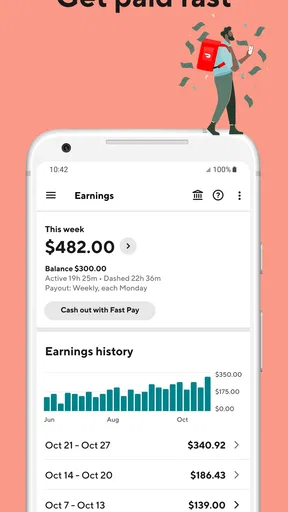
- Earnings information helps track completed work and payouts.
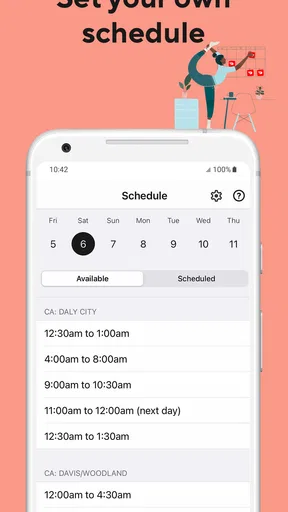
- Scheduling tools can help organize delivery hours.
What could be better
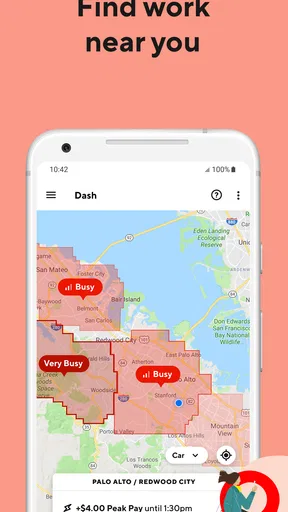
- Offer availability can vary widely by location and time.
- Some deliveries may involve long waits at restaurants.
- Navigating busy areas can be stressful during peak hours.
- App issues can disrupt access to delivery details.
- Vehicle expenses can reduce take-home earnings.




