

 Analysis byWeUseApps
I like word games that let me get started without a tutorial or a long commitment, and Wordscapes Search: Word Games is built around that easy entry point. I look at a letter set, try to spot a word, and trace it on the puzzle. The pleasure is less about racing a clock than about noticing a word that was sitting in plain sight. That makes it a comfortable choice for a quiet break, though it won’t satisfy everyone looking for a more demanding word challenge.
Start by spotting a word
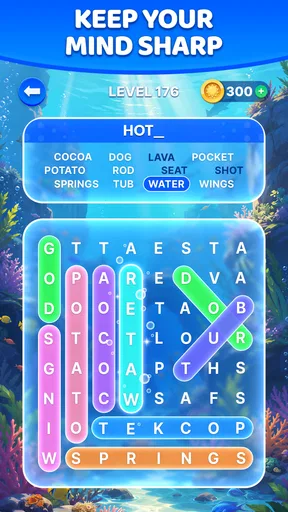
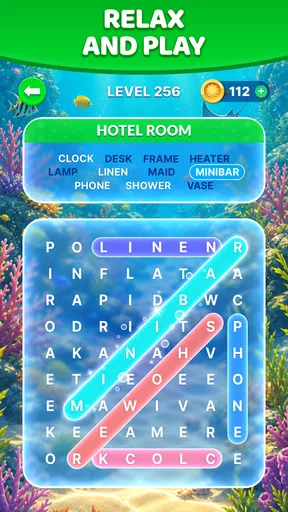
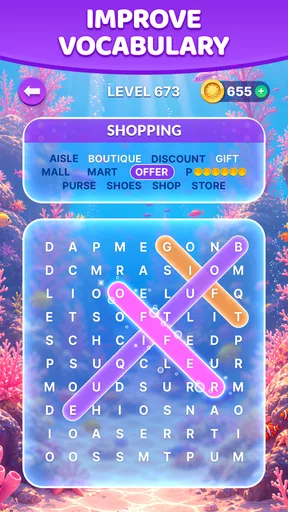
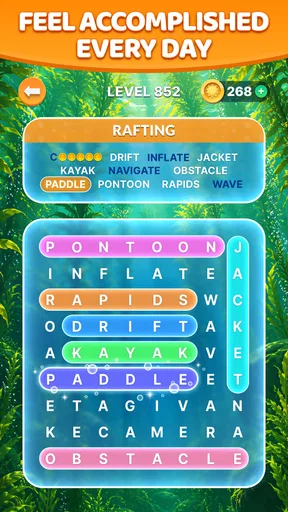
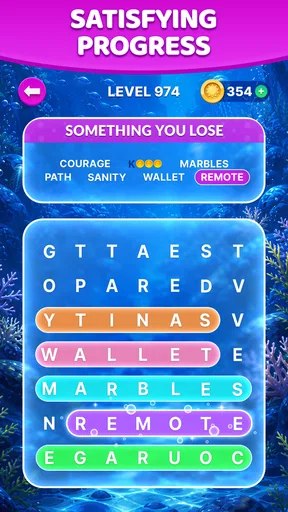
This is a word-search game from PeopleFun, designed for players who enjoy finding words among letters rather than building them from a rack or answering trivia questions. Its scenic presentation gives the puzzles a gentler feel than a bare grid on a page. I find that combination appealing when I want something focused but not intense: the visual setting provides a little atmosphere while the search itself remains the main event.
The first useful habit is to scan for unusual letter combinations instead of reading every row from left to right. If I see a distinctive pair or ending, I use it as an anchor and look around it for a possible word. That approach is more effective than repeatedly sweeping the whole board, especially when a puzzle has several plausible directions. It also turns the game into a small exercise in pattern recognition, not just a test of vocabulary.
Tracing a candidate word gives the search a tactile quality that a paper puzzle does not have. I can test a possibility directly, then adjust my attention when it does not fit. That simple action-feedback cycle is the game’s strongest practical idea: I don’t need to plan a complicated move or remember a long chain of clues. I can focus on one possible word, see what happens, and continue from there.
The format suits short pauses particularly well. I might open it while waiting for someone or during a lull at home, solve a few words, and put it aside without needing to keep track of a sprawling story. It is also easy to share the basic appeal with a family member who already likes word searches. The game is rated for Everyone, which makes it broadly approachable, though a child’s comfort with on-screen puzzles and in-app purchases is still something a parent should consider.
How the feedback keeps the search moving
When a word is found, the puzzle responds by confirming progress, which gives each successful trace a small sense of closure. The reward is modest rather than dramatic, and that suits the pace. I don’t feel pushed to perform quickly; instead, the satisfaction comes from clearing a target and seeing the remaining puzzle become more manageable. A good word can also reveal a fresh angle on nearby letters, nudging me back into the search.
There is a useful distinction between being stuck and simply needing a better scan. If I have been circling the same area mentally, I pause and search for a less obvious starting point: a rare letter, a short sequence, or a possible word running in a direction I had overlooked. This is a better first response than tapping at random. It keeps the puzzle engaging and helps me tell whether I need a hint or just a reset in attention.
The game’s low-pressure rhythm is a strength, but it can also make progress feel gradual. Players who want rapid-fire scoring, competitive matches, or a constant stream of escalating stakes may find the feedback too quiet. A traditional timed word game is a better fit if the fun comes from beating a clock; a crossword is better when you want clues and deliberate deduction. This game’s particular pleasure is the visual hunt through letters.
What makes one more puzzle tempting
The reward loop works because a completed word creates room for another attempt. I notice a possibility, trace it, get confirmation, and then scan what remains. Once a puzzle is finished, that small task is neatly closed, so beginning again feels like a fresh decision rather than an obligation to continue an unfinished session. That makes it easy to play in short bursts and stop when I have had enough.
For a more satisfying session, I recommend resisting the urge to rush through every line. I scan the board in layers: first for conspicuous letter patterns, then for words that might cross or run in less familiar directions, and finally for whatever remains. This method reduces aimless repetition and makes the later part of a puzzle feel like a genuine search instead of a chore. It is especially helpful when several letters make the same common word seem likely.
The scenic framing is part of the experience, but I would not choose the game primarily as a landscape viewer. The scenery gives the word hunt a softer mood; it does not change the underlying task into an adventure or a narrative. If I want a word game with clue writing, a story, or a social competition at its center, I would look elsewhere. If I want a calm puzzle whose basic action is immediately understandable, the presentation and loop fit together well.
Where it fits among word games
Compared with a standard printed word search, this version makes selecting words more direct and gives immediate confirmation, which is handy when I’m playing with one hand or only have a few minutes. Compared with word-building games, it asks less of me in terms of managing letter tiles or weighing several possible plays. That simplicity is a genuine advantage when I’m tired, but it also means the game may feel less strategic to someone who enjoys planning combinations and competing for a high score.
It is also different from crossword-style puzzles. I don’t have to infer an answer from a clue before checking the grid; the central challenge is locating words in the letter arrangement. That makes it a friendlier starting point for someone who likes vocabulary but dislikes cryptic clues. On the other hand, players who want to learn definitions or stretch into unfamiliar terminology may get more value from a dictionary-based word game. Here, recognition and visual scanning matter more than explaining why a word is correct.
A realistic way to use it is as a small transition between tasks. I can play a puzzle during a commute wait or while tea is steeping, then close the app when the moment is over. Because the loop is self-contained, I don’t need to reserve a long block of time. Still, if I tend to lose track of time in games, the easy “one more” feeling is worth noticing: each completed search naturally invites a new one, even though nothing requires me to continue.
Costs, device fit, and practical expectations
The game is free to download, with optional in-app purchases listed from $0.99 to $99.99 per item. I’d treat those as a reason to check purchase settings before handing a device to a child, rather than assuming that free installation means every part of play is free. If you prefer not to spend, the sensible approach is to try the basic loop first and decide whether the available experience already gives you what you want.
Wordscapes Search has a 4.7 average from around 234,000 ratings, and it has been installed over 10 million times. Those figures suggest a large audience for its approachable format, but they don’t tell me whether it will suit a player who wants tougher puzzles or more variety than a word search provides. I’d use them as context, not as a substitute for matching the game to your own habits.
It was released on November 22, 2019, and its current version is 1.56.0. The stated minimum operating-system requirement is 7.0. The game is from PeopleFun, and its age rating is Everyone. Those details make it straightforward to assess basic compatibility, while the actual feel of the puzzle is best judged by whether you enjoy spotting words on a screen and repeating that search at an unhurried pace.
Who should play, and who may want something else
I’d recommend Wordscapes Search: Word Games to someone who enjoys word searches and wants a clean, low-pressure way to play them on a phone. It is particularly well suited to brief breaks, casual play alongside family, and moments when I want a small mental task without the demands of a timed round. The combination of tracing, confirmation, and a clear finish gives each session a satisfying shape.
I would skip it if my main goal were intense competition, deep strategy, clue solving, or a strong learning component. Those are reasonable expectations from the broader word-game category, but they are not the core appeal here. I would also look for another option if the repeated scanning begins to feel monotonous; the same simplicity that makes this easy to pick up can limit its staying power for players who need a changing set of mechanics.
My overall view is that this is a pleasant, accessible word-search game whose best feature is its rhythm: look, trace, get feedback, finish, and decide whether another puzzle sounds inviting. It doesn’t need to make that loop complicated to make it enjoyable. If that kind of gentle repetition suits you, it is an easy game to keep around for spare moments. If you want every session to bring a new strategic problem, a more varied word-game format will probably be a better match.
What we like
- Quick rounds make it easy to play during short breaks.
- A hint system helps when a word search gets difficult.
- The clean layout keeps the letter grid easy to read.
- Progression offers new puzzles to work through over time.
- Word searches provide a relaxing alternative to timed games.
What could be better
- Some puzzles may feel repetitive after extended play.
- Hints can run out and may require an in-game purchase.
- Small letters can be hard to tap on compact screens.
- Ads may interrupt the flow between puzzles.
- The game requires an internet connection for some features.




