





 Analysis byWeUseApps
Shopping through a live sale is a different habit from searching a conventional online store. Instead of quietly comparing product pages, you watch a seller present items in real time and decide whether to take part. That format is the main reason I would consider Whatnot: it makes browsing feel more like dropping into a specialist shop than filling a cart from a catalogue. It can be lively and useful when you already know what you collect, but less comfortable if you prefer to research at your own pace.
Whatnot is a free shopping app from Whatnot Inc., released on December 6, 2019. It is rated Mature 17+, so it is not intended for younger users. Its average rating is 4.7 from around 329,000 ratings, with roughly 24,000 written reviews, and it has over 10 million installs. Those figures suggest a substantial audience, but they do not tell you whether a particular seller, item, or live event will suit you. I would treat the app as a place to discover and evaluate individual offers, not as a guarantee that every shopping experience will be equally smooth.
Why the live format can feel unfamiliar
The first adjustment is learning to separate entertainment from shopping decisions. A seller speaking enthusiastically about an item can make a stream engaging, yet the pace and presentation may leave less room for the kind of careful comparison you get on a standard retail listing. I find it helps to arrive with a purpose: a category or type of item in mind, plus a clear idea of what details I still need before buying.
Live shopping can be appealing for collectibles and other items where seeing a seller handle or discuss an object adds context. It may also help you discover sellers and products you would not have found through a basic search. But an energetic presentation is not the same as independent verification. Before committing, pay attention to the item description and the information available about the seller and purchase. If you cannot establish what matters to you, it is sensible to keep watching rather than feel pushed into a decision.
This is one place where Whatnot differs from a conventional marketplace or a large retailer. A standard product page is built for scanning and comparison; a live sale is built around a changing presentation. Neither approach is automatically better. If you want a quiet, predictable purchase of a specific everyday item, a regular retailer may be quicker. If the chance to watch a specialist discuss what is being offered matters to you, the live format has a clearer advantage.
Where a buyer may get stuck
Most early friction is likely to come from the format rather than a complicated shopping concept. You may open a live event without knowing whether it is relevant, miss an explanation while doing something else, or find that the item you noticed is no longer the one being discussed. That is a normal trade-off of watching something unfold in real time. I would not use a stream as my only source of information for a purchase that needs close inspection or careful specification matching.
It is also easy to confuse a seller’s description with the details you personally need. For a collectible, that might mean condition, completeness, or a particular edition; for another product, it could be size, compatibility, or what is included. These are examples of questions to ask yourself, not assurances about what information every listing or seller provides. Make a short checklist before browsing. If a key point remains unclear, pause and look for a more suitable offer rather than filling in the gaps from assumptions.
Another useful habit is to distinguish “interesting to watch” from “worth buying.” Live presentation can make a product feel urgent, particularly when the discussion moves quickly. I recommend setting a spending limit before entering a session and deciding what evidence would make an item a good fit. That small bit of preparation gives you room to enjoy the show without treating every appealing moment as a reason to purchase.
Setup checks that make browsing easier
Before judging the app, I would check the basics that affect any live, content-heavy shopping experience: whether the connection is stable, whether the app is current through the app store, and whether the device has enough battery for the time you plan to spend watching. These are ordinary troubleshooting checks, not special requirements unique to Whatnot. If a stream is slow or interrupted, trying again on a steadier connection can help distinguish a temporary network issue from a problem with the app itself.
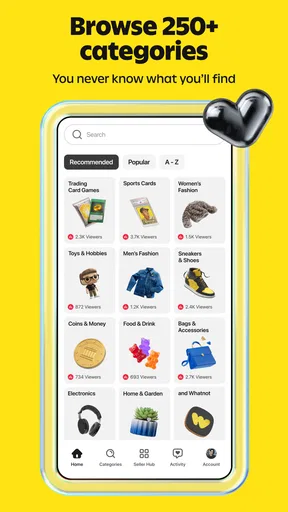
It is worth deciding what you want from the experience before spending time setting things up. A buyer who wants to browse casually can start by exploring relevant categories and observing how sellers present items. Someone shopping for a particular object should first write down the identifying details that matter and use those to judge whether a live offer is suitable. This avoids the common trap of watching for a long time, enjoying the atmosphere, and only then asking whether the item actually meets the original need.
If you are considering selling as well as buying, approach that as a separate learning curve. A live marketplace asks sellers to present items in a setting where viewers can react as events unfold. Think through what you would need to explain clearly and how you would handle questions before trying to sell. I would not assume that being comfortable as a buyer automatically makes someone ready to host or manage a sale; the two roles call for different preparation.
For a first visit, keep the session modest. Choose one area of interest, watch long enough to understand the pace, and avoid treating a brief look as a complete survey of the marketplace. If you are using the app while doing chores or commuting, remember that divided attention can make it harder to catch details. A live sale is not ideal when you cannot focus on what is being shown or said.
A practical way to recover when a workflow stalls
If browsing stops responding or a live presentation fails to load, start with the simplest checks rather than assuming your account or purchase is at fault. Confirm that other apps can connect, try reopening Whatnot, and give the connection another chance before repeating an action. Avoid tapping a purchase control repeatedly when the screen appears delayed; first make sure the previous action did not complete. This is a general safeguard for any shopping app where a slow response could leave you uncertain about what happened.
If you lose the thread of a live event, do not feel obliged to reconstruct everything you missed. Rejoin the discussion when you can, check the information currently shown, and ask for clarification if that option is available in the situation. If the item has moved on or the details remain unclear, let it go. The ability to walk away is more useful than trying to catch up under pressure.
For a purchase-related concern, keep your own notes about what you saw and what you expected, and use the help or support options available inside the app. Be precise about the issue: whether it concerns the item, the transaction, or simply a technical interruption. Those are different problems and may need different next steps. I would avoid relying on assumptions about how a particular case will be resolved; explain what happened clearly and follow the guidance presented in the app.
When the app may not be the cause
A disappointing result does not always mean the software malfunctioned. A stream can be difficult to follow because of a weak connection, background noise, or a fast-moving presentation. A product can also turn out to be a poor match because its description did not answer the buyer’s questions, or because the buyer did not have a clear checklist beforehand. Separating these possibilities helps you choose a useful next step instead of repeatedly reinstalling or reopening an app when the real issue is the information you need.
Likewise, a seller’s presentation and the app experience are not interchangeable. Whatnot provides the marketplace setting, but you still need to assess the specific offer in front of you. I would take extra care with expensive, condition-sensitive, or highly specialized purchases, where small details can change the value or usefulness of an item. If you need extensive documentation, side-by-side technical comparisons, or time to consult another person, a conventional listing or specialist retailer may be the calmer choice.
There is a similar distinction for sellers. A technical issue can interfere with an event, but preparation also matters: clear descriptions, a focused presentation, and a plan for answering questions make a live session easier for viewers to understand. Those are sensible practices rather than promises about the app’s tools. If you are not comfortable explaining an item in real time, you may prefer a selling channel built around written listings instead.
Who will get the most from Whatnot
I would recommend trying Whatnot if you enjoy specialist shopping, like learning from live presentations, or want discovery to be part of the buying experience. It is particularly suited to someone who can watch attentively, compare offers thoughtfully, and resist buying just because a moment feels exciting. The large audience gives the marketplace a sense of activity, but a busy environment is only valuable if the particular sellers and items match your interests.
It is less suitable for people who want every purchase to be fast, quiet, and easy to compare across a fixed set of specifications. It may also frustrate anyone who dislikes real-time pacing or prefers to make decisions only after reading detailed information at their own speed. In those situations, ordinary shopping apps and retailer websites are often more practical. They let you scan stable pages and revisit details without following a live conversation.
A realistic use case would be setting aside a little time to look for a collectible you already understand. I would decide the maximum I am willing to spend, list the condition or edition details I need, then watch a relevant seller and compare what is actually presented against that list. If the item checks out, I can consider it; if not, I have still learned what to look for next time. That is a healthier approach than opening the app with no plan and treating every interesting object as an opportunity.
My practical verdict
Whatnot is most compelling when live presentation is part of the value: you want to see a seller discuss items, discover niche products, or enjoy the social pace of a shopping event. It is less compelling when your priority is a frictionless transaction or exhaustive product comparison. I like the idea of turning browsing into a more human, event-based experience, but I would keep my usual shopping discipline: verify the details that matter, set a limit, and leave when an offer is not clear enough.
The app is free to try, so a cautious first visit can show whether its pace suits you. Start with an area you genuinely care about, observe before buying, and treat any technical hiccup as something to diagnose step by step. My recommendation is for curious, attentive shoppers who enjoy the live format and can make decisions without being hurried by it. If you prefer to compare quietly and purchase only after extensive research, a conventional marketplace will probably fit your habits better.
What we like
- Live auctions make browsing feel interactive.
- Buyers can ask sellers questions during streams.
- The app supports a wide range of collectible categories.
- Users can follow sellers to find future shows.
- Seller ratings help shoppers assess marketplace trust.
What could be better
- Fast auctions can make it easy to overspend.
- Product condition may be hard to judge on screen.
- Shipping costs can raise the final purchase price.
- Show schedules may not suit every time zone.
- Disputes may take time to resolve through support.




