
 Analysis byWeUseApps
Shopping for a car can turn into a string of half-remembered details: which listing had the clean-looking history, where the asking price sat, and whether that same model was still available nearby. CARFAX - New & Used Cars is aimed at making that search easier by bringing local vehicle listings, price alerts, and history details into one place. I see its strongest use as a research companion while narrowing down cars, not as a substitute for inspecting a vehicle or checking every important document yourself.
Finding your footing in a car search
CARFAX, Inc. makes this free app for the Auto & Vehicles category. It has been available since June 29, 2012, and its current version is 6.52.1. The app is rated for Everyone and requires iOS 11 or later. It has a 4.7 average from around 36,000 ratings, with more than 5 million installs. That broad use makes sense: the appeal is straightforward for anyone who wants to compare used cars and keep an eye on options without beginning every search from scratch.
The first thing I would do is treat the app as a way to organize the search, rather than expecting it to make the decision for me. A listing can help identify a candidate, and vehicle-history details can raise useful questions, but neither proves that a car is mechanically sound or fairly priced. That distinction matters most when a listing looks unusually appealing. I would use the information to decide what to ask the seller and what to inspect, not as a final verdict on the vehicle.
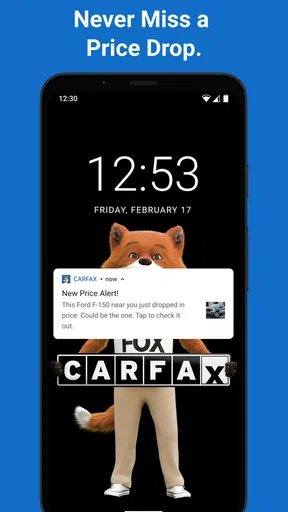
Price alerts are particularly useful when you have a fairly clear idea of what you want but are not ready to buy immediately. Instead of checking listings whenever you remember, alerts can bring a relevant change back to your attention. I would keep the search focused enough to avoid a stream of cars that are technically similar but not realistic for my needs. A broad search can feel productive at first, yet too many loosely matched options make comparison harder.
Why buyers can get stuck
The friction in a car-search app often starts with the search itself: it is easy to compare vehicles that look alike in a short listing, even when their histories, condition, or seller details call for different questions. I would slow down before treating a price or a history summary as a complete picture. Check the specific vehicle you are considering, note anything that needs clarification, and keep the listing details available when you contact the seller.
Another common snag is expecting an alert to replace active research. An alert is a prompt to look again, not a guarantee that a particular car is still available or that its terms remain unchanged. If one catches your eye, open the listing and recheck its current details before making plans around it. This small habit can prevent wasted calls or trips based on information you saw earlier.
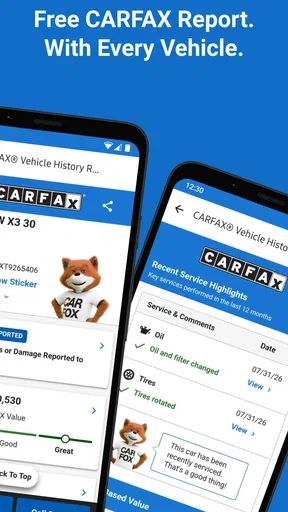
History details also need context. A record can help you ask better questions, but a clean-looking report should not be treated as proof that there are no problems. Conversely, a detail that needs explanation is a reason to investigate, not an automatic reason to reject the car. I would use the report as a conversation guide: ask the seller about anything unclear and, for a serious candidate, arrange an appropriate inspection.
Set up a search you can actually use
Before relying on alerts, decide what would make a car worth your attention. Think about the type of vehicle you need, how far you are willing to travel, and which trade-offs you can accept. This is more useful than starting with every possible listing and trying to impose a plan later. A narrow, sensible search gives each alert a clearer purpose.
It also helps to keep a short comparison note outside the app. For each serious candidate, record the asking price, the questions raised by its history, and what you still need to verify. That is not a special feature claim; it is a practical way to avoid mixing up similar listings when you are looking at several cars over a few days. I find this especially important when the same model appears in different trims or with different mileage and seller descriptions.
If something does not appear as expected, first check the search criteria and whether you are looking at the right area. A search that is too restrictive can hide plausible options, while one that is too broad can bury them. Adjust one criterion at a time, then see whether the results become more useful. Changing several things at once makes it harder to understand why the list changed.
For alerts that seem irrelevant, revisit the search that generated them rather than assuming the notification itself is broken. Tightening the criteria may improve the signal; widening them may help if you are seeing too few candidates. I would also confirm that the app is up to date before troubleshooting further. The current release is version 6.52.1, and updating through the app store is a sensible first check if the app behaves unexpectedly.
A workflow for recovering from a dead end
Imagine I am looking for a used car for a daily commute. I find a promising listing, save the details for comparison, and use the history information to prepare questions. Before arranging a visit, I check whether the listing is still current and confirm the points that matter most to me with the seller. If the answers do not line up with the listing, I move on rather than letting the time already spent push me toward a questionable choice.
If a listing disappears or an alert leads nowhere, I would return to the broader search and look for comparable vehicles instead of repeatedly reopening the same stale result. Keep the useful criteria, but do not assume that a replacement car is equivalent just because the model and price look close. Compare the individual vehicle’s details again. This is a simple way to avoid carrying assumptions from one listing to another.
When several options are available, rank them by what you still need to learn, not just by which one looks best on screen. A car with a slightly less attractive listing may deserve a call if its history and seller answers are easier to verify. On the other hand, if a key detail remains vague, it can be sensible to spend your time on another candidate. The app is most valuable when it helps you choose the next useful action.
When the problem may be outside the app
Not every frustrating search result points to an app problem. A seller may change a listing, a vehicle may no longer be available, or the information a buyer wants may require direct confirmation. Those are ordinary complications of shopping across listings. I would distinguish between a screen that is not loading or responding and a listing that simply does not match what I hoped to find.
If the app itself is slow or behaving oddly, try the basic checks first: close and reopen it, check your connection, and make sure you are using the latest version available to you. If the issue concerns one particular vehicle, compare what you see with what the seller can confirm. If it concerns the app more generally, restarting the app is a more useful first step than assuming every missing result reflects a broader search problem.
There is also a limit to what a vehicle-history tool can establish. A report is not a hands-on inspection, a test drive, or a guarantee about future reliability. Buyers who need a definitive mechanical assessment should seek one separately. Likewise, someone who only wants the broadest possible inventory across multiple services may prefer to compare several car-shopping sources rather than rely on one app alone.
How it fits beside other ways to shop
Compared with browsing general classified listings, CARFAX’s practical distinction is the combination of vehicle listings with history details and price alerts. That pairing can make it easier to move from “this car looks interesting” to “here are the questions I should ask.” A general marketplace may still be useful for wider browsing or for listings that are not surfaced here, so I would not treat the two approaches as mutually exclusive.
Compared with visiting sellers or dealerships one by one, using an app first is a lower-effort way to shortlist possibilities. The trade-off is that an on-screen search cannot tell you how a vehicle feels to drive or resolve every uncertainty in its condition. I would use CARFAX to decide which cars merit a closer look, then judge the actual vehicle on its own merits.
The app is a good fit for people who want to monitor nearby options, compare candidates over time, and use vehicle-history details to guide follow-up questions. It is less suitable for someone who expects a report to certify a car’s condition, or for a buyer who has no interest in narrowing a search and would rather browse every possible source at once. If you are only casually curious and do not want alerts or repeated comparison, the added research workflow may be more than you need.
My practical verdict
I would recommend CARFAX - New & Used Cars to a friend who is actively shopping and wants a more organized way to follow listings. Its most useful contribution is not a promise that the right car will appear; it is the chance to connect a listing with history questions and keep an eye on price changes without rebuilding the search each time. Used thoughtfully, that can make the early stages of buying less scattered.
My advice is to set realistic search criteria, use alerts as reminders rather than guarantees, and keep notes on the specific details you need to verify. Then treat history information as evidence to investigate, not a final approval stamp. That balanced approach is where the app earns its place: it can help me spend attention more carefully, while the final decision still belongs to the buyer and the real vehicle in front of them.
What we like
- Free vehicle history reports are available for many used cars.
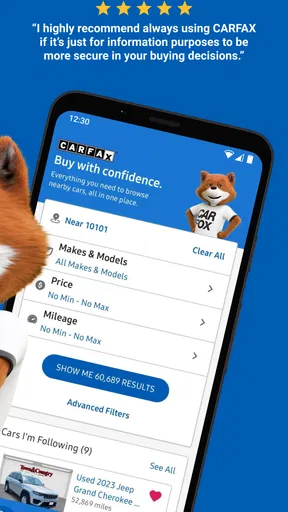
- Search filters make it easier to narrow down listings.
- Saved searches help track new cars that match your preferences.
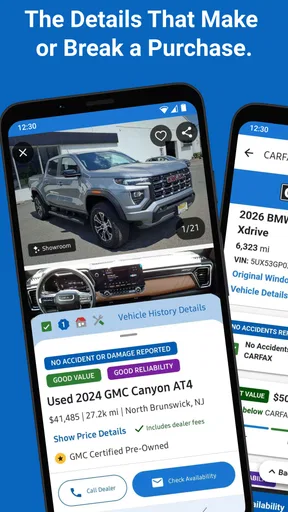
- Dealer details and contact options are available in the app.
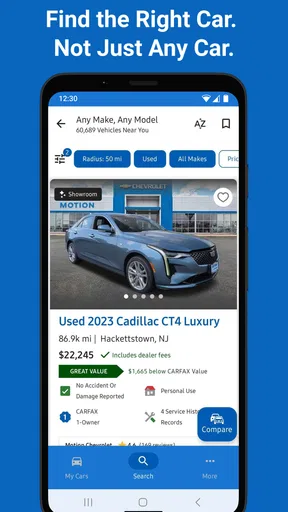
- Listings include useful information such as mileage and price.
What could be better
- Vehicle history reports may be unavailable for some cars.
- Listing availability and prices can change without notice.
- Some dealer listings may contain incomplete information.
- The app is most useful in areas with many participating dealers.
- Contacting sellers may require sharing your personal information.




