
 Analysis byWeUseApps
I judge a weather app less by how much it shows than by how quickly it helps me decide what to do. The Weather Channel is built for people who want a broad forecast view alongside tools for watching conditions change, especially when rough weather is possible. In my experience, its strongest case is not replacing every source of local information; it is giving you a practical place to check the outlook, keep an eye on radar, and make a plan before heading out.
Checking the forecast without turning it into a project
The Weather Channel is a free weather app from The Weather Channel, and its central appeal is straightforward: it brings everyday forecasts together with severe-weather notifications, future radar, and live alerts. That combination is useful when I need more than a quick temperature glance. I can check the general picture, then look for signs that the weather may affect a commute, an errand, or time outdoors.
The app has a 4.6 average from around 3.6 million ratings, and it has been installed over 100 million times. Those figures make it a familiar choice, but popularity alone does not tell me whether it suits a particular routine. What matters is whether I want a fuller forecast experience or simply the fastest possible answer to “Do I need a jacket?” For the latter, a lightweight built-in weather app may feel more direct.
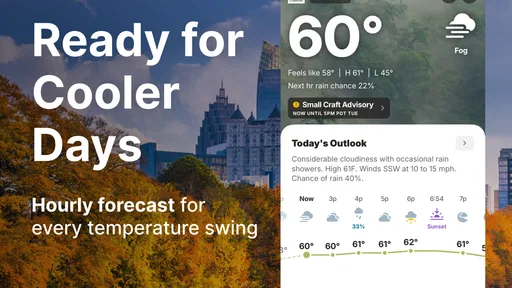
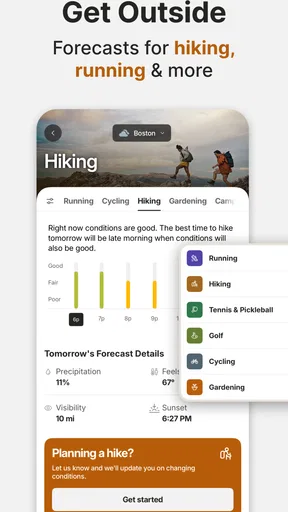
I like that the app’s weather focus can support both routine planning and more urgent checks. On an ordinary morning, I might use it to decide whether to carry an umbrella. When conditions look unsettled, the radar and alert tools give me a reason to spend a little longer examining what could happen rather than relying on one snapshot. That is a useful distinction: a forecast helps with the day ahead, while radar can help me think about what is moving through nearby.
Speed is about reaching a useful answer
I would not treat this as a bare-bones utility whose only job is to display one number instantly. A richer weather app has more information to present, and the experience is most valuable when I take advantage of that depth. If I only want a glanceable temperature, a simple home-screen weather view is often quicker because it avoids opening a larger app and navigating through extra context.
For a more considered check, the app’s design premise makes sense: start with the forecast, then move to radar or alerts when the situation calls for it. That keeps the detailed tools relevant rather than making every weather check feel like an emergency briefing. My practical tip is to use the app in two modes: a quick forecast check for ordinary plans, and a deliberate radar check before travel or outdoor commitments when the weather looks changeable.
There is a trade-off here. More layers of information can help me make a better decision, but they can also slow down the mental task of finding the one detail I need. If I am already running late, I may prefer a compact forecast rather than exploring several screens. If I have time to plan, the added context is a strength. The best measure of speed is therefore not just how quickly an app opens; it is how quickly I can get from a forecast to a sensible choice.
When radar and alerts earn their place
The most useful heavy-use moment is a day when the forecast is not enough by itself. Imagine I have an outdoor appointment after work and the sky looks uncertain. I can check the broad forecast earlier, then revisit the radar closer to leaving. If the picture suggests I should allow time for a change in conditions, I can adjust my route or move the plan indoors. That workflow is more actionable than checking the same daily summary repeatedly.
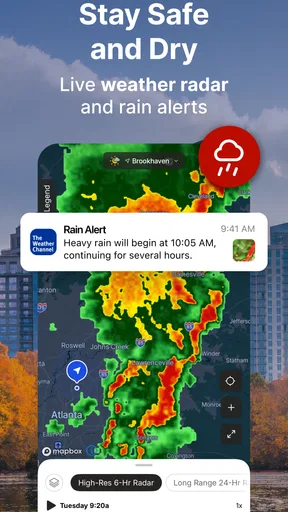
Future radar is particularly valuable as a planning aid, but I would use it as guidance rather than a promise. Weather can shift, and a projected view should not be mistaken for certainty about the exact conditions at one specific doorstep or minute. My approach is to combine it with the live picture and any relevant alert, then leave room for a backup plan. For a drive, that might mean checking again before setting out instead of making a decision based only on an earlier glance.
Severe-weather notifications and live alerts matter most when I cannot keep the app open. They can bring a changing situation to my attention without requiring constant manual checking. Still, alerts are only useful if they reach me at the right time and do not become background noise. I would keep them enabled for the kinds of weather warnings I genuinely need, while avoiding a habit of treating every notification as equally urgent. That is a personal setup choice, not a reason to ignore important warnings.
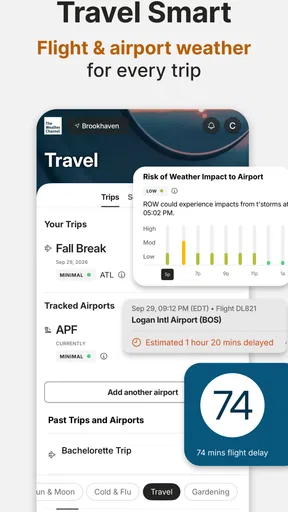
For heavy use, such as following changing conditions while arranging a trip, I would expect to move between forecast information and radar more often than I would in a normal week. The app’s range of weather tools suits that pattern. I would also avoid leaving a detailed weather view open unnecessarily: check the information, make the decision, and return when the situation changes. That keeps the app serving a purpose instead of turning into a screen I refresh out of habit.
Reliability means checking the right source at the right time
I see the app as a useful everyday reference, not a substitute for judgement during dangerous conditions. Notifications and live alerts can help me notice a developing issue, while radar can provide context for what may be approaching. If a warning affects my area, I would take it seriously and follow local emergency guidance rather than relying on one app as my only source of instruction.
There is also a practical reliability habit worth adopting: check location and timing before acting on a forecast. A broad view can be useful for deciding whether to bring rain gear, but it does not remove the need to consider where I am going and when I will be there. For a long drive or an outdoor event, I would check again nearer the departure time. Weather information is most dependable as part of an ongoing decision, not as a one-time guarantee.
If an alert or screen does not immediately answer my question, I would recover by returning to the main forecast and checking the relevant radar or live-alert information again. That is a simple workflow, but it prevents me from confusing an earlier view with current conditions. I would also keep another trusted way to receive urgent local information available when the stakes are high. This is sensible preparation for any weather app, including a well-known one.
My confidence in a weather app is not based on an assumption that it can be perfect everywhere. It comes from using it for appropriate tasks: ordinary planning, watching a weather pattern, and noticing alerts. When a decision has serious consequences, I want more than a casual glance. The Weather Channel can be part of that process, but it should not become the sole authority for emergency action.
How it fits different phones and routines
The app is rated for Everyone and supports devices running Android 9 or later. Its current version is 16.26.0. Those details make it relevant to many Android users, but an older or constrained device can still change how comfortable a feature-rich weather app feels. I would pay attention to the experience on the phone I actually use rather than assuming that every device will feel equally quick or spacious.
I cannot responsibly promise a particular loading speed, battery impact, or memory footprint for every phone. Those depend on the device and how the app is used. A practical way to judge fit is to install it, try a normal forecast check, and then test radar and alerts during a day when conditions are changing. If the app feels heavier than you need, your phone’s built-in forecast may be enough for routine use, with this app kept for more detailed checks.
As a free app, it is easy to try, but it also includes in-app purchases ranging from $0.99 to $29.99 per item. I would start with the free experience and decide whether it already covers my needs before considering anything extra. The presence of optional purchases does not mean every user needs to spend money; if all I want is a forecast and weather awareness, I would first see how far the included tools take me.
On a small screen, my advice is to keep the purpose of each visit clear. Open the app to answer a question—whether conditions may affect a plan, whether an alert needs attention, or whether radar changes the timing—and then leave. That approach is especially helpful if you find detailed dashboards distracting. A person who enjoys examining forecast context may appreciate the extra depth; someone who values a minimal interface may prefer a simpler alternative.
Who should choose it—and who may not need it
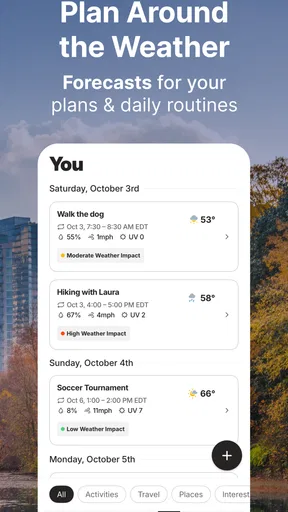
I would recommend The Weather Channel to someone who wants more than a daily high and low, particularly if severe-weather alerts and radar are part of their planning. It makes sense for commuters, people organizing outdoor activities, and anyone who wants to revisit conditions as plans get closer. Its combination of forecasts and changing-weather tools gives me a reason to return when the weather is uncertain rather than relying on a single morning check.
I would steer a person toward a simpler weather app if their main priority is a quick glance with minimal navigation. I would also be cautious about recommending any one forecast app as the complete answer for someone who needs highly specialized local or professional weather information. The Weather Channel is a broad consumer weather app, and the right choice depends on whether its mix of everyday forecasts, radar, and alerts matches the decision at hand.
Compared with the usual alternatives, the key difference is how much attention you want to give the forecast. A phone’s built-in weather view is convenient for routine checks; a radar-focused tool may suit someone who mainly tracks precipitation; and The Weather Channel is appealing when I want those kinds of checks alongside a more general weather experience. There is no universal winner. If I only check tomorrow’s temperature, the built-in option is probably enough. If I want to follow changing conditions and receive alerts, this app has a clearer role.
The name is familiar, but I would choose the app for its practical workflow, not its recognition. It lets me move from a basic forecast to radar and alerts when my plans depend on the weather. That progression is the useful part, especially if I check at different points in the day rather than expecting one forecast to settle every question.
My performance verdict
My overall view is positive, with a clear caveat: the app is most worthwhile when I use its depth. For an ordinary temperature check, it may be more than I need. For a day involving uncertain weather, it gives me a sensible path from forecast to radar to alert, helping me adjust plans without having to rely on guesswork alone. I would install it if those tools match my routine, then judge its comfort and responsiveness on my own device.
Ultimately, I see The Weather Channel as a capable everyday companion rather than a guarantee of perfect conditions or a replacement for local emergency guidance. I would keep it in my toolkit for planning, make a habit of checking again when timing matters, and treat projections as useful estimates rather than promises. If you want a free weather app with a fuller set of ways to follow changing conditions, it is worth trying; if you want only the fastest possible glance, a simpler option may suit you better.
What we like
- Hourly forecasts help with planning throughout the day.
- Radar maps make it easy to track approaching precipitation.
- Severe weather alerts can provide timely local warnings.
- Widgets show current conditions without opening the app.
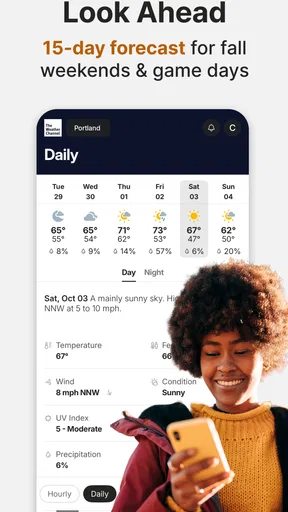
- Forecasts include useful details like wind and humidity.
What could be better
- Some features require a paid subscription.
- Ads can interrupt the browsing experience.
- Radar data may not update instantly in every area.
- Location access is needed for accurate local forecasts.
- Forecast accuracy can vary by region and weather conditions.




