
 Analysis byWeUseApps
Suno is most appealing when I treat it as a songwriting sketchpad rather than a button that reliably delivers a finished track. It can turn a musical idea into something I can hear, which is a surprisingly useful way to test a mood, a lyric, or a direction. The trade-off is that generation is not the same as precise composing: if I have a very particular sound in mind, I may need patience and a willingness to accept imperfect results.
Turning a rough idea into something audible
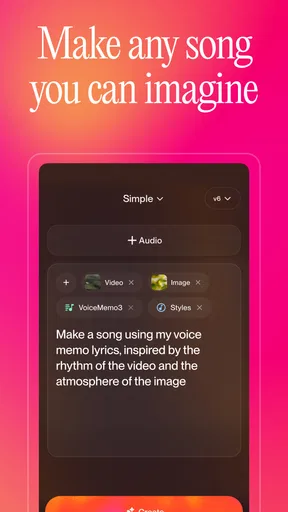
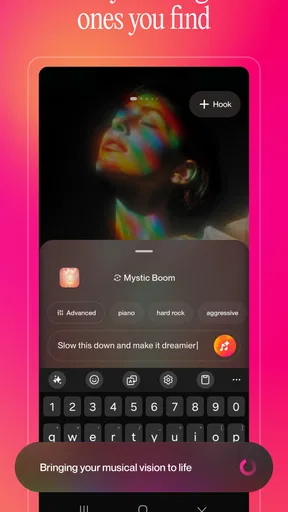
Made by Suno, Inc, this free music and audio app is built around AI-generated songs. The central attraction is simple: describe what you want to hear and use the result as a starting point. That makes it different from a conventional music player, which helps me find and listen to existing work, and from a digital audio workstation, which expects me to build a track with tools and musical decisions. Suno sits between those approaches: I bring the concept, and the app helps turn it into a listenable draft.
That shift from imagining to hearing is the real strength. A phrase such as “a wistful song for a rainy commute” can be easier to refine once I have an actual musical response to react to. I might discover that the idea needs more energy, a different mood, or a simpler lyrical direction. Even when the output is not what I would keep, it can reveal what I meant more clearly than staring at a blank page.
I would not approach it as a substitute for a musician who can follow detailed instructions exactly. Generative music involves interpretation, and the result may not land precisely on the arrangement, vocal character, or emotional tone I pictured. The most productive mindset is to treat each attempt as a draft: useful for exploration, but not automatically a finished piece.
Why the creative loop works
The useful part is not only getting a song; it is having something concrete to judge. When I am working on a short video, a personal project, or a playful gift, hearing a generated idea can help me decide whether the concept has legs. I can compare the feeling of the result with the feeling I intended, then adjust my description or rethink the idea. That makes the app less like a magic music machine and more like a collaborator that offers unpredictable first drafts.
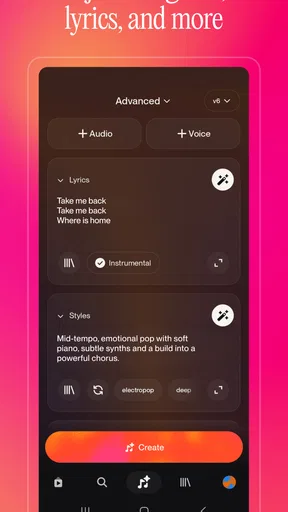
A practical tip is to begin with a clear emotional purpose rather than a pile of stylistic instructions. If I ask for too many qualities at once, it becomes harder to tell which part of the prompt shaped the result. I get more value by deciding what matters most—such as a relaxed mood or a dramatic build—and evaluating that first. Once the broad direction feels close, I can experiment with additional detail.
Another useful approach is to save the prompt that produced a promising result before changing it. Keeping a simple record of what I asked for makes experimentation less random: I can alter one idea at a time and notice whether the change helped. This is especially worthwhile when I am exploring a theme for a small creative project and want to compare several directions without losing the one that felt closest.
Where it fits among music tools
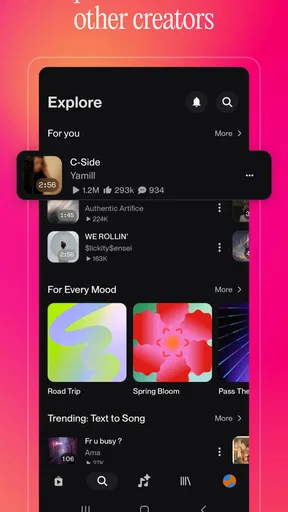
Compared with a streaming service, Suno is for making new material rather than browsing a familiar catalog. Compared with a traditional production app, it asks for less hands-on construction, but also gives me less direct control over every musical decision. That distinction matters. If I want to select specific sounds, edit a detailed arrangement, or polish a track through a deliberate production workflow, a dedicated music-making tool is likely the better fit.
For casual experimentation, though, the lighter approach is a genuine advantage. I do not need to begin by learning a full set of production controls just to see whether a musical idea is amusing, moving, or worth developing. I can use it to spark a concept, make a playful song for someone, or explore a mood before deciding whether to invest time in a more hands-on process.
It is also important to separate a convincing listening experience from a dependable production result. A generated track may be entertaining and still not suit a project that needs a very specific structure or carefully controlled sound. I would audition the result for its actual purpose rather than assuming that a polished-sounding draft is automatically ready for every use.
The limitations I would keep in mind
The biggest friction is the gap between intention and outcome. A prompt can communicate a broad idea, but it does not guarantee that every detail will appear as imagined. That can be delightful when I am open to surprise and frustrating when I have a narrow target. If I am trying to reproduce a precise musical arrangement, I would rather use tools that expose direct editing controls than repeatedly reword a request and hope the result moves in the right direction.
There is also a creative trade-off in letting an AI shape the musical decisions. The convenience can help me get past a blank page, but it can make it tempting to accept the first plausible result instead of making deliberate choices. I get more out of the app when I listen critically: what does the result do well, what feels wrong, and what would I change if I were developing the idea further? Used that way, generation supports my taste instead of replacing it.
Cost deserves a little attention before I make the app part of a regular routine. The app is free to install, while in-app purchases range from $2.99 to $699.99 per item. That broad spread makes it sensible to check the purchase options shown in the app before spending. I would first see whether the free experience suits my habits, then decide whether any paid option solves a real need rather than paying simply because I am curious.
The experience is aimed at a teen audience. That makes the age guidance worth noticing if a younger person will use it, especially because the app invites users to create and listen to generated songs. As with any creative app, I would consider whether its content and purchase options are appropriate for the person using the device.
Everyday uses that feel worthwhile
One realistic use is making a small, personal song idea for a birthday or a group chat. I could start with a shared joke or a memorable event, then listen to whether the result captures the intended tone. The value is in creating something tailored and amusing, not in expecting a professional recording. If the first version misses the joke or feels too sentimental, that is useful feedback for a revised prompt.
Another scenario is a creator looking for an early mood reference. Before editing a short clip or assembling a presentation, I could explore whether a calm, tense, or celebratory musical direction feels right. This is helpful as a brainstorming aid, but I would not assume the generated track automatically meets the practical requirements of a public project. For anything that needs precise editing or a clearly suitable final soundtrack, I would check the intended usage and choose a workflow designed for that purpose.
It can also be a low-pressure way for someone who does not play an instrument to explore songwriting ideas. A person might have a line, a theme, or a feeling but no obvious route from that seed to a song. Hearing a generated interpretation gives them material to respond to. The app is less suitable, however, for someone who wants a structured course in music theory or detailed instruction in production; its appeal is making and exploring, not replacing those forms of learning.
Who should try it, and who should look elsewhere
I would recommend it to curious listeners, casual creators, and people who enjoy testing ideas without needing every result to be exact. It is especially useful if the hardest part of starting a song is imagining what a concept might sound like. The app can make that early stage more playful and give a vague thought enough shape to discuss, revise, or simply enjoy.
I would point a working composer or meticulous producer toward a more controllable tool when the job depends on precise arrangement, repeatable results, or hands-on editing. I would also suggest a streaming app instead if the main goal is discovering established artists and albums. Suno’s appeal is not that it does either of those jobs better; it is that it offers a different path from an idea to a new musical sketch.
The app has earned a 4.8 average from 2.6 million ratings, with 37,000 reviews and over 10 million installs. Those figures show that it has attracted broad interest, but they do not answer the more personal question: will its unpredictable creative process suit me? I would judge it by whether I enjoy iterating on prompts and can treat imperfect outputs as part of the process.
A considered recommendation
The current version is 1.94.0, and the app requires Android 8.0 or later. It was released on December 3, 2024, and carries a Teen content rating. Those practical details are useful to check against the device and user before installing, while the free entry point makes trying the basic idea straightforward.
My verdict is that Suno is best as a fast, imaginative sketchpad for people who want to hear an idea before they know exactly what it should become. Its strongest moments come when I stay open to unexpected interpretations; its weakest come when I need exact control and get impatient with variation. If you want a playful way to explore song concepts, I think it is worth trying. If you need a dependable production environment or a finished track that follows detailed instructions, I would choose a more hands-on alternative.
In the end, I would recommend Suno to someone who enjoys the process of experimenting as much as the result. It can turn a passing thought into something you can play, judge, and reshape, which is a satisfying creative trick. Just go in expecting a source of ideas rather than a replacement for musical direction, careful editing, or your own taste.
What we like
- Turns text prompts into original songs with vocals and instrumentals.
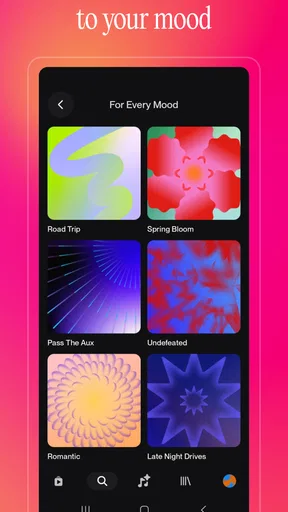
- Offers multiple genres and moods to shape each track.
- Makes it easy to share generated songs with others.
- A free tier lets new users try music generation.
- Song creation is accessible without musical training.
What could be better
- Free usage limits how many songs you can generate.
- Results can vary in quality between generations.
- Lyrics may include awkward phrasing or errors.
- Generated tracks may not match the prompt precisely.
- Usage rights can depend on your plan and the terms.




