
 Analysis byWeUseApps
When I look for a rental, the hard part is rarely finding a few listings; it is sorting the promising ones from places that do not fit my budget, location, or daily routine. Rent. Apartments & Homes is built for that search, and I find it most useful as a practical starting point: a way to browse rental homes, compare possibilities, and narrow down where to spend my attention. It is a free House & Home app from Rent Group, Inc, and its focus is clear rather than sprawling.
Browsing feels quick; the search still takes judgment
In my experience, a rental-search app is only as useful as the choices it helps me make. This one is centered on discovering apartments and homes, so I can approach it with a specific area or a general idea of what I want and use the listings to build a shortlist. That is more convenient than keeping scattered notes from different sources, especially when I am comparing several neighborhoods or property types.
I would not treat a fast-moving browse session as proof that I have found the right home. A listing can look appealing at first glance, while the practical questions—whether the location works for my commute, whether the layout suits my household, and whether the full cost fits—require a closer look. I use the app to organize discovery, then verify the details that matter before making plans around a property.
For a realistic example, imagine I am moving across town and have only a lunch break to check what might be available. I can use that time to scan homes in the areas I am considering and save the strongest candidates mentally or in my own notes for a proper comparison later. The key is to decide on a few non-negotiables beforehand. Without that, browsing can become an endless stream of attractive but unsuitable options.
Make a shortlist before you start comparing
One useful habit is to separate essential requirements from preferences. I would write down a maximum rent, acceptable neighborhoods, and any must-have practical needs before opening the search. Then I can judge each listing against the same standard instead of changing my criteria every time a new photo catches my eye. This is especially helpful when looking at apartments alongside houses, since the appeal of each may be quite different.
I also recommend keeping a compact comparison note outside the browsing session: location, apparent fit, questions to ask, and whether I have already contacted anyone about it. That workflow helps avoid mixing up similar listings and makes follow-up more focused. It is not a special feature claim; it is simply a good way to get more value from a discovery app when several possibilities compete for attention.
Busy searches expose the trade-offs
Rental hunting often means returning to the same search repeatedly, checking new possibilities, and comparing a few homes while juggling work or family plans. Rent. Apartments & Homes is suited to that discovery loop, but I would keep each session purposeful. If I browse broadly without a location or budget in mind, the number of options can make the task feel larger rather than easier. A narrower search gives me a better chance of turning browsing into decisions.
When I am looking at multiple homes, I try not to rely on photos alone. Images can help me decide whether a place deserves more attention, but they cannot settle questions about noise, travel time, storage, building condition, or the feel of a street at different times of day. I use the app to identify candidates, then make a separate checklist of what I need to confirm through a viewing or direct conversation.
That distinction also helps when a listing seems unusually compelling. Instead of assuming that a polished presentation means a smooth rental process, I check whether the property meets my practical requirements and whether the next steps are clear. The app can reduce the effort of finding options; it cannot make every option a good choice or replace careful screening.
Reliability is about the whole search, not one session
A rental search can stretch over days or weeks, so what matters to me is whether I can return to the task and keep my thinking organized. The app’s purpose is straightforward: browse rental homes and apartments. I see it as one part of a broader process, rather than a complete record of every question, conversation, and decision. Keeping my own notes is useful if I compare places over time or share candidates with someone else.
I would also build in a little flexibility. Listings and availability can change, and a home that looked suitable during one browsing session may not remain an option by the time I am ready to act. That is a general reality of renting, not a reason to abandon the app. It does mean I would avoid treating any shortlist as final until I have checked the current status and confirmed the details directly.
If I lose track of a search or need to resume later, the simplest recovery plan is to save the essential criteria somewhere outside the app: the areas I am targeting, my budget ceiling, and the questions that still need answers. That way, I can restart without relying on memory. I would also keep contact details and viewing arrangements in a place I can find easily, rather than assuming that browsing history alone is enough to manage a move.
Who will get the most from it
I think this is a good fit for renters who are beginning a search, weighing different neighborhoods, or trying to see what kinds of apartments and homes are available in an area. It is also useful for someone moving to a new city who wants to get a feel for the rental landscape before making a tighter plan. The app is free, which makes it easy to try as an additional way to explore listings without making it the only source of information.
It may be less suitable for people who already have a very specific property in mind and only need to communicate with a landlord or complete a transaction. In that case, a direct contact route or a service focused on the next step may be more efficient. Likewise, renters who need extensive advice about leases, tenant rights, or neighborhood conditions should look beyond a listing-browsing app; those decisions require information and expertise that a property search alone cannot provide.
The app is rated for Everyone, and its broad rental focus makes it approachable for ordinary home searches. That does not mean every renter will find the same value in it. Someone searching in a narrow market may still need to check local sources, while someone comparing a wider range of areas can benefit more from having a dedicated place to browse possibilities.
How it compares with other ways to search
Compared with scanning general classifieds or jumping between unrelated sources, a dedicated rental app gives the task a clearer focus: I am looking for apartments and homes, not browsing every kind of second-hand item or local notice. That focus can make discovery feel more organized. On the other hand, no single app should be assumed to show every suitable rental or to answer every question about a property. I would cross-check especially promising options and keep an open mind about other legitimate ways to find a home.
Compared with asking friends or checking neighborhood groups, an app is more convenient for browsing at my own pace and seeing a range of possibilities. Personal recommendations can still be stronger for learning what an area is like or hearing about a local opportunity. I see these approaches as complementary: use the app to create a shortlist, then use direct questions, local knowledge, and in-person viewing to decide whether a home really fits.
Device expectations and practical constraints
The current version is 12.6.0, and the app requires Android 8.0 or later. I would check that requirement before installing it on an older device. Beyond compatibility, I would not make a decision based on assumptions about battery use, data consumption, or how it behaves on every phone; those can depend on the device and how someone browses. A sensible approach is to use a stable connection when comparing listings and avoid trying to make a final decision while rushing through a short session.
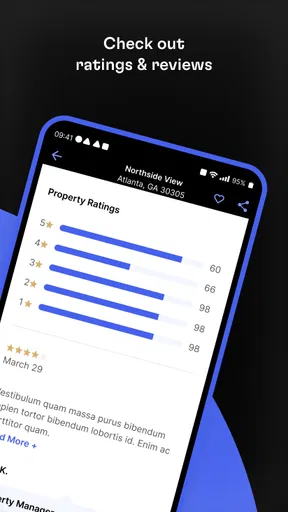
Rent. Apartments & Homes has been available since August 25, 2010, and it has more than five million installs. It holds a 4.7 average from around 146,000 ratings, alongside roughly 8,700 written reviews. Those figures suggest that many people have used it, but I would still judge it by whether the available listings suit my own area and search priorities. A strong overall rating cannot guarantee that a particular neighborhood or property type will be well represented for every renter.
For stability, I find it more useful to plan around the information I need than to expect an app to solve the entire moving process. Before contacting anyone, I would confirm the listing is still relevant, prepare a short set of questions, and note what would rule the home out. That approach protects my time even if I have to revisit the search or switch to another source.
My performance verdict
Rent. Apartments & Homes earns a place in my rental-search toolkit because it keeps the central task—finding apartments and homes—easy to understand. I would recommend it to a friend who wants a free way to begin exploring rentals, especially if they are still deciding on a location or comparing different kinds of homes. Its greatest practical strength is as a discovery aid: it helps turn a vague search into a set of candidates worth investigating.
My main caution is to keep expectations grounded. Browsing is not verification, attractive photos are not a viewing, and a listing is not a guarantee that the home will still be available when I am ready. The app is less useful if I expect it to replace local research, careful questions, or a clear comparison process. I get the best results by setting criteria first, taking concise notes, and checking important details before committing time or money.
With more than five million installs and a 4.7 average, it is an established option in the rental-search category, but the right choice still depends on how well it serves the area I am searching. I would use it alongside other sensible sources rather than as my sole authority. If I were starting a move today, I would open it to explore the market, build a focused shortlist, and then do the careful work that turns a promising listing into a home I can trust.
What we like
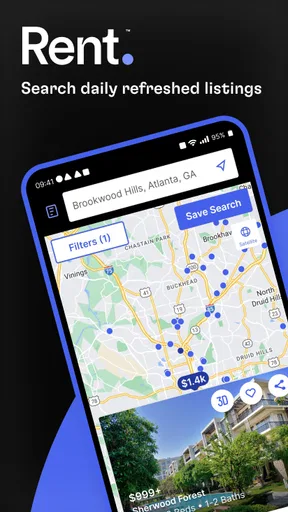
- Search homes by location and adjust the map view to explore nearby rentals.
- Save appealing listings for easier comparison later.
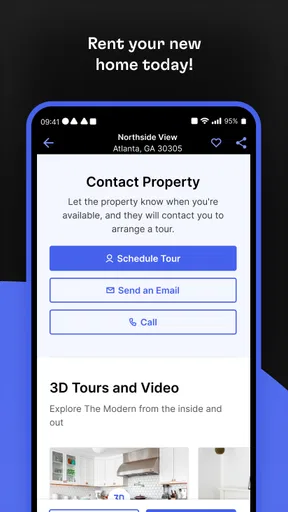
- Contact property owners or managers directly through the app.
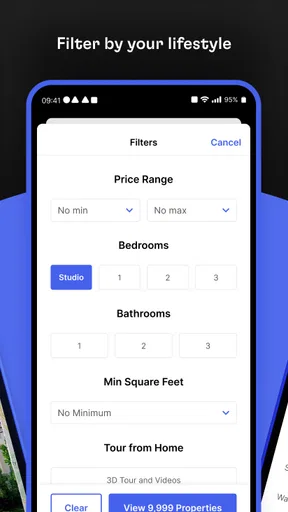
- Use filters to narrow results by rental preferences.
- Browse apartment and house listings from a mobile device.
What could be better
- Listing availability may change before you contact the advertiser.
- Rental details can vary in completeness from one listing to another.
- Some areas may have fewer available properties than others.
- Contacting advertisers may require sharing personal information.
- Prices and fees should be confirmed with the property manager.




