

 Analysis byWeUseApps
Searching for a home on a phone sounds simple until you are juggling several neighborhoods, rental options, school priorities, and questions for an agent. Homes.com is built for that broader search: it brings home and rental listings, agent discovery, and school information into one place. I find that combination most useful when you are still working out what matters, rather than when you already know the exact property you want.
This is a free house-and-home app from CoStar Homes.com Android Team. Its broad focus makes it a practical starting point for buyers and renters, but it is not a substitute for checking a property in person or confirming important details with an agent. The app is rated for Everyone, and its 4.7 average from around 31,000 ratings suggests that many users find it worthwhile. My view is more specific: it can help organize the search, while the quality of your results still depends on your location, your criteria, and how carefully you follow up.
Where a home search can get stuck
The hardest part of looking for a home is often not finding a listing; it is deciding whether a listing fits your real life. A property may look appealing until you consider the commute, the nearby schools, the monthly budget, or whether the surrounding area suits your routine. Homes.com’s mix of homes, rentals, agents, and schools gives you a way to consider those questions together instead of treating the property photo as the whole decision.
That breadth is helpful, but it can also make the first session feel unfocused. If you open the app without a clear idea of whether you are buying or renting, or without even a rough location in mind, you may spend time browsing attractive but irrelevant options. I would begin with one practical constraint—such as the area you need to reach regularly—then compare listings within that frame. You can widen the search once you understand what the local choices look like.
Another common point of friction is interpreting a listing as a promise rather than a snapshot. Listings can change, and details that matter to you may need clarification. I treat the app as a discovery and comparison tool, not as the final authority on availability, condition, or suitability. Before making plans around a particular property, confirm the essentials with the relevant agent or contact and check that the listing still matches your needs.
The app’s reach is substantial, with more than a million installs, but that does not mean every area will feel equally useful. Real-estate search is inherently local: the number and relevance of listings can vary by place. If your first search looks thin, try a nearby area or adjust one criterion at a time before deciding the app has nothing for you. A narrow set of filters can hide options that would otherwise be worth considering.
Start with a useful search, not a perfect one
I recommend treating your first search as a way to learn the market. Use a realistic location and a broad enough set of needs to see the range of possibilities. Then make a note of what repeatedly appears: property types, price ranges, or neighborhoods that seem to fit. This is more informative than immediately imposing a long list of strict preferences, especially if you are new to the area.
A useful, less obvious habit is to separate requirements from preferences before browsing. A non-negotiable commute or room requirement should guide your search differently from a preferred finish or extra feature. When every preference becomes a hard condition, you can screen out homes that might work after a closer look. Homes.com is best used with criteria you can revisit, not a rigid checklist you never question.
Setup checks that prevent avoidable frustration
Before blaming the app for an empty or confusing search, check the basics. Make sure the location is the one you intended, review any constraints you have applied, and consider whether your search area is too narrow. If results seem unexpected, remove one restriction and search again. Changing several things at once makes it harder to tell which choice affected the listings.
It also helps to check that the app is current and that your device meets its requirements. The current version is 18.8.0, and the minimum operating-system requirement is version 10. If the app behaves oddly, a sensible first step is to close and reopen it, then check the app store for an available update. These are general troubleshooting steps, not a guarantee that every issue will resolve in the same way.
When the app is slow or a page does not load as expected, check whether your connection is working by trying another app or page. A temporary network problem can look like a broken search. If other services work normally and the issue persists, restarting the app and trying again later is a reasonable next move. I would avoid making repeated changes to a search while the connection is unstable, because it can become unclear which results reflect your settings.
Homes.com is free, which makes it easy to try without making a purchase decision first. Still, free access does not remove the effort involved in evaluating properties. Set aside time to compare details rather than scrolling quickly through photos; a short, focused search is often more useful than a long session in which you forget why you saved or revisited a particular option.
Recovering your search when the workflow goes sideways
If you lose track of a promising property, reconstruct the search from the most reliable clues: the area, the kind of home, and the features you remember. Avoid changing every criterion in an attempt to force the exact same result. Listings and search results can change, and a small difference in location or requirements may bring back a more useful set of options than an overly precise guess.
For a realistic example, imagine you are renting near a new job and are comparing two neighborhoods. First, search each area separately with only your essential needs. Then look at the available homes and rentals alongside the school information if that affects your household. Use the agent-finding part of the app when you need help with local questions, but keep a separate note of what you want to ask. That way, you can compare answers consistently rather than relying on memory after several conversations.
One practical trade-off is that a single app can make it easier to keep browsing, but it may also tempt you to treat everything as one seamless decision. A listing, school information, and an agent search answer different questions. I would evaluate them separately: whether the home fits, whether the surrounding area works for your situation, and whether the person helping you can answer the questions you need resolved. Bringing those strands together is useful; assuming one automatically confirms the others is not.
If a result disappears or details seem different on a later visit, do not assume that your device has corrupted the search. The listing itself may have changed, or your search may now be using different criteria. Check the location and filters again, then confirm the status directly before arranging your plans. This simple recovery routine is more dependable than repeatedly reinstalling an app whenever a property is no longer visible.
When another source—or a person—is the better next step
Homes.com is not the right choice if you need an immediate, authoritative answer about a property’s current availability or a detail that could affect a major decision. In those situations, contact the agent or property representative and ask directly. Likewise, a school listing can help you identify what to investigate, but it should not replace checking the information that matters to your family with an appropriate local source.
Compared with general classified-ad browsing, Homes.com has a more focused real-estate purpose and connects the property hunt with agents and schools. Compared with asking an agent to guide the entire search, it gives you more room to browse independently before deciding whom to contact. Those are useful distinctions, but no one approach is best for everybody. A person who wants tailored advice from the beginning may prefer to speak with an agent first; someone who is still exploring may value browsing across homes and rentals before narrowing the field.
It may also be a poor fit if you expect a phone app to settle questions that require an inspection, a direct conversation, or current local knowledge. I would use it to build a shortlist and prepare better questions, not to make a final decision from a screen. If the experience is awkward on your device, or you prefer comparing many listings at once on a larger display, a desktop search may be more comfortable for that part of the process.
The app has been available since September 10, 2012, and its current release is 18.8.0. I mention that only as context for a product that has had time to develop into a broad search tool; what matters in everyday use is whether its listings and connected information help with your own location and priorities. Its 3.1 thousand reviews offer another signal of active user feedback, but an overall rating cannot tell you whether the local coverage suits your exact search.
A practical verdict for buyers and renters
I would recommend Homes.com to someone who wants one convenient place to begin exploring homes, rentals, agents, and nearby schools. Its strongest use is early in the process: compare areas, notice what is available, and turn vague preferences into questions you can act on. The app is free and has an Everyone age rating, so it is straightforward to try with a broad range of household needs.
Go in with a clear starting area, keep your first search flexible, and tighten your criteria gradually. If results look wrong, check the location and filters before assuming the app has failed; if a listing raises an important question, confirm it with a person rather than relying on a screen. Those small habits make the experience more useful and reduce the risk of confusing discovery with verification.
For me, the best reason to install Homes.com is that it can help turn a sprawling property search into a set of manageable comparisons. It is less suited to anyone expecting exhaustive local coverage or final answers without follow-up. Used as a starting point—not as the whole decision—it is a sensible companion for people deciding where to live next.
What we like
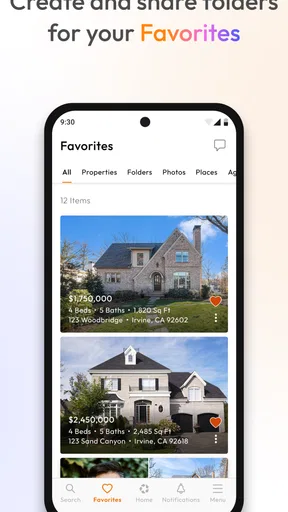
- Save favorite homes to revisit them later.
- Contact listing agents directly through the app.
- Use map search to explore homes in specific areas.
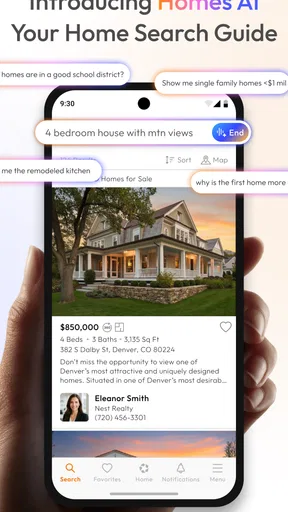
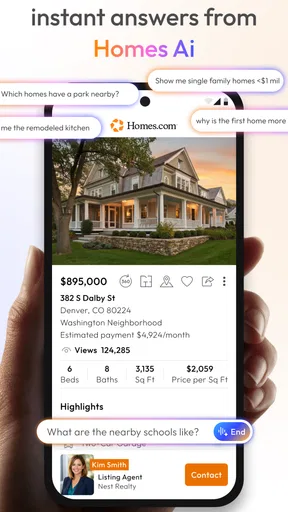
- View property photos and listing details in one place.
- Search homes for sale as well as rental properties.
What could be better
- Listing details may vary in accuracy or completeness.
- Some properties may no longer be available when you inquire.
- The number of listings can vary by location.
- Agent responses may take time and are outside the app's control.
- Frequent alerts may require adjusting notification settings.




