
 Analysis byWeUseApps
I judge a PDF reader less by grand promises than by a simple test: can I open a document, make sense of it, and get back to what I was doing without a fight? PDF Reader: Documents Master is Praya’s free tools app for that everyday job. Its purpose is clear, and that focus is useful if you mainly want a place to read PDFs on your phone rather than a full document-editing suite. My view is cautiously positive: it looks like a straightforward option, but the modest feature picture means it is best approached as a reader, not as a solution for every document task.
Where the app stands today
The current release is version 1.0.1, and the product is still at an early point in its life. That matters because there is a difference between choosing a mature document platform with a long-established workflow and trying a relatively new reader whose core appeal is simplicity. I would consider it for opening and reviewing PDFs, while keeping a second tool available for work that needs annotation, conversion, signing, or detailed file management.
Praya’s app has an average rating of 3.9 from 674 ratings, with 127 written reviews. It has passed 500K installs, which suggests that plenty of people have given it a try, though popularity alone cannot tell you whether its reading experience suits your particular documents. I would treat those figures as a reason to investigate rather than as proof that it will outperform the reader already on your phone.
It is free and rated for Everyone, so the barrier to trying it is low. The minimum operating-system requirement is 10. That makes compatibility worth checking before you plan to move a daily document routine to it, especially if you use an older device. For people on supported devices who just need a PDF opened quickly, the basic proposition is easy to understand.
The key distinction is reader versus document workspace. A dedicated reader can be a sensible choice when you receive a form, a manual, a bill, or a set of notes and want to inspect it on a small screen. It is not automatically the right place to revise the file, prepare a polished submission, or manage a large archive. I would decide based on what happens after reading, not only on how often I open PDFs.
A practical way to use it
Imagine that a colleague sends a PDF schedule while you are away from your desk. You need to check a time, confirm a room, and reply with the right detail. A lightweight reader is useful in that moment because the task is about finding and understanding information, not editing the original. I would open the file, verify the relevant section, and then return to the message. That is the kind of narrow, frequent job where a phone-first PDF app can earn its place.
A second good use is keeping a reference document available during an appointment or a trip: a printed-style itinerary, instructions, or a product manual. The important habit is to open the file before you are in a hurry and confirm that it is readable on your device. Small screens can make dense tables and wide pages awkward regardless of which reader you choose. If the document is complicated, I would check it on a larger screen first and use the phone for quick lookups.
How it compares with familiar alternatives
Many phones already include a basic way to view PDFs, and cloud-storage apps often open documents from their own file lists. Those built-in options are hard to beat when you only open a file once in a while: there is little reason to install another app unless it makes your routine easier. PDF Reader: Documents Master is most worth considering if you want a dedicated reader rather than bouncing between a file manager, a browser preview, and a cloud app.
At the other end are larger office and document suites. They can be a better fit when you regularly mark up pages, fill forms, add signatures, convert files, or collaborate. The trade-off is that a broader suite can feel heavier than necessary for someone who simply wants to read. I would not choose this app over a known editing tool for a submission that must be signed or annotated; I would use the specialized tool that already supports that workflow.
For a student, the dividing line may be the kind of course material involved. A short handout or reading packet is a natural phone task, while long textbooks with diagrams, columns, or frequent page comparisons are usually more comfortable on a tablet or computer. For someone who checks invoices or instructions occasionally, a reader can be enough. For a person processing documents all day, a dedicated desktop workflow is likely more productive.
What the early version means for existing users
Version 1.0.1 gives a clear snapshot of the app’s current release, but it does not by itself establish a pattern of major changes. If you already use it, I would judge updates by whether they improve your own routine: does a document open reliably, is text comfortable to inspect, and can you return to the right file without needless steps? Those practical checks matter more than assuming that a newer version automatically means a deeper feature set.
For someone considering a switch, the early release is a reason to test before depending on it. Start with ordinary PDFs you can reopen elsewhere, not the only copy of an important form. Check a short text document, a longer file, and one with a layout that matters to you, such as a table or a page with small print. This small trial can expose whether the reader handles your real material comfortably without risking a work deadline.
Existing users should also keep expectations grounded. A version number is evidence of the software’s current state, not a promise about future additions. I would avoid reorganizing an entire document archive around any new reader until it has proven dependable over repeated use. For casual reading, that threshold is modest; for work records or time-sensitive paperwork, reliability and a clear backup route matter much more.
Useful habits that make phone reading easier
One non-obvious tip is to treat the first open as a layout check, not just a quick glance. Look for clipped text, tiny labels, or tables that require constant zooming. If a document is awkward on the phone, that is not a problem the reader can necessarily solve; it may simply be designed for a larger page. Recognizing that early saves you from relying on an unreadable screen during a meeting.
Another useful habit is to separate reading from editing. When you receive a form, first use the reader to understand what information it asks for. Then move to an editor or official form tool if the file needs to be completed or signed. Keeping those stages distinct reduces the chance of mistaking a viewing app for a document-preparation tool and helps you choose the right application for the actual task.
I would also keep a known fallback for important files. If a PDF is central to travel, a class, or a deadline, make sure you can reopen it through another trusted route before leaving home or closing a work session. That is not a criticism unique to this app; it is sensible phone-document practice. A reader earns confidence through repeated, uneventful use, and a backup avoids turning a minor compatibility surprise into a real inconvenience.
Where friction may appear
The main limitation is the narrowness of the proposition. A PDF reader can cover the first step—viewing a file—without covering the next ones. If your routine includes filling fields, adding comments, rearranging pages, or exporting another format, you may need to leave the app and continue elsewhere. Switching tools is manageable for occasional tasks, but it becomes irritating when it happens several times a day.
There is also a difference between a simple interface and a complete workflow. A reader can feel easy precisely because it does less, yet people sometimes expect a document app to handle storage, organization, and editing together. I would not assume that installing a dedicated viewer replaces your file manager or cloud storage. Keep your documents organized where you already manage them, and use this app only if its reading role proves convenient.
Readers who depend on accessibility options, detailed search, bookmarks, or annotation should test those needs directly before making it their main tool. I am not suggesting those capabilities are present or absent; the practical point is that they can be decisive for a particular person. If you routinely navigate long PDFs by headings or mark passages for later, choose a reader that demonstrably supports the exact method you depend on.
Who should try it, and who should pass
I would suggest giving PDF Reader: Documents Master a try if you want a free, focused option for opening everyday PDFs and are comfortable testing it with non-critical files first. It makes the most sense for occasional readers, people who check documents while away from a computer, and anyone who wants a dedicated app rather than relying on a browser preview. The app’s tools category fits that practical, utility-first role.
I would skip it as a primary work platform if your day revolves around revising PDFs, handling signatures, comparing versions, or maintaining a carefully searchable archive. In those cases, a broader office suite, a specialist editor, or a desktop program is a better match. I would also stay with a built-in reader if it already opens your files quickly and you have no unmet need; adding another app just for the sake of having one does not improve the workflow.
What I would watch next
Because the app is early in its release history, the most useful future evidence will be practical rather than flashy: whether updates make everyday reading more dependable, whether the app remains comfortable with varied PDF layouts, and whether any added capabilities preserve its straightforward feel. Those are expectations, not claims about what Praya has planned. For now, I would judge the current release on the documents I actually need to read.
My recommendation is to treat it as a low-commitment trial, not an automatic replacement for every document tool on your device. Open a few representative PDFs, check that the reading experience works for your eyes and your files, and keep another route for tasks beyond viewing. PDF Reader: Documents Master is worth considering when you want a simple PDF-reading option; it is less compelling when you need a complete document workshop. That honest boundary is what makes the choice easier.
What we like
- Opens PDFs without requiring a dedicated desktop program.
- Useful for reading documents while away from a computer.
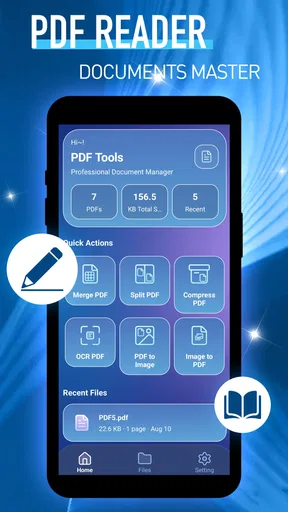
- A focused interface keeps common PDF tasks easy to find.
- Can help organize document access on a mobile device.
- Handy for checking files before sharing them.
What could be better
- Large PDFs may take longer to load on older devices.
- Small phone screens can make dense pages hard to read.
- Some features may require payment or an upgrade.
- PDF editing options may be limited compared with desktop tools.
- Document handling may depend on available device storage.




