


 Analysis byWeUseApps
When I want to know what is happening around my neighborhood, a national news feed is often too broad to be useful. NewsBreak is built to bring local reporting and alerts closer to the center of the experience. That focus can make it handy for keeping an eye on nearby developments, but it also means I pay attention to what I choose to follow, what notifications I allow, and how much confidence I place in any single report.
Local coverage is useful, but trust takes judgment
NewsBreak is a free news and magazines app from Particle Media Inc. It has been available since June 17, 2016, and its current version is 26.43.1. Its broad reach—over 50 million installs, with a 4.6 average from around 641,000 ratings—suggests it has become a familiar way for many people to check local headlines. Those numbers tell me it is widely used, not that every story will suit my interests or that every headline deserves equal weight.
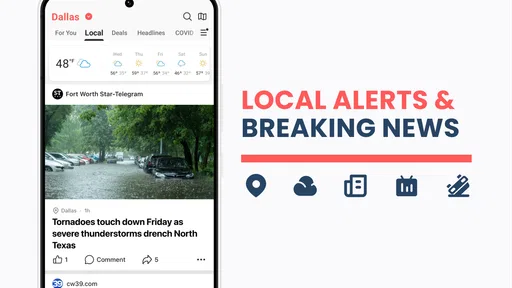
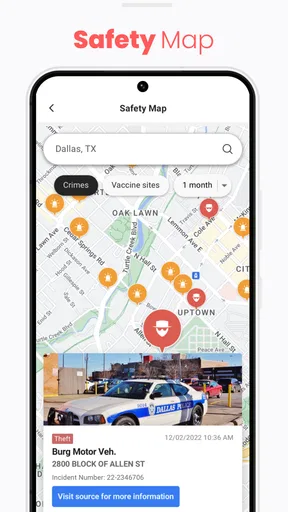
The app’s strongest idea is practical: local news can matter more to your day than another national debate. A road closure, a school update, a weather-related notice, or a city decision may change what you do this afternoon. I find that neighborhood angle more immediately useful than a general feed when I am trying to understand what is happening close by.
Still, a location-focused feed is only as useful as its relevance and presentation. Local reporting can vary in depth, and a headline alone rarely gives enough context to judge a complicated event. I treat the app as a starting point: it can point me toward a story, while careful reading and checking the original reporting remain important when the issue affects a real decision.
Make the feed serve a real routine
A realistic use is checking the app before leaving home. If a nearby incident or local announcement appears, I can decide whether to read more before changing my route or plans. The useful habit is to distinguish an alert from a complete account: I open the story, look for its source and details, and avoid passing along a dramatic headline without understanding what happened.
For someone who has recently moved, local coverage can also help build a basic picture of a place: what issues residents are discussing, which public decisions are in the news, and what kinds of events are affecting the area. That is different from relying on a citywide social-media group, where useful firsthand tips and unverified claims can sit side by side. NewsBreak offers a news-oriented way into those topics, though readers should still assess the reporting rather than assume that a polished feed settles every question.
I would not make it my only source for emergencies, public-health guidance, or other high-stakes information. In those moments, an official local alert or a directly responsible organization is the better authority. NewsBreak can help me notice that something is happening; it should not replace the source that can confirm what people need to do.
Notifications are a choice, not a requirement
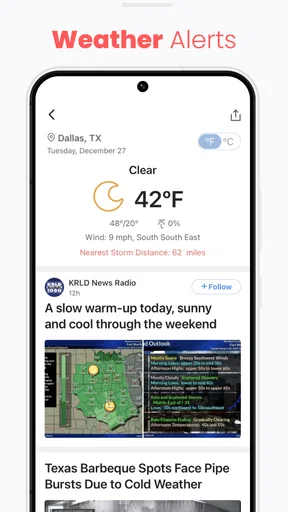
Alerts are potentially the app’s most useful feature and its easiest route to distraction. A notification can bring a relevant local development to my attention without requiring me to open the feed, but too many interruptions make every alert easier to ignore. My practical advice is to start with a restrained notification setup, then allow more only if the alerts are consistently useful to your routine.
This is also a trust decision. A person may be comfortable reading local stories while preferring not to receive repeated prompts throughout the day. Those are separate preferences: installing a news app does not mean every notification is worth enabling. If you are setting it up for a family member, it is worth checking that the alert settings match that person’s habits rather than assuming more updates are always better.
Location is another sensitive part of a neighborhood-news experience. I would think carefully about whether the convenience of location-relevant coverage is worth the location access an app requests, and review the choices presented by the phone and the app before granting anything. I do not assume that a local feed requires every possible permission. A sensible approach is to allow only what is needed for the experience you actually want and revisit that choice if the app remains useful without broader access.
Read with context, especially when headlines feel urgent
Local stories can affect people directly, so a striking headline may prompt a quick reaction. I try not to treat urgency in the wording as proof of urgency in my own situation. I read the article, note whether it concerns my immediate area, and look for clear attribution and context before deciding what to do. That small pause is a valuable workflow for any fast-moving news feed.
Another useful habit is separating discovery from verification. NewsBreak may help surface a topic that I would otherwise miss; for a consequential claim, I then look for confirmation from an authoritative source or additional reporting. This is not a reason to avoid the app. It is a way to use its local reach without asking one feed to do the work of a newsroom, an emergency service, and a public authority all at once.
Its Teen content rating is a reminder that the app is intended for a broad audience, but that label does not make every story suitable for every reader. News can include upsetting or difficult subjects. If a younger person uses it, I would talk about how to handle alarming headlines and encourage them to bring serious concerns to a trusted adult rather than rely on a notification for guidance.
How it fits beside other news options
Compared with a national newspaper app, NewsBreak’s appeal is proximity: it is more suited to finding coverage tied to a neighborhood or local area than to following one publication’s national reporting in depth. Compared with social feeds, it puts news stories at the center rather than mixing them with friends’ posts and casual discussion. Neither comparison makes it a universal replacement. I would keep a trusted publication for deeper national coverage and use official channels for instructions that require immediate accuracy.
That division of labor helps avoid a common mistake: expecting one app to cover every kind of information equally well. NewsBreak is most compelling when I want a quick view of what is being reported locally. It is less compelling if I mainly want long-form analysis from a particular newsroom, a carefully limited stream of only a few topics, or direct emergency instructions. Choosing the right source for the question matters more than choosing the app with the busiest feed.
Costs, controls, and everyday trade-offs
The app is free to download, with in-app purchases ranging from ten cents to about sixty dollars per item. I would check any purchase prompt carefully and consider whether an optional item adds something I genuinely want before paying. The free entry point makes it easy to try the local-news experience, but it does not mean every optional purchase is necessary for every reader.
For user control, I focus on the choices I can actively manage: whether to allow notifications, whether to grant location access, and whether to continue using the app if the feed or interruptions do not feel worthwhile. I also look for account and privacy controls within the app and the phone’s settings rather than assuming that a default choice fits me. I prefer to make those decisions deliberately, especially when an app is part of my daily routine.
One practical test is to use the feed for a week with conservative settings. Notice whether the local stories are actually relevant, whether alerts help with decisions, and whether you find yourself opening the app out of habit rather than need. If the signal is good, keep the setup that works. If it feels noisy, reduce alerts or step back; a news app should help you stay informed, not dictate the rhythm of your day.
Who will get the most from it
I’d recommend trying NewsBreak if you care about neighborhood developments, have recently moved, or want a convenient way to discover stories tied to the place where you live. It may also suit someone who prefers a local-first starting point and is comfortable doing a little extra checking when a story could affect an important choice. The app’s 4.6 average and roughly 150,000 written reviews show that many people have taken time to rate or discuss it, but personal relevance is still the better test.
I would skip it, or keep it as a secondary source, if you dislike notification-driven news, want reporting from one specific outlet, or need definitive instructions during an emergency. It is also not ideal for someone who would rather avoid location-related choices altogether. In those cases, a publication you already trust or the relevant local authority may be a better fit.
My verdict is cautiously positive. NewsBreak makes local headlines easier to encounter, and that can be genuinely useful when nearby events shape ordinary plans. I like it best as a discovery tool rather than a final authority: keep permissions and alerts intentional, read beyond the headline, and confirm high-stakes information elsewhere. If that sounds like a reasonable way to use a local-news app, it is worth trying; if you want a tightly controlled source of verified instructions or in-depth reporting from one newsroom, choose a more specialized option.
What we like
- Personalized local feeds make nearby headlines easy to find.
- Breaking news alerts can keep you informed about urgent events.
- The app covers local topics that national outlets may overlook.
- You can follow multiple locations to track news in different areas.
- A mix of articles and video offers different ways to catch up.
What could be better
- Ad placement can interrupt the reading experience.
- Some local areas may have limited story coverage.
- Push alerts can feel frequent unless you adjust their settings.
- Coverage quality may vary between publishers and locations.
- The app may collect location data to personalize nearby news.




