





 Analysis byWeUseApps
I like music games that give me something to do with a spare minute without demanding a long tutorial, and Tiles Hop fits that mood well. You guide a bouncing ball across a path of floating tiles, trying to land in time with the music. The idea is easy to grasp, but staying on the beat while the route shifts takes more attention than the simple controls suggest. It works best as a quick rhythm challenge rather than a substitute for a full music game.
Getting into the rhythm
In Tiles Hop Music & Ball Game, the basic task is to move the ball from tile to tile and keep its jumps aligned with the track. I found it helpful to watch the next landing point rather than stare at the ball itself. That small change makes the game feel less like frantic tapping and more like reading a moving path.
The control approach is approachable: you guide the ball across the screen, and the challenge comes from timing and direction together. A jump that lands slightly off can break a run, so rhythm matters, but so does anticipating where the next tile sits. This blend is why the game can feel welcoming at first and still demand practice once the sequence gets less forgiving.
My most reliable routine is to begin a run by settling into the song’s pulse, then make small, deliberate movements instead of sweeping across the screen. When I react only to the tile directly under the ball, I tend to move too late. Looking one landing ahead gives me more time to correct, especially when the path changes direction.
That makes the game a good fit for short breaks: I can start a round, focus on the beat for a while, and stop without needing to keep track of a complicated story or a long session. It is also a useful choice for someone who likes testing coordination in small bursts. If you want detailed music creation tools or a traditional instrument-learning course, though, this is not trying to be either.
How I build a repeatable run
When a section goes wrong, I try not to treat every miss as a reflex problem. Sometimes I was watching the wrong part of the screen; sometimes I was moving too broadly and overshooting the next tile. Repeating the same track with one adjustment at a time—such as focusing farther ahead or easing up on the movement—makes it easier to understand what actually helps.
This is a more useful habit than simply restarting in frustration. A rhythm game can make a miss feel instantaneous, but the cause often begins a beat earlier, when I stop anticipating the path. I recommend paying attention to that lead-in. It turns a string of attempts into practice rather than a test of patience.
Settings and small choices that matter
Before settling into longer play, I check the available settings and choose an arrangement that makes the music and visual path comfortable to follow. The key point is not to assume there is a magic setup: what feels clear depends on your device, your hearing environment, and how you prefer to track movement. If the beat is hard to pick out, a quieter place or headphones may help, but I would still keep the screen visible enough to anticipate the next landing.
I also treat the sound and the visuals as complementary cues. Listening for the pulse can help me keep a steady pace, while watching the tiles tells me where to move. Relying on only one can be a disadvantage: focusing entirely on the melody may leave me late to a turn, while staring only at the path can make my timing uneven.
For a quick session in a shared space, I would check audio levels before starting so the game does not become an awkward interruption. For a commute or other noisy setting, I would avoid assuming that the soundtrack will remain easy to hear. The game is still playable as a visual coordination challenge, but the music is central to its identity, so a quiet moment is a better fit when you want to feel the rhythm.
Faster patterns without rushing
Experienced play is less about moving faster at every opportunity and more about reducing unnecessary corrections. I try to make each movement purposeful and keep my attention on the next safe landing. A broad swipe can feel decisive, but it may carry the ball farther than I intended; smaller adjustments give me more control when the route shifts.
Another useful pattern is to separate timing from direction in my attention. I first feel the song’s pulse, then use the path to decide where the ball needs to go. Trying to solve both questions in a panic after each jump makes the run feel chaotic. This habit is especially useful when a sequence asks for consecutive changes of direction: I can preserve the beat while preparing the next move.
I also avoid changing several things at once after a failed attempt. If I alter my timing, movement size, and where I look all together, I cannot tell which change helped. Keeping one adjustment consistent across a few retries gives me a clearer sense of the pattern. That is not a shortcut that guarantees a clean run, but it makes practice less random.
For an everyday example, I might open the game while waiting for a friend or during a short break between tasks. I choose one song, give it a focused attempt, and then decide whether I have enough time and patience for another. That boundary matters: the retry loop can make a quick session stretch longer than planned, particularly when I feel close to improving a run.
Where the challenge can become friction
The same minimal design that makes the game easy to start can also limit its appeal. If you want a broad set of musical controls, deep composition options, or a gradual course in reading rhythm, the central activity may feel narrow after repeated sessions. Its pleasure comes from repeating a clear task and improving coordination, not from continually learning an entirely different kind of play.
Touch control can also be unforgiving when my finger obscures the path or when I make a rushed movement. A large screen may make the route easier to see, but it does not remove the need for careful timing. If you are playing while distracted, the game is less satisfying: missing a beat because you were glancing away is different from making a useful attempt to master a difficult sequence.
There is another practical trade-off around spending. The game is free to install, while optional in-app purchases range from $0.99 to $49.99 per item. I would start by playing without buying anything and decide later whether any paid option suits how I use it. The range is broad enough that it is worth paying attention at purchase screens, particularly if you are handing the device to a child.
It is rated Everyone 10+, so I would still use ordinary judgment about a younger player and the device’s purchase controls. The game is published by AMANOTES PTE. LTD.; that context may be useful if you are comparing music games from the same developer, but the best test is whether this particular rhythm-and-path loop is enjoyable for the person playing.
Who should choose it—and who should pass
I would recommend Tiles Hop Music & Ball Game to someone who enjoys short, repeatable challenges and likes matching movement to music. It is especially suited to players who are happy to improve through focused retries rather than unlock a complex set of abilities. Its Music category is reflected in the central experience: the soundtrack is not just decoration around an unrelated puzzle, but part of how I judge my timing.
People choosing among rhythm games should think about what they want from the genre. Compared with a conventional note-lane game, this one asks me to steer a bouncing ball along a route instead of concentrating mainly on hitting notes in fixed lanes. That makes spatial anticipation a bigger part of the challenge. A player who prefers instrument practice, precise note charts, or a larger strategic system may be happier with another style of music game.
The game has an average rating of 4.3 from around 3.4 million ratings, with roughly 80,000 written reviews, and it has passed 500 million installs. Those figures suggest that its quick-to-understand loop reaches a wide audience, but they do not guarantee that its particular control style will suit you. The more useful question is whether you enjoy trying the same rhythmic route again with better timing.
What to expect over time
The release date was January 16, 2018, and the current version is 8.18.1. It requires Android 7.0 or later. Those details are worth checking against your device before installing, especially if you are using older hardware. The game is free to begin with, but the optional purchase range is a reason to review any spending choices rather than assume every part of the experience is included.
Over time, I think the best way to keep the game enjoyable is to set a small goal for each session: hold a steadier rhythm, look farther along the route, or make fewer panicked corrections. That gives each retry a purpose. If I keep chasing a perfect run without changing how I play, the same frustrating miss can repeat and make the game feel more demanding than fun.
My verdict is that Tiles Hop is a strong pick for a casual player who wants a music-led coordination challenge that is easy to start and satisfying to practice. Its greatest strength is the direct connection between the beat, the ball, and the next landing; its main limitation is that this focused loop will not satisfy everyone looking for musical depth or variety. I would try it for short, attentive sessions, use deliberate movements, and skip it if your ideal music game is closer to a lesson, a rhythm chart, or a creative studio.
What we like
- Simple one-touch controls are easy to learn.
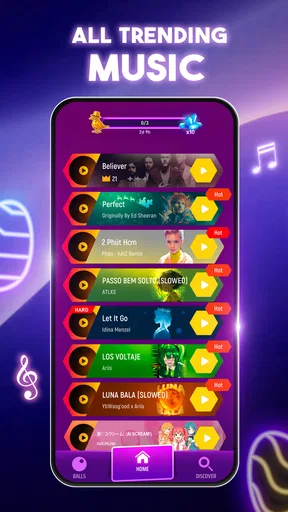
- Songs span several popular music styles.
- Short levels suit quick play sessions.
- Vibrant visuals make each track feel lively.
- New songs and balls add variety over time.
What could be better
- Precise timing can be difficult on faster tracks.
- Some songs and features may require payment.
- Frequent ads can interrupt play.
- Progress may feel repetitive after many levels.
- A stable internet connection may be needed for some content.




