

 Analysis byWeUseApps
I tend to judge a music game by whether its visual mood and tapping rhythm work together, rather than by how busy its screen looks. Magic Dancing Tiles makes a straightforward promise: follow piano-style tiles in time with electronic dance music. In play, that idea gives the game an immediate, upbeat feel. It is easy to understand at a glance, but keeping a clean rhythm takes more attention than the simple premise suggests.
A bright, direct first impression
This is a free music game from PHY STUDIO, built around short bursts of focused tapping. The basic appeal is practical: I can open it when I have a spare moment, pick up the rhythm, and get into a song without first learning a complicated control scheme. That makes it a natural fit for casual sessions, especially if you like rhythm challenges but do not want a full instrument simulator.
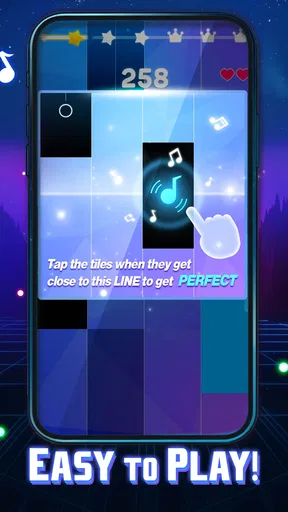
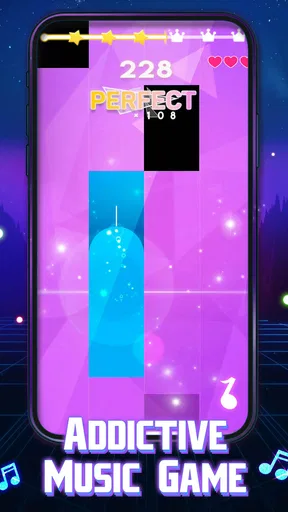
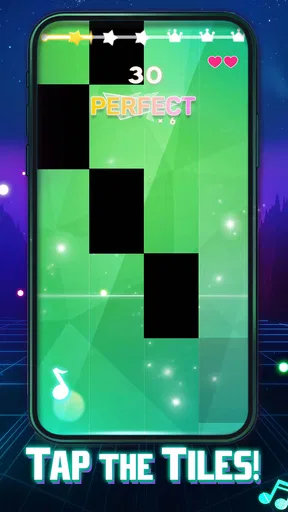
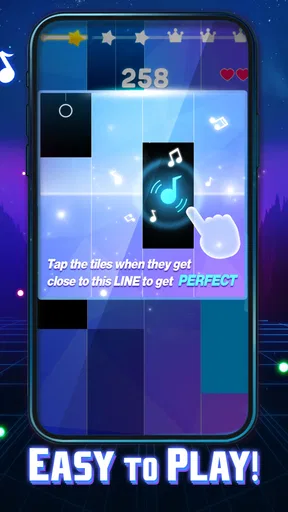
The visual idea is closely tied to the play. Piano-like tiles give each tap a clear target, while the EDM framing points the experience toward energetic, electronic music rather than a quiet piano lesson. The result feels more like following a beat through a sequence of notes than performing music yourself. That distinction matters: players looking for expressive instrument controls may find the interaction limited, while anyone who enjoys timing and quick reactions can get to the point quickly.
The game has a 4.8 average from around 50,000 ratings, and it has passed 50 million installs. Those figures suggest that its uncomplicated rhythm-game appeal has found a broad audience, though popularity alone cannot tell you whether its style suits your taste. Its age rating is Mature 17+, so it is worth checking that label before handing the device to a younger player.
Tiles, motion, and the mood they create
The tiles do useful work as visual signposts: they turn the music into a stream of decisions, asking me to notice the next target and respond in time. This is a more immediate visual language than a traditional notation display. I do not need to read music to understand what the game is asking, which makes the first few moments approachable even for someone who has never played a rhythm game.
That clarity also creates a trade-off. A stream of targets can make attention feel narrow: eyes on the next tile, fingers ready, beat in mind. The mood is lively, but the action is not necessarily a relaxed way to listen to a track. If I want music to sit in the background while I do something else, this is the wrong format. If I want a small task that gives a song a little tension and momentum, the visual framing makes sense.
One useful way to approach a new track is to watch the tile pattern for a moment before trying to chase every note at full speed. That brief adjustment helps me separate the beat from the visual rush. It is a small habit, but it makes the game feel less like frantic tapping and more like a rhythm challenge I can read and respond to.
Electronic sound with a clear job
The EDM focus gives the experience its energy. In a game where timing is the main activity, a strong, regular pulse helps me anticipate when to tap; the music is not just decoration but part of the information I use. The piano-tile presentation adds a familiar musical cue, while the electronic framing keeps the mood bright and driving.
There is a difference between enjoying a song and enjoying it as a playable pattern. When I am concentrating on hits, I listen for timing and momentum more than for subtle details. That is a strength for quick play, because the beat can keep the session moving, but it may disappoint someone hoping for a calm soundtrack or a broad range of musical moods. The game’s identity is strongest when I am in the mood for upbeat rhythm rather than variety for its own sake.
For a better session, I would treat the first attempt as a way to learn a track’s pulse instead of expecting a perfect run immediately. Once the beat feels familiar, my attention can shift from guessing the next moment to making more deliberate taps. This is especially helpful when playing in a noisy room: I can focus on the visual sequence, but the rhythm is still easier to follow when I can hear the music clearly.
Simple controls, demanding attention
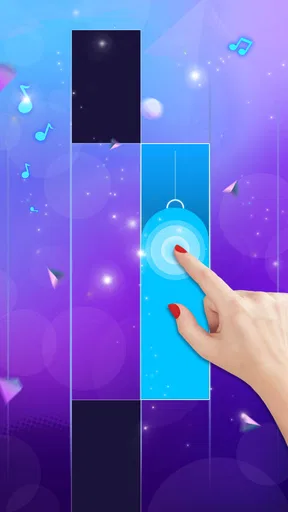
The central interaction is easy to explain: tap the tiles in time. That simplicity is the game’s biggest advantage for a casual player and also its main limitation. There is little barrier between opening the game and trying a song, but the basic action does not offer the expressive range of a music-making app or the broader tactical choices of a more complex rhythm game. The challenge comes from timing and staying attentive, not from mastering a large control vocabulary.
That makes it a good choice for short breaks, waiting for a ride, or taking a quick mental reset between tasks. I would avoid starting a focused session when I am already distracted or need to keep one ear on a conversation: rhythm play rewards concentration, and divided attention can turn a satisfying run into a string of missed cues. For a longer sit-down session, it depends on how much I enjoy repeating a timing-focused challenge.
A practical tip is to keep the phone steady and tap with a consistent finger rather than changing hands mid-song. That reduces accidental movement and helps my timing feel more repeatable. It will not make a difficult passage disappear, but it removes one avoidable source of inconsistency. Players who prefer to use a game casually can also think of each attempt as practice rather than a test; that mindset makes the rhythm easier to learn.
Compared with a conventional piano-learning app, this is much more about reaction and entertainment than teaching technique. Compared with rhythm games built around complex patterns or a wide range of play styles, its appeal is more direct: a clear tile sequence and music-led tapping. I would choose it when I want something quick and accessible, and choose a music lesson tool when I want structured practice, or a more involved rhythm title when I want greater mechanical depth.
Who will enjoy it, and where it can grate
I would recommend it to someone who likes electronic music, visual timing cues, and games that can be understood in a few seconds. It is also a reasonable pick for people curious about rhythm games who do not want to begin with complicated controls. The 50 million-plus install total shows how widely it has been picked up, but the more relevant question is whether repeated tapping to an energetic beat sounds fun to you.
I would skip it if you want a realistic piano experience, detailed music instruction, or a game that rewards exploration beyond its core rhythm action. I would also be cautious if you dislike rapid visual prompts or find repeated attempts tiring. A simple premise is not the same as effortless play: staying in time still asks for focus, and the same basic interaction may feel repetitive to someone who wants frequent changes in how they play.
There are in-app purchases, with items priced from $3.99 to $29.99, so the free entry point is not the whole spending picture. I would decide whether I enjoy the core tapping before considering any purchase, and check the item details in the app store rather than assuming that paying is necessary to have a worthwhile first impression. The current version is 0.5.69, and the game was released on October 30, 2023; it requires Android 7.1 or later.
My verdict on its playable atmosphere
What works best here is the coherence between the tile-based presentation, the piano cue, and the energetic musical direction. The screen gives me something clear to follow, and the beat gives each tap a reason to happen when it does. That combination makes Magic Dancing Tiles easy to approach without pretending to be a full piano game.
Its limits are just as clear: the experience is built around one central kind of interaction, and the rhythm demands attention rather than letting the music fade into the background. I would keep it in mind for brief, focused sessions when I want to engage with a beat, not when I am looking for lessons, broad musical variety, or deep mechanical progression. If that compact, music-led challenge sounds appealing, it is an easy game to try; if you want to create music rather than react to it, another kind of app will suit you better.
What we like
- Simple one-touch controls are easy to pick up.
- A wide song selection keeps music gameplay varied.
- Short rounds suit quick play sessions.
- Timing challenges reward focus and coordination.
- New songs offer goals for returning players.
What could be better
- Fast note patterns can be difficult for beginners.
- Some tracks may require an internet connection.
- Ads can interrupt the flow between rounds.
- Touch input may feel imprecise on smaller screens.
- Unlocking songs may take time or require purchases.




