
 Analysis byWeUseApps
I find the McDonald’s app most useful when I’m already considering a stop and want to check the menu, place an order, or see what offers are available before I get there. It’s a free Food & Drink app from McDonalds USA, LLC, and its value is practical rather than mysterious: it puts McDonald’s ordering and rewards in one place. The main reason to install it is convenience, not a promise that every visit will cost less.
What free access is worth in practice
You can download and use the app without paying for the app itself. That makes trying it a low-commitment choice, especially if McDonald’s is already part of your routine. The food you order is a separate purchase, of course; I wouldn’t treat “free app” as meaning that every order, deal, or reward has no cost attached.
The app has a 4.0 average from around 2.2 million ratings, with roughly 415,000 written reviews, and it has passed 50 million installs. Those figures suggest it is a well-established option, but they don’t tell me whether a particular offer will suit my order or whether the app will feel worthwhile to you. I’d judge it by how often you visit and whether ordering ahead or checking rewards fits the way you like to eat.
For a once-in-a-while customer, the benefit may simply be having the menu and ordering tools handy. If you rarely go to McDonald’s, installing an app just to browse may not change much. For someone who stops in regularly, even a small convenience—choosing an order before reaching the counter—can make the download more useful over time.
Where the app earns its place
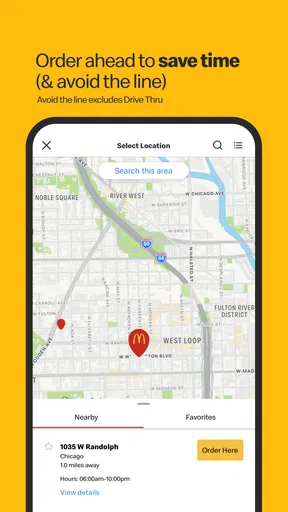
The best case for using it is having the decision-making and ordering step ready before you arrive. I like this sort of workflow when I know what I want but don’t want to work it out while standing in a queue. You can review choices at your own pace, make changes before committing, and approach the restaurant with a clearer plan than if you were deciding at the counter.
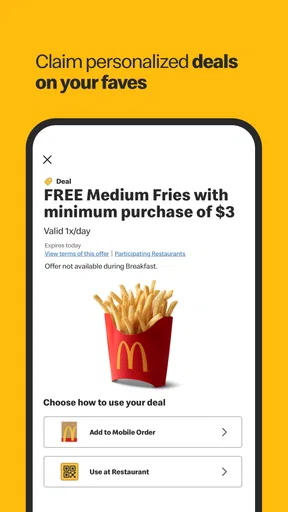
Deals and rewards are another reason to check in, but I’d make them a bonus rather than the whole point. A deal only represents value if it matches something you actually want. It’s easy to be drawn toward an offer and then spend more than intended on items you wouldn’t otherwise have chosen. My practical tip is to decide what you came for first, then see whether an available offer genuinely improves that order.
That small change in order of operations helps keep the app useful rather than persuasive. I would browse offers when planning a meal, not use the presence of a deal as a reason to make an extra trip. The distinction matters: the app can help you find an option, but your own appetite and budget are better guides to whether it’s a good purchase.
For a realistic everyday example, imagine I’m leaving work and want to grab dinner on the way home. I can use the trip to check what I want and prepare an order before reaching the restaurant, rather than making the whole decision at the counter. If I see a reward or deal that suits the meal I already had in mind, I can take it into account. If it would push me toward extra food, I can ignore it and keep the order simple.
Ordering ahead and the small decisions that matter
Mobile ordering is most helpful when it reduces friction, but it works best if you treat the final review as important. Before placing an order, I’d check the selected items and any choices attached to them, then make sure I’m using the right restaurant for the stop I’m actually making. That habit is particularly useful when plans change: an order prepared for one location or moment may not match where you end up.
I also wouldn’t assume that placing an order in an app means I can skip every step on arrival. The restaurant’s own process still matters, so I’d follow the instructions shown for that order and confirm what to do when I get there. This is a sensible expectation for any restaurant ordering app: the phone can organize the request, but the location is where the meal is fulfilled.
Another useful habit is to use the app before you’re rushed. Browsing while walking into a busy restaurant or while juggling other tasks makes mistakes more likely. Taking a moment to review the meal beforehand is a better use of the screen, and it makes customization or offer decisions easier to think through. If you’re ordering for more than one person, checking the whole basket before submitting is especially worthwhile.
There is a tradeoff to ordering digitally. The counter gives you a direct chance to ask a question or explain what you need; an app can make choices quicker, but you have to read the options carefully and resolve uncertainties yourself. If your order is unusual or you need help deciding between menu choices, talking to staff may be more comfortable than navigating a screen.
Rewards and deals without overspending
I’d approach rewards as a way to get more from visits I was already planning, rather than as a reason to visit more often. Check what is available, compare it with your usual order, and skip anything that doesn’t fit. This is a more reliable way to judge value than counting every promotion as savings: an offer has no real value to me if it leads to spending on something I don’t want.
It can also help to separate two questions: “Is this order convenient?” and “Is this offer worthwhile?” The app may be useful for the first even when there is no deal that fits. Conversely, a reward might catch your eye, but if you prefer ordering face to face or don’t want to manage another account or screen, it may not be worth changing your routine for that one benefit.
When you’re planning a group meal, the app can help you think through selections before you order, but I would still confirm every item before submitting. A last-minute change in someone’s preference is easy to miss when several people are contributing. For a simple solo meal, the digital route can feel efficient; for a complicated group order, a direct conversation may be easier to manage.
How it compares with other ways to order
The obvious alternative is ordering in person. That remains a better fit when you want to ask questions, decide after seeing the menu, or avoid using your phone for a meal. The app has the advantage of letting you prepare choices at your own pace and check deals or rewards in the same place. Neither method is automatically better: convenience depends on whether you value advance planning more than a direct interaction.
Compared with general restaurant or food-ordering apps, McDonald’s own app is the focused choice for McDonald’s visits. Its appeal is not that it replaces every way of ordering food; it is that it keeps the chain’s ordering, deals, and rewards together. If you are choosing among several restaurants, a broader service may be more useful for comparing options. If you already know you want McDonald’s, a dedicated app is the more direct tool.
I would also avoid installing it solely because other people mention rewards. Whether those rewards are worthwhile depends on the offers you encounter and your own buying habits. The app’s free download lowers the barrier to trying it, but it doesn’t remove the need to make sensible decisions about what you order.
Who will get the most from it
I’d recommend it to people who visit McDonald’s often enough to benefit from having its ordering and rewards tools close at hand, particularly if they like to plan an order before reaching the restaurant. It is also a reasonable choice for anyone who wants to check current deals as part of deciding what to buy, provided they can ignore offers that don’t suit their needs.
You may get less from it if you visit only occasionally, prefer speaking to staff, or want one app to compare lots of different restaurants. It may also be a poor fit if offers tend to encourage you to buy more than you intended. In that case, ordering in person—or simply choosing your meal without browsing promotions—could be the more comfortable option.
The app is rated Everyone, and it was released on October 24, 2014. Its current version is 26.72.5, and it requires Android 9 or later. Those details make it useful to check compatibility before installing on an older Android device; the age rating is broad, but the more important question for an individual user is whether the ordering flow and offers suit their habits.
My verdict on the value
McDonald’s is worth trying if you already eat there and want an easier way to prepare orders or keep an eye on rewards. Because the app itself is free, I see little reason not to test it if those features match your routine. Just keep the food purchase separate in your mind: the app’s no-cost download doesn’t guarantee that using a deal will make a meal cheaper.
I’d skip it if you rarely visit, dislike ordering on a phone, or would rather choose from a wider range of restaurants. For regular customers who like planning ahead, though, it can make a familiar stop more organized and help surface offers without requiring a separate search. My recommendation is simple: install it for convenience, judge each deal against what you actually wanted, and keep ordering in person when that feels easier.
What we like
- Mobile ordering can reduce time spent waiting in line.
- The app often offers deals that are exclusive to mobile users.
- You can customize many menu items before placing an order.
- Saved payment details make repeat purchases quicker.
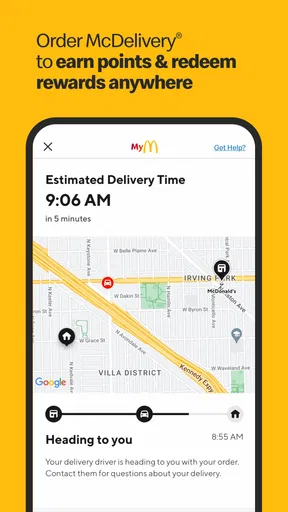
- Order tracking helps you follow a pickup or delivery order.
What could be better
- Available deals vary by location and may have limited redemption rules.
- Some offers require a minimum purchase to use.
- Menu items and prices can differ between nearby restaurants.
- Delivery availability depends on your address and local partners.
- App performance and order accuracy may vary by restaurant.




