

 Analysis byWeUseApps
I find that ordering food by phone works best when it removes uncertainty rather than simply moving a menu onto a screen. The Domino’s app is most useful when I already know what I want, need to coordinate an order with other people, or want a clearer sense of what is happening after checkout. Its connection to Domino’s ordering and progress-tracking system is central to the experience: a steady network makes the process feel straightforward, while a weak connection can make even a simple order feel less certain.
Ordering depends on a reliable connection
Domino’s Pizza USA is a free Food & Drink app from Domino’s Pizza LLC, and its purpose is focused: browse Domino’s options, place an order, and follow its progress. I would not treat it as a general restaurant-discovery tool. It is for people who have chosen Domino’s and want to handle the purchase from a phone rather than call or visit in person.
The app’s usefulness is closely tied to connectivity. Browsing, confirming choices, sending an order, and checking its status all involve communicating with the service. With a dependable connection, the flow can feel convenient and reassuring. If a mobile signal drops while I am choosing or paying, I would pause before tapping again rather than risk submitting the same order twice. That small habit matters more here than in an app where a delayed screen update has no practical consequence.
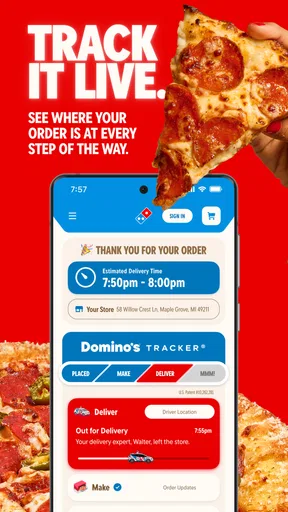
After ordering, the Domino’s Tracker® is the feature that gives the app its clearest identity. Rather than leaving me to wonder whether the order went through, it provides a place to follow progress. I see this as a useful check-in, not a promise that every step will update instantly. A tracker depends on information arriving from the service, so a quiet screen during poor connectivity is not necessarily evidence that the order has stopped moving.
For planning, I would complete the order while I have a stable connection, then check progress when I can get online again. If I am standing somewhere with unreliable reception, such as a busy venue or a building with poor signal, I would avoid making last-minute changes until the app has clearly responded. The key trade-off is simple: the phone can make the process easier, but it also makes network quality part of the ordering experience.
When the app is more useful than a call
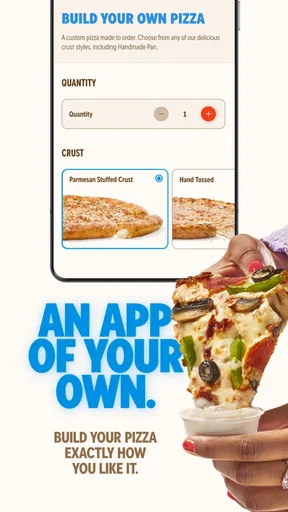
I would reach for the app when I want to review my choices at my own pace. A phone call can be quicker for a straightforward request, but it asks me to listen, respond, and keep track of details in real time. In the app, I can check the selections on screen before submitting. That is particularly helpful when ordering for a household with different preferences, because I can take a moment to confirm what I have added instead of trying to remember a spoken list.
There is also a practical advantage after checkout: the tracker gives me a convenient reference point without needing to call simply to ask whether the order is progressing. I would still use direct contact if I needed help with a problem that the app does not resolve. The tracker is best for routine status checks; it should not be mistaken for a personal support conversation.
Useful in ordinary mobile situations
A realistic use case is getting home after a long day and ordering dinner while coordinating with someone else in the household. I can make the selections, review them, submit the order, and then check its progress while putting away groceries or setting the table. That is more useful than repeatedly asking whether anyone has ordered yet, especially when the timing matters to the people sharing the meal.
Another good fit is ordering during a short break, provided I have enough time and a reliable connection. I would not start an order while walking through a crowded area and assume I can finish without interruption. Menus and order details are easier to review when I can focus, and a failed connection at checkout creates avoidable doubt. If I am in a hurry, I would either place the order before leaving or use another method I know I can complete confidently.
The app is also convenient when I want to check progress without keeping the ordering screen open in front of me. I can return to it when I have a moment, rather than repeatedly interrupting whatever I am doing. The value is modest but real: a single place to order and check status can reduce the small bits of coordination that otherwise fall to one person in a group.
What to do when a screen stalls
Connectivity problems are most consequential around submission. If the app appears to freeze after I place an order, I would first give it a moment and check whether the order appears in the app before trying again. Retrying immediately is tempting, but it can create uncertainty about whether the first attempt succeeded. If the connection is unstable, I would switch to a stronger network if one is available, reopen the app, and look for a clear confirmation before taking another action.
This is a sensible recovery routine, not a guarantee that every interruption will resolve neatly. If I cannot tell whether an order was accepted, repeating it blindly is not a good workaround. I would seek confirmation through the available support or contact route rather than assume that a stalled display means nothing happened. That distinction is worth remembering with any connected ordering service: the screen can lag behind the transaction.
For tracking delays, I would also separate a network issue from a delivery or preparation issue. A progress view that does not refresh may reflect a weak phone connection, while the actual order may be continuing. I would reconnect and check once more before drawing conclusions. If the information still does not make sense or the order seems to need attention, contacting Domino’s is more useful than repeatedly refreshing the tracker.
Small habits that make ordering smoother
My most useful tip is to review the full order before submitting, especially when ordering for more than one person. On a small screen, it is easy to focus on the latest choice and overlook something already in the basket. A deliberate final check helps catch mismatched preferences and reduces the chance of needing to correct an order after checkout, when a fast change may be harder to make.
I would also avoid treating progress updates as a precise countdown. The tracker is valuable because it gives visibility into the order, but its main job is to show progress rather than replace judgment about timing. If I have a fixed appointment or a very narrow meal window, I would not rely on a status screen alone to guarantee that everything will arrive at a particular moment.
When several people are involved, it helps to decide who is responsible for placing the order and checking its progress. That is a simple coordination step, but it prevents duplicate attempts and conflicting changes. The app is most effective when one person keeps track of the order rather than everyone independently checking and wondering whether someone else has already submitted it.
Data use and the limits of the phone experience
Because ordering and tracking require the app to communicate with the service, I would expect active use to depend on a connection. I would not begin browsing or checking progress on mobile data if I am trying to conserve it; connecting to Wi-Fi first is an easy precaution. I cannot attach a specific data estimate to the experience, so the practical approach is to use a network that suits your own plan and avoid leaving the app open for repeated status checks when you do not need them.
A phone also brings its own distractions. Notifications, low battery, or switching between apps can interrupt the process at an inconvenient moment. I would make the order when I can give it a few minutes of attention, then return to tracking only when useful. That is less about the app being difficult and more about avoiding preventable mistakes when entering an order on a small screen.
If you want to compare several restaurants, this is not the tool I would choose. A broad food-ordering service is better suited to browsing different cuisines and comparing options across businesses. Likewise, calling may suit someone who prefers a human conversation or has an unusual request that is easier to explain aloud. The Domino’s app makes the most sense when the decision is already made and the goal is a direct, self-guided order.
Who should choose it—and who may not
I would recommend it to regular Domino’s customers who value checking their selections on screen and following the order afterward. It is also a good fit for households that need a simple way to coordinate a familiar meal. Its overall reception is strong, with an average rating of 4.6 from around 2.4 million ratings, and it has been installed over 10 million times. Those figures suggest broad use, though they do not mean every order or connection will be trouble-free.
Someone who rarely orders from Domino’s may have little reason to keep a dedicated app installed. If you prefer speaking to a person, have poor mobile reception where you usually order, or need to compare a wide range of restaurants, a call or a broader ordering option may be a better fit. I would also hesitate to depend on any app-based status view when a connection is unreliable and the order is time-sensitive.
The app is rated for Everyone, costs nothing to download, and is currently at version 13.11.3. It has been available since February 21, 2012, and its continued focus remains practical rather than expansive: ordering Domino’s and keeping an eye on progress. I see that narrow scope as a strength for its intended audience, not a reason to use it for restaurant decisions it was not built to make.
My connectivity verdict
For me, the strongest reason to use the app is the combination of a self-managed order and a progress view in one place. It can make an ordinary dinner plan feel more organized, especially when I have a stable connection and a clear idea of what I want. Its weakest moments are the ones shared by connected services: uncertain reception, a stalled confirmation, or a tracker that has not refreshed when I expect it to.
If you order from Domino’s and can get online reliably, this is a convenient, focused tool that can save a call and make the wait easier to follow. I would use it with a quick final review, avoid resubmitting an uncertain order, and treat tracking as helpful context rather than an exact guarantee. If those expectations fit how you order, Domino’s Pizza USA is worth trying; if you need broad restaurant choice or prefer direct conversation, another route will suit you better.
What we like
- Order from the full Domino’s menu in one place
- Save favorite orders for faster checkout
- Track order progress from preparation to delivery
- Choose carryout to avoid delivery fees
- Use coupons and deals available in the app
What could be better
- Some deals may require a minimum order
- Delivery availability depends on your location
- Menu prices can vary by store
- Customization may make ordering feel time-consuming
- Order changes may not be possible after submission




