
 Analysis byWeUseApps
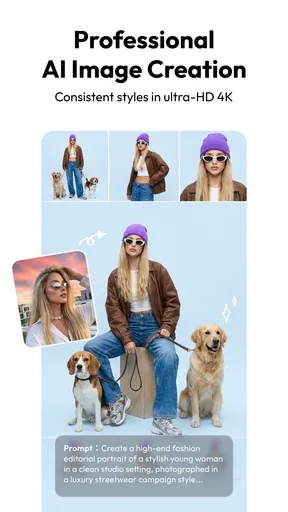
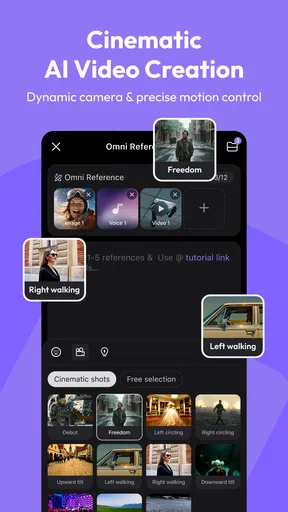
I like creative apps best when they help me get from a rough idea to something shareable without demanding a full editing setup. Hailuo AI: Image&Video Maker is aimed at that quick, experimental kind of creation: it uses AI to turn prompts and visual ideas into images and videos. I would treat it as a place to explore concepts and make short, expressive pieces, rather than as a replacement for a traditional photo editor or a precise video workstation.
From a rough idea to a first result
The most useful way to approach Hailuo AI: Image&Video Maker is to begin with a specific visual intention, not a long story. Decide what the viewer should notice first, then describe the subject, setting, mood, and movement in plain language. A focused prompt gives the generator fewer competing directions to reconcile. For instance, a scene with one clear subject and a simple setting is easier to assess than a paragraph asking for several characters, changing locations, and multiple actions at once.
That matters because AI creation is inherently iterative. I would not expect the first result to match every detail in my head. Instead, I would look for the strongest part of the output—the lighting, composition, atmosphere, or motion—and use that as the basis for a more deliberate next attempt. If a result is close but too busy, simplify the prompt; if it feels flat, make the mood or focal point more explicit. This is a more useful habit than piling on extra adjectives after every generation.
For a practical everyday example, imagine needing a visual for a group chat or a personal social post about a rainy afternoon. I would ask for one central subject, a recognizable rainy setting, and a particular mood, then judge whether the image or clip communicates that feeling at a glance. If it does, I can use it as a finished creative piece or as a starting point for another edit elsewhere. If I need exact text, a faithful likeness, or a carefully controlled product shot, I would use a conventional editor or camera workflow instead.
As a photography app, it sits in an unusual corner of the category. It is less about carefully adjusting a photo I already took and more about generating visual material from an idea. That distinction helps set expectations: people who enjoy trying variations and discovering unexpected interpretations will likely get more out of it than those who want direct, predictable control over every pixel.
Build prompts that are easy to revise
A useful prompt has a stable core and a small number of adjustable details. I would keep the subject and scene consistent while changing just one element, such as the lighting or overall mood. Comparing those results makes it easier to understand what influenced the output. Changing the subject, setting, style, and action together may produce a different result, but it teaches you less about which instruction mattered.
For video ideas, I would describe a simple action rather than an entire sequence of events. A single movement or visual change is easier to evaluate than several actions competing for attention. This is especially helpful when the intended clip is atmospheric: a quiet scene can feel coherent with one clear motion, while a busy prompt may produce an uneven result. The goal is not to write the most elaborate prompt; it is to give the model a clear visual job.
It also helps to separate what must remain fixed from what can be explored. If I am testing a concept for a recurring character or visual theme, I would preserve the central description and vary the surroundings in separate attempts. That creates a more useful comparison than rewriting everything from scratch each time. It is not a guarantee of consistency, but it makes experimentation easier to assess and repeat.
Check the practical details before a long session
The app is free to install, but it includes in-app purchases ranging from $0.99 to $854.40 per item. I would check the purchase details shown in the app before committing to any paid option, especially if I expect to generate frequently. The listed range is broad enough that casual users should avoid treating every creative session as an invitation to spend. Start with a small test, decide whether the results suit your needs, and only then consider whether a purchase makes sense.
Hailuo AI is developed by MiniMax AI, and its current version is 2.22.1. The minimum operating-system requirement is Android 7.0, so it is worth checking compatibility before setting aside time to try it. The app has a Teen content rating; that is a useful signal for families deciding whether it fits their household, though adults should still use their own judgment about the images and prompts they create.
There is a clear audience already exploring it: the app has over 10 million installs, around 90 thousand ratings, and an average rating of 3.4. I read that combination as a reason to approach it with curiosity rather than assume every user will have a smooth or consistently impressive experience. The substantial audience suggests the format appeals to many people, while the middling average is a reminder that AI-generated results can be uneven and that expectations matter.
Before starting a serious project, I would also check the app’s current controls and options in the version installed on my device. Interface details can change between releases, so it is better to rely on what is actually visible than on a remembered tutorial. In particular, look at the choices presented around creating and saving work, and make sure the available output fits how you plan to use it. A quick test can prevent the frustration of building a workflow around an assumption.
Repeatable habits make experimentation faster
Experienced use is less about discovering a secret button and more about keeping the creative process organized. I would save a short note of prompts that produce a direction I like, along with the specific change I made on the next attempt. That gives me a personal reference without relying on memory. Even a simple record such as “same scene, softer light” can make it easier to revisit an idea and avoid repeating unsuccessful wording.
Another time-saving habit is to decide what counts as a successful result before generating. If I want a mood board, I may only need a striking composition. If I want a clip to share, the movement and overall coherence matter more. Defining the purpose first prevents endless tweaking for details that will not affect the final use. It also gives me a sensible stopping point when a result is already good enough.
When a prompt misses the mark, I would diagnose the problem in layers. First ask whether the main subject is clear. Then consider whether the setting is doing too much, and finally whether the requested action is plausible as a single visual moment. Making one adjustment at a time helps reveal whether the issue was ambiguity or an inherent limitation of the generated result. This method is more reliable than repeatedly rewriting the whole prompt in frustration.
A further practical trade-off is that generative tools encourage exploration but can make selection the real work. If I generate several alternatives, I need to compare them against the purpose of the project rather than simply choosing the most dramatic one. A visually striking result may be less useful if it loses the subject or mood I originally wanted. Keeping the brief in mind turns a stream of possibilities into an actual creative decision.
Where it fits—and where another tool is better
Compared with a conventional photo editor, Hailuo AI is better suited to inventing imagery than correcting a specific photograph. A traditional editor is the stronger choice when I need precise cropping, color correction, retouching, or exact control over a real image. Compared with a standard video editor, Hailuo AI is more about generating a visual concept than assembling a polished timeline with carefully timed cuts and detailed audio work. These tools can complement each other: I can use generated material for inspiration and finish a project in software designed for precise editing.
I would recommend it to people who like visual experimentation, want to explore image and video ideas from text, or need a fast way to test a creative direction. It may also suit someone who has a visual concept but does not have the drawing skills or production setup to create it manually. The key is being comfortable with iteration and treating the output as a draft or creative possibility when exact control is important.
I would skip it if my priority were dependable reproduction of a reference, detailed hands-on image adjustments, or a predictable professional video workflow. AI generation can interpret instructions differently from how a person intends them, and the process may take patience. People who dislike trying alternate prompts or sorting through imperfect results may find a conventional editor more satisfying. For work where accuracy, repeatability, or fine detail is non-negotiable, a tool with direct controls is the safer choice.
It is also worth thinking about the intended audience before sharing generated work. The Teen rating gives a broad age guideline, but it does not replace reviewing individual outputs. I would check the finished image or clip myself, particularly if it is going into a family setting, a classroom, or a public-facing project. That small review step is sensible for any AI-generated material, because the final result—not just the prompt—determines whether it is appropriate.
A good creative sandbox, with realistic expectations
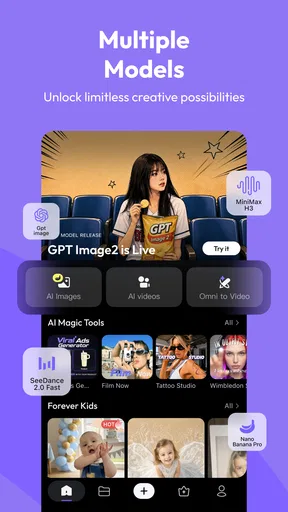
Hailuo AI: Image&Video Maker is most rewarding when I treat it as an experimental studio rather than a magic shortcut. Clear prompts, controlled revisions, and a defined use for each result make the experience more productive. Its mix of image and video creation gives idea-driven users room to explore, while its purchase range and the uncertainty inherent in generation are reasons to proceed thoughtfully.
My recommendation is to try it with one small, low-stakes idea first. Keep the prompt simple, compare a few deliberate variations, and decide whether the output quality and workflow suit you before investing time or money. For playful concepts and visual brainstorming, Hailuo AI: Image&Video Maker can be a useful companion. For exact edits or polished, tightly controlled production, I would pair it with—or choose instead—a conventional creative app.
What we like
- Creates short videos from text prompts or still images.
- Offers multiple AI styles for varied visual results.
- Simple controls make it approachable for beginners.
- Lets users preview generated videos before saving.
- Useful for turning creative ideas into shareable clips.
What could be better
- Generated results may not match the prompt precisely.
- Video generation can take time during busy periods.
- Some features or credits may require payment.
- Output quality can vary between generations.
- AI results may contain visual glitches or awkward motion.




