
 Analysis byWeUseApps
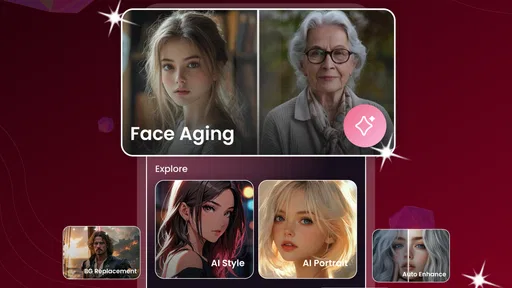
I’d use AI Face Aging - Photo Editor for a quick, playful look at how a portrait might change with age—not as a serious portrait retouching suite. Its appeal is the narrow focus: choose a face photo, try the aging effect, and decide whether the result is convincing enough to keep or share. That makes it easier to approach than a general photo editor when all I want is one specific transformation, though it also means there is less reason to open it for everyday cropping or color correction.
Getting a useful result from a single portrait
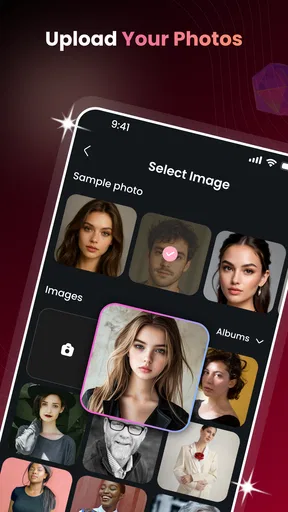
The first decision matters more than any clever editing routine: pick a photo where the face is easy to read. A clear, front-facing portrait with even light gives an age effect a better starting point than a tiny face in a group picture, a profile view, or a shot with heavy shadows. I’d begin with an ordinary photo rather than the most polished one, because strong makeup, filters, or dramatic lighting can make it harder to judge what the transformation itself is doing.
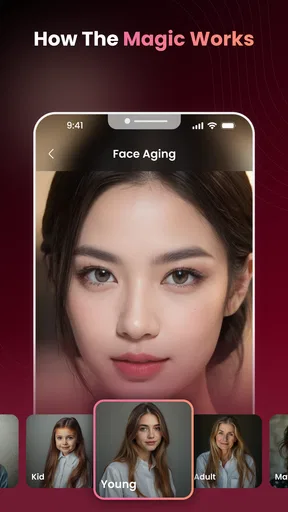
Once the image is selected, I’d treat the first result as a draft. Look at the face at normal viewing size, then zoom in enough to notice whether the changes sit naturally around the eyes, cheeks, and jaw. A result can be entertaining at a glance but less convincing when the skin texture or facial edges look inconsistent. If the preview feels wrong, switching to a cleaner source image is often a more useful next step than repeatedly trying the same one.
That simple approach suits the app’s purpose as a photography app built around AI age transformation. It is not the tool I’d choose to restore an old family photograph or prepare a professional headshot. I’d use it for curiosity, a lighthearted comparison, or a small creative project where the altered portrait is the point. Keeping that expectation clear helps avoid judging it by the standards of a full-featured editor.
Choose the source image before chasing the effect
For a realistic-looking comparison, use a portrait with a relaxed expression and minimal obstruction. Glasses, hair across the face, a hand near the chin, or a strong side angle can all make it harder to assess the result. This is not a promise that every clean portrait will transform perfectly; it is a practical way to reduce distractions and make the output easier to evaluate.
I’d also keep the original photo untouched. Save or retain a copy before experimenting, especially if the portrait is meaningful or has already been edited. That gives me a straightforward way to compare the transformation with the source and prevents a playful experiment from replacing the image I actually wanted to keep. When sharing the result, I’d label it as an AI effect so friends do not mistake it for a genuine aging prediction.
Check the choices that affect your result
Before settling on an image, take a moment to inspect the controls the current screen actually offers. The app’s current version is 1.1.1, and interfaces can change between releases, so I would not assume that a control seen in an older walkthrough is still present. If there is an intensity or style choice available, compare the options on the same portrait rather than changing the source photo at the same time. That makes it easier to tell whether the setting or the image is responsible for a better result.
When there are no meaningful controls to adjust, the source photo becomes the main variable you can manage. Try one well-lit portrait and one with a different expression or angle, then compare the outcomes. This is a more reliable test than treating a single awkward output as proof that the whole idea does not work. It also keeps the process honest: an AI effect is an interpretation of an image, not a measured forecast of how a real person will look later.
I would check the app’s save and sharing options before doing a batch of experiments. Knowing where the finished image goes and how to return to the source is useful in any portrait workflow, especially when several versions start to look alike. If an option is not visible, I would not assume the app can do it; I’d keep the workflow to the actions shown on screen and use the phone’s usual photo tools for any extra adjustments.
Build a repeatable routine instead of tapping at random
A useful habit is to test a small set of portraits with consistent framing. For example, I might use one straight-on image in soft daylight, then a second straight-on image with a different expression. Keeping the angle similar makes the comparison clearer. If I change lighting, pose, crop, and effect settings all at once, I cannot tell which change improved the result.
For a family chat or a casual social post, I’d make one transformation, inspect it, and stop when it works for the intended joke or conversation. Repeatedly generating variations can turn a quick amusement into a tedious search for a perfect image that the app may not be designed to produce. If I’m making a before-and-after pair, I’d keep the original and transformed images at the same crop and display size; otherwise, the presentation itself can make the comparison feel more dramatic than the effect.
Another practical pattern is to separate “fun” from “usable.” A strange output may still be worth sharing as a joke, while a more natural one may suit a simple side-by-side post. I would not use either as evidence about someone’s health, future appearance, or actual aging process. That boundary is especially important when the subject is a child or someone who has not agreed to have their image transformed and shared.
Where it fits among photo-editing alternatives
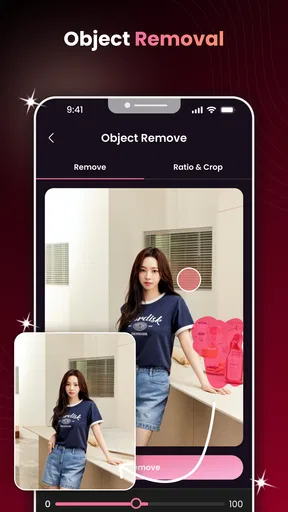
Compared with a general-purpose editor, this app is the more direct choice when the job is specifically an AI aging effect. A broad editor is usually better when I need precise retouching, layers, text placement, color correction, or a carefully designed layout around the portrait. The focused approach can save time for a one-effect experiment, but it does not replace those tools simply because it changes a face.
It also differs from manual aging makeup or a carefully staged portrait session: those approaches give a person more control over the visual details, while an AI transformation can be faster and more surprising. The trade-off is that the output may not preserve every feature in a way I would choose. If likeness and fine control matter more than speed, I’d use a conventional editor or a human-led creative approach instead.
Some people will also prefer a general photo app they already know, particularly if they only want to make a quick collage or add a caption. In that case, installing a separate tool for one effect may not be worthwhile. I see this one as a focused experiment to reach for when the aging transformation itself is the reason for editing, rather than an all-purpose home for my photo library.
Practical limits and sensible expectations
The strongest limitation is the gap between a playful visual effect and a believable portrait. AI can produce an image that reads as “older” without creating a consistent or medically meaningful account of how that particular person will age. I would judge the result as an artistic edit, not a prediction. The more important the portrait is, the more carefully I would review it before sharing or treating it as a finished image.
Image quality and composition can also constrain the outcome. A dark photo, a face partly outside the frame, or several people close together can make it less clear what the effect should apply to. If a result looks uneven, start again with a better-cropped source instead of assuming that more attempts will necessarily fix it. That is a small but useful discipline: improve the input first, and only then decide whether the app’s style suits the picture.
Privacy deserves a moment of attention whenever a face photo is involved. I would avoid uploading an image of someone else without permission, and I would review the app’s current privacy information and device prompts before choosing sensitive portraits. The app is rated for Everyone, but that does not remove the need for sensible choices about personal photos, consent, and what gets shared outside the device.
There is also a question of purpose. If I need a reliable visual for an editorial project, a client presentation, or an image that must preserve a person’s identity precisely, I would not rely on a quick AI aging treatment without close review. For a casual post, a private comparison, or a conversation starter, the same uncertainty can be part of the fun. The right use depends on whether I value surprise or exact control more.
Who should try it, and who should pass
AI Face Aging - Photo Editor is a reasonable fit for someone who wants a simple, focused way to experiment with an older-looking portrait. Willson Studio is the developer, and the app is free, which makes it easy to try without treating it as a major commitment. It has a 4.0 average from around 6,500 ratings, with 62 written reviews, and over 5 million installs. Those figures suggest that the idea has reached a broad audience, but they cannot tell me whether a particular portrait will come out well.
The age rating is Everyone, and the app supports Android 8.0 or later. It was released on February 3, 2026, and its current version is 1.1.1. Those details are useful when checking whether it fits a device or a household, but they do not change the basic recommendation: use it for light creative play, keep the original image, and inspect the result before sharing it.
I’d skip it if I wanted comprehensive editing tools, dependable identity-preserving retouching, or a serious forecast of future appearance. I’d also choose another approach if I only needed routine edits such as straightening, cropping, or adding text. The narrow focus is both its convenience and its main constraint: it is appealing when aging a face is the task, and easy to outgrow when the task becomes broader.
A focused tool best used with a light touch
My recommendation is to try it with a clear, low-stakes portrait and a specific goal: see a transformation, make a playful comparison, or create a small shareable moment. Use consistent images when comparing results, preserve the original, and avoid reading the output as a realistic promise about anyone’s future. Those habits make the experience more useful without expecting the app to do more than its focused concept can support.
As a photography app, it works best as a small specialist rather than a replacement for the editor I use every day. If the first result is entertaining and the process feels convenient, it has done its job. If I need control, polish, or a dependable likeness, I would move to a broader editing tool. That is the distinction I’d want a friend to know before deciding whether to install it.
What we like
- Quickly previews an older-looking version of a portrait.
- Simple controls make basic edits easy to try.
- Works well for sharing playful results with friends.
- Useful for creating themed photos and social posts.
- Lets users explore different aging effects on their images.
What could be better
- Results can look artificial on some photos.
- Image quality may affect how convincing the effect appears.
- Some features may require payment or a subscription.
- The app may request access to personal photos.
- Generated edits may not accurately predict real aging.




