
 Analysis byWeUseApps
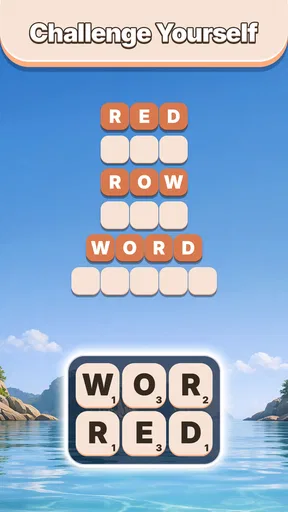
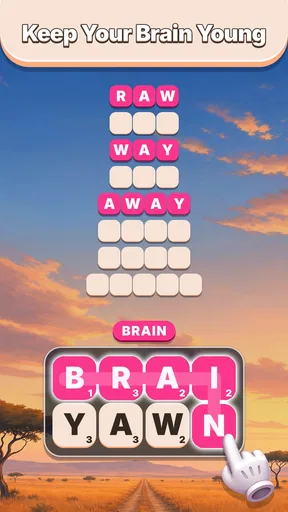
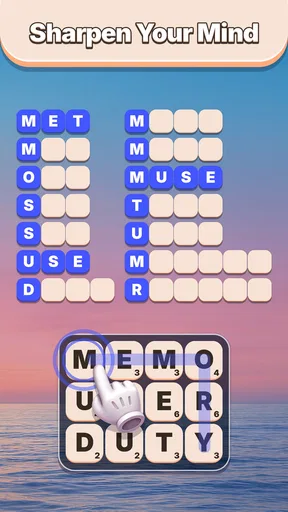
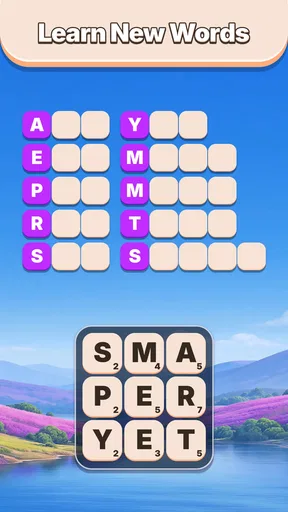
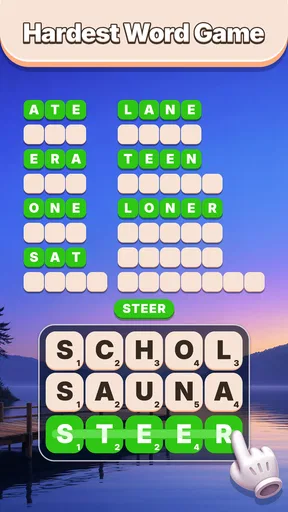
Word Tiles - Relaxing Puzzle is a word game I’d choose when I want a small, focused challenge rather than a long session or a complicated puzzle system. Its appeal is easy to understand: look over letter tiles, search for words, and work through a puzzle at a comfortable pace. That makes it a natural fit for a quiet break, though it won’t satisfy everyone looking for a demanding word game.
Agave Games has made a puzzle game for a broad audience, and the Everyone age rating reflects that approachable positioning. The game is free to download, while optional in-app purchases range from $1.99 to $49.99 per item. I’d treat those purchases as a reason to check the price shown in the app before confirming anything, rather than assuming every part of the experience is included at no cost.
A gentle pace, with the right expectations
The basic attraction is the contrast between a simple board of letters and the effort of spotting words within it. Compared with a crossword, this style asks less of you in terms of interpreting clues; compared with a conventional word-search grid, it puts the tiles themselves at the center of the task. That makes it easy to pick up, but it also means players who want rich clues, a strong story, or a highly competitive challenge may prefer another kind of puzzle.
I’d describe its speed as more about mental tempo than device performance: the game is built around looking, noticing, and making a move, not racing through complicated controls. That’s useful when you have only a few minutes and don’t want to relearn a ruleset each time. It’s also a trade-off. If you enjoy timed pressure or a steadily escalating tactical puzzle, a relaxed word-tile format can feel too gentle.
One practical way to get more from a board is to scan it in passes instead of staring at the whole arrangement. First look for short, familiar word patterns; then check the remaining tiles for longer combinations or less obvious alternatives. This keeps the task from turning into random tapping and is especially helpful when a quick glance produces nothing. It’s a simple habit, but it makes a casual word game feel more deliberate.
Where it fits into an ordinary day
For a realistic use case, I’d reach for it while waiting for an appointment or taking a short pause between tasks. A word puzzle can occupy attention without requiring the long concentration block that a sprawling strategy game demands. If you’re interrupted, the sensible approach is to treat each visit as a brief session and avoid starting when you know you’ll need to focus on something else immediately.
That makes it more suitable for relaxed, occasional play than for people who want a game to organize their evening. It can also work for someone who enjoys language puzzles but finds clue-heavy formats tiring. The main question is whether you enjoy discovering words from available letters: if that small act of recognition feels satisfying, the format has a clear purpose; if you’d rather solve a narrative mystery or compete against another player, it may not hold your attention.
Keeping a session useful instead of frustrating
A common trap in tile-based word puzzles is repeatedly searching for the same obvious answer. When that happens, I’d pause and change the angle: read the available letters from a different starting point, look for endings as well as beginnings, and consider whether a familiar word is hiding in a less familiar arrangement. This is not a special feature claim; it’s a practical way to approach the kind of word-finding task the game presents.
Another useful trade-off is choosing a stopping point before a short break becomes an aimless stretch of play. A relaxed puzzle is easy to keep opening because it doesn’t ask for much setup. I’d use it as a deliberate reset—one or a few boards, then back to what I was doing—rather than expecting it to provide the variety of a larger game. That distinction matters if you’re trying to decide whether this is a quick companion or your main source of entertainment.
The game has reached over a million installs and has a 4.9 average from around 44,000 ratings, alongside roughly 1,100 written reviews. Those figures suggest that many players respond well to its accessible puzzle premise, but popularity doesn’t settle the personal question: a relaxed word search can be a welcome change for one player and repetitive for another. I’d use the format itself, rather than its standing in the store, as the best guide to whether it suits you.
What heavier use may feel like
For longer sessions, the main concern I’d weigh is mental repetition, not an assumed demand on the phone. The same broad activity—examining letters and finding words—can be calming in short bursts but less engaging if you expect a changing mix of mechanics from one sitting to the next. If you enjoy settling into a familiar rhythm, that consistency may be a strength. If you need frequent surprises, switch-ups, or a sense of progression to stay interested, this is a reason to keep your expectations modest.
I wouldn’t choose a word-tile puzzle as a substitute for a resource-intensive action game, and I also wouldn’t promise that it will use a particular amount of battery or storage. Those outcomes depend on the device and the app’s behavior in use. The grounded expectation is simply that its central activity is a straightforward puzzle interaction, rather than a complex simulation. If your phone is older or short on space, checking the app’s compatibility and available storage before installing is still the sensible move.
When playing in a busy setting, the best workflow is to make the game a small, self-contained break. Find a quiet moment, focus on the letters, and stop when your attention is needed elsewhere. That advice is less about performance and more about the puzzle’s strength: it asks for observation, so interruptions can make even an easy board feel oddly stubborn. A calm environment will help more than trying to rush through it.
Reliability and what to expect from updates
The current version is 1.6.4. I wouldn’t infer from a version number alone that every device will behave identically, or that a particular update has changed a specific feature. In practical terms, if the game doesn’t open smoothly on your phone, the sensible first steps are the usual ones: close and reopen it, check that the device has enough free space, and make sure the operating system meets the stated minimum.
That minimum is Android 10, so owners of older Android devices should check their system version before counting on an installation. A compatible operating system is not a promise of equal speed on every model; older hardware can still feel different from a newer phone. I’d also avoid leaving a puzzle open in the background if your device is already struggling with other apps. Closing it before switching to demanding tasks is a simple way to reduce avoidable friction.
For recovery from an interruption, I’d be cautious about assuming a particular save or resume behavior unless I had checked it on my own device. If a board matters to you, finish it before leaving the app when possible. This is a useful habit for any mobile puzzle, especially when you’re playing in short gaps and may be pulled away without warning.
Free to start, but keep purchases in view
The free price makes it easy to try the core idea before deciding whether it belongs in your routine. There are in-app purchases priced from $1.99 to $49.99 per item, so I’d review purchase prompts carefully and use the device’s purchase controls if children may play on the phone. The Everyone rating makes the game broadly accessible, but it doesn’t remove the need for an adult to manage spending settings where appropriate.
I wouldn’t treat optional purchases as necessary just because they’re available. First see whether the puzzle loop itself is enjoyable and whether you’re likely to return to it. If you only want an occasional word challenge, paying for extras may not make sense; if you find yourself playing regularly, you can decide whether any offered purchase has a clear value to you. That’s a better basis for spending than buying simply to make a free game feel complete.
Who should pick it—and who should pass
I’d recommend Word Tiles - Relaxing Puzzle to players who like word searches, prefer an easy-to-grasp activity, and want something that can fit into short pauses. It may also suit people who want a gentler alternative to crosswords with demanding clues. The key is enjoying the act of spotting words among tiles; the premise is specific enough that you can tell fairly quickly whether it clicks.
I’d skip it if you want multiplayer competition, complex word definitions, a deep campaign, or a puzzle that constantly changes its rules. A traditional crossword is a better choice when you want clues and general knowledge; a timed word game is better when you want urgency; and a narrative puzzle is better when story and atmosphere matter most. Those alternatives offer different kinds of engagement, not necessarily a better version of the same one.
Agave Games’ title is best judged as a light, focused word puzzle rather than an all-purpose mobile game. Its accessible format, free entry point, and Everyone rating make it easy to consider, while optional purchases and the possibility of repetition are worth keeping in mind. If you want a calm way to exercise word recognition for a few minutes, it’s a reasonable choice. If you need constant novelty or a serious test of vocabulary, I’d look elsewhere.
My bottom line is that its value depends on the mood you bring to it. I’d keep it for brief, low-pressure sessions and use a more varied puzzle game when I want a bigger challenge. With over a million installs and a 4.9 average, it has clearly found an audience, but the most useful test is still a personal one: try the tile-based word hunt, notice whether its pace relaxes or bores you, and decide from there.
What we like
- Easy-to-learn rules make it accessible to casual players.
- Short rounds fit well into quick breaks.
- Word challenges offer a gentle way to practice vocabulary.
- Relaxing presentation suits low-pressure play.
- Progression gives players new puzzles to work through.
What could be better
- Some puzzles may feel repetitive over time.
- Later levels can become noticeably more challenging.
- Hints may be limited or tied to in-game resources.
- Ads may interrupt the puzzle flow.
- A stable internet connection may be needed for some features.