



 Analysis byWeUseApps
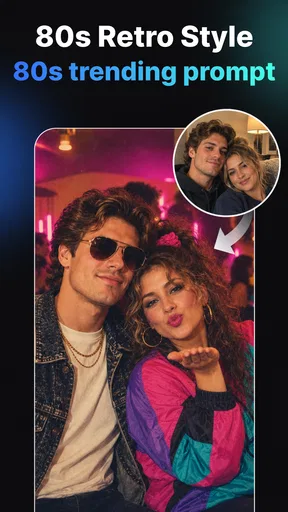
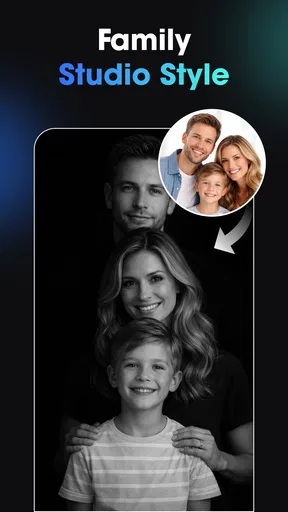
Vidix is best understood as a quick creative playground, not a full photo or video editing suite. I’d reach for it when I want to give a selfie or a short clip a bold, AI-made look without building an edit from scratch. Its appeal is the jump from ordinary media to stylized output; the trade-off is that an automated result offers less precise control than a traditional editor.
Where its creative appeal comes from
Made by Supercool Labs, this free art and design app brings AI photo and video creation together with filters, effects, and 3D-inspired art styles. That combination makes it easier to experiment than an editor built around layers, masks, and manual adjustments. I can focus on choosing a visual direction rather than learning a detailed editing workflow.
The app has a 4.2 average from around 116,000 ratings, with over 10 million installs. Those figures suggest it has attracted a broad audience, though they don’t tell me whether a particular effect will suit my taste or whether every result will look polished. AI styling is inherently subjective: a transformation that feels lively on one portrait can look too artificial on another.
The strongest use case is making a piece of media feel noticeably different with little effort. A portrait can become more imaginative, while a video can take on a more designed, attention-grabbing mood. I see the value less in replacing a camera or a professional editing tool and more in giving everyday content a creative second life.
A practical way to get better results
I’d start with one clear subject and a source image or clip that already has a readable composition. AI effects have more to work with when the main person or object is easy to distinguish from the background. If a photo is cluttered or a clip has several competing subjects, the finished style may not emphasize what I intended. That is a useful reason to choose the input carefully before trying different looks.
For a social post, I’d make a few variations from the same source and compare them at the size people will actually see on a phone. A striking preview can lose its appeal when details become small, while a subtler treatment may read more cleanly in a feed. This simple comparison helps avoid choosing an effect just because it looks dramatic in the editor.
For video, I’d keep the goal modest: make a short moment feel distinctive rather than expecting a complete production workflow. A stylized treatment can help a quick clip feel more cohesive, but it is not a substitute for planning shots, trimming footage, or making precise timing decisions. If those tasks matter, I would use a dedicated video editor alongside Vidix rather than expecting one app to do everything.
What it does better than a conventional editor
Compared with a standard photo editor, Vidix is oriented toward transformation and visual experimentation rather than careful correction. Conventional tools are usually the better choice when I need exact exposure adjustments, detailed retouching, or consistent color across a batch of images. Vidix is more attractive when I want to explore an unusual style and would rather see a generated interpretation than adjust every parameter myself.
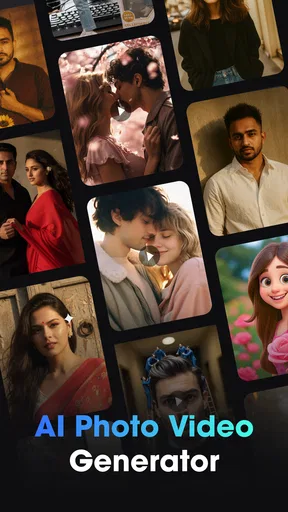
It also occupies a different space from apps focused only on static artwork. The photo-and-video emphasis makes it relevant when I want a related visual treatment across a portrait and a short clip. That doesn’t mean every output will match perfectly, but it gives me a reason to consider it for mixed-media posts rather than opening separate tools just to try a creative effect.
The distinction matters for expectations. AI styling can make a result feel fresh, but it can also smooth away the qualities that made the original image feel personal. I’d keep the original file and treat the generated version as an alternative, not an automatic improvement. For a profile picture, a polished conventional edit may still feel more authentic; for a playful post, the more dramatic transformation may be exactly the point.
The limits I would keep in mind
The main friction is the gap between inspiration and control. A preset or generated style can quickly produce a strong visual direction, but that convenience is not the same as being able to fine-tune every detail. If I need a specific crop, carefully controlled retouching, or a repeatable look across many assets, a more manual editor is likely to be less frustrating.
There is also an aesthetic risk: effects can dominate the subject. A portrait may become more like an illustration than a recognizable photograph, and an effect that looks appealing on one face may not flatter another. I’d judge each result rather than assuming the same treatment works for every source. This is especially important when the image is meant to represent a person professionally or needs to preserve a natural appearance.
Another practical limitation is that the app’s free price does not mean every option is necessarily free. Vidix is free to install, but it includes in-app purchases ranging from $0.99 to $79.99 per item. I’d explore the available experience first and pay attention to any purchase prompt before committing. If I only want occasional experiments, I would avoid spending until I know that the styles I actually use justify the cost.
Because AI effects can be resource-intensive in general, I’d also keep expectations sensible on older devices: large media and elaborate transformations may not feel as immediate as a basic filter. The app requires Android 7.0 or later, so compatibility is worth checking before planning a workflow around it. It is rated for Everyone, which makes it broadly accessible, but that age rating is not a promise that every generated result will suit every context.
Who is likely to enjoy it
I’d recommend Vidix to someone who regularly shares photos or short videos and likes trying unusual visual treatments, but doesn’t want to learn a complicated editing setup. It is a reasonable fit for casual creators, people making playful profile images, and anyone who wants an easy starting point for stylized social content. Its current version is 1.3.0, and its large audience makes it a familiar option to explore in the art-and-design space.
A realistic everyday example: I take a portrait before meeting friends, then decide it feels too plain for a story post. I could use Vidix to explore a more artistic version, compare it with the untouched photo, and choose whichever better suits the mood. If the effect makes my face look unlike me, I can keep the original instead. That kind of low-stakes trial is where the app makes the most sense.
I’d skip it if my priority were precise photo restoration, professional retouching, detailed timeline editing, or guaranteed consistency across a client’s campaign. In those cases, manual controls and predictable exports matter more than quick AI interpretation. It may also be a poor fit for anyone who dislikes heavily processed imagery or simply wants a clean crop and a small brightness adjustment.
My verdict
Vidix has a clear purpose: make it easy to experiment with AI-styled photos and videos, especially when speed and visual novelty matter more than exact control. I like that it treats still images and clips as part of the same creative playground, and I would use it for informal posts where an unexpected look is a benefit rather than a risk.
Its limits are equally clear. Automated styles can overpower a subject, and people who need precise editing will probably be happier with a traditional tool. The in-app purchase range also makes it sensible to test the free experience before buying anything. Overall, I’d recommend it as a fun companion for casual creative experiments—not as the only editor on a serious workflow. It is most rewarding when I bring a good source image, keep the original, and judge the result by whether it fits the moment rather than whether it looks more elaborate.
What we like
- Creates short videos from still photos with minimal editing.
- AI effects offer a quick way to transform portraits.
- The straightforward workflow is approachable for beginners.
- Useful for making social-ready visual content.
- Can help add motion to otherwise static images.
What could be better
- AI results may look inconsistent across different photos.
- Generated clips may not match the intended motion.
- Some features may require a paid plan or credits.
- Processing can take longer for complex effects.
- The app may need a reliable internet connection for generation.




