
 Analysis byWeUseApps
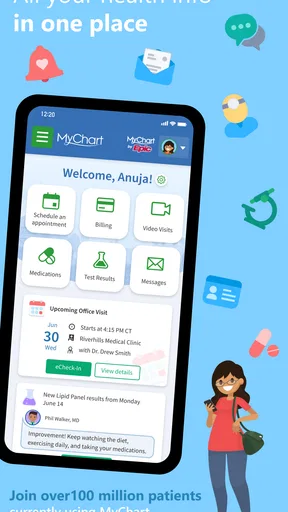
In a household where appointments, test results, and health questions can involve more than one person, keeping track of the details is a job in itself. MyChart is a medical app from Epic Systems Corporation that gives users a digital place to engage with their health care. Its value at home is less about turning one phone into a shared family record and more about making it easier for each person to manage their own health information and keep up with care.
A medical app for everyday household routines
I find the household angle especially relevant because health information is personal even when care is coordinated. One person might be helping a partner remember an appointment, while another is keeping an eye on their own care. A mobile health app can make those routines feel less scattered, but it is important to approach MyChart as an account-based tool rather than a general family dashboard. Each user should understand whose information they are viewing and whose account they are using.
The app is free and is rated for Everyone. That broad age rating describes the app’s content classification; it does not mean that every household member should automatically use the same account or that the app is a substitute for a conversation with a health professional. I would treat it as a practical companion for handling medical information, while keeping individual privacy and responsibility in view.
One device, distinct people
Sharing a phone or tablet is common at home, especially when one device is easier to reach than another. That convenience does not make medical records communal. Before opening the app, I would make sure the person using the device knows which account is active and can avoid exposing another household member’s private information. A quick change of user may seem harmless in other apps, but health details deserve more care.
This distinction matters when one household member provides practical support to another. Helping someone keep track of care is not the same thing as taking over their account. The app can be part of a household routine, but the people involved should agree on what help is wanted and who should have access to what. That simple boundary can prevent confusion and preserve trust.
For a shared-device setup, I would also avoid leaving a health app open where someone else could casually browse it. That is sensible device hygiene, not a claim about a particular privacy control. The useful habit is straightforward: use the app intentionally, confirm the account context, and close or put away the device when finished.
Setting expectations before getting started
Good setup begins with clarity. I would first decide whether the app is being used by one person for their own care or as part of a support routine with another adult. If someone is helping, it is worth discussing what that means in practice: reminders, checking details together, or simply being available when the account holder wants assistance. Clear expectations reduce the risk of one person assuming more responsibility or access than the other intended.
It also helps to separate the person who owns the health information from the person who may be offering practical help. That line can be especially important in families with different levels of comfort around phones, medical terminology, or online accounts. A relative may be confident with technology but still need the account holder’s direction. Respecting that direction keeps the app from becoming a source of household friction.
I would not treat one shared login as the default answer for a family. Instead, the account holder should remain the center of decisions about their own information, and any support should happen with their knowledge and agreement. This approach is useful whether the household is coordinating care for a partner, assisting an older relative, or simply managing busy schedules around individual appointments.
Coordinating care without mixing up responsibility
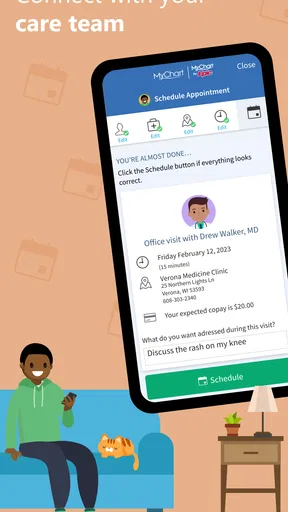
Medical coordination is often made up of small tasks: remembering what needs attention, making time for an appointment, and discussing questions that matter to the person receiving care. A mobile app can give someone a more convenient place to engage with those tasks. In my view, the best household use is supportive rather than controlling: the user stays involved, while a trusted person helps when invited.
That can make a difference when several people are trying to help. Rather than relying on one family member to remember every detail, a household can agree on who will provide support and what the account holder prefers to handle alone. If plans change, it is better to confirm with the person involved than to assume that another household member has the latest information.
Clear communication matters because an app is only one part of care. It does not replace professional advice, a direct conversation with a clinician, or the account holder’s own judgment about what support they want. I see it as a digital aid for engaging with care, not as an authority that should settle disagreements between family members.
For a couple, that may mean one person offers to sit alongside the other while they use the app. For a parent and adult child, it may mean agreeing on when help is welcome rather than checking in uninvited. These are ordinary household choices, but they become more important when the information being handled is sensitive. Good coordination starts with consent and clear account boundaries.
Age, independence, and trust
The Everyone content rating makes the app broadly suitable in terms of its listed content classification, but household decisions about age should still be thoughtful. Children and teens may need an adult’s guidance when dealing with medical information, while older adults may appreciate assistance with navigating a phone. In either case, the right level of help depends on the person, their circumstances, and the choices made by the people responsible for their care.
I would avoid assuming that a younger user should be left entirely on their own simply because an app is rated for everyone. Likewise, I would not assume that an older relative wants someone else to manage their information. A respectful approach is to ask what support is useful, explain what the app is being used for, and let the person participate as much as they can and want to.
Trust is built through predictable behavior. If a family member is helping, they should make it clear when they are opening the app and why. They should also avoid treating a shared device as permission to inspect private health details. These habits do not require complicated rules; they require the same consideration people would want when handling any personal information.
Where a household has different comfort levels with technology, patience helps. A person who is less familiar with apps may need someone to sit with them and explain the steps without rushing. Someone who is comfortable on a phone may prefer to manage everything independently. The most useful setup is the one that reflects the individual’s needs instead of forcing every household member into the same routine.
What the app’s scale suggests
MyChart has been available since October 31, 2011, and the current version is 11.9.3. Epic Systems Corporation develops it, and the Android app has passed 10 million installs. Those details help show that it is an established medical app with a substantial audience, although popularity alone cannot tell me whether it will fit every person’s care arrangements.
Its average rating is 4.4, based on around 290,000 ratings, with roughly 126,000 written reviews. I take that as a useful sign that many people have engaged with the app, not as a promise that every household will find it effortless. Health routines vary, and the value of a medical app depends on how well it fits the user’s needs and the care they receive.
The app is free, and its minimum operating-system requirement is version 11. Those practical details are worth checking when deciding which device to use at home. If a household relies on an older phone or tablet, compatibility may shape the choice of device; if the app is available on a suitable device, each person can then decide whether it belongs in their personal care routine.
Making it part of a household routine
To make the app useful without creating confusion, I would keep the routine simple. The account holder should know when they are using it, any helper should understand their agreed role, and family members should communicate directly about plans. That approach keeps the app from becoming a substitute for conversation and helps everyone remember that health information belongs to the individual it concerns.
It is also sensible to avoid making a single family member the unofficial keeper of everyone’s medical life. Support can be shared, but responsibility should remain clear. When one person is assisting another, they can check that their help is wanted and allow the account holder to make their own decisions wherever possible. That balance is especially valuable in multigenerational homes, where people may have very different expectations about privacy and independence.
My impression is that MyChart makes the most sense as a personal medical app that can fit into a coordinated household routine. It is not something I would treat as a shared family account by default. Used thoughtfully, it can support an individual’s engagement with care while allowing a trusted person to help in a way that respects consent, privacy, and personal boundaries.
My household verdict
For a household looking for a way to engage with medical care on a mobile device, MyChart is worth considering. Its long-running presence, broad adoption, and free price make it an accessible option for people who want a digital companion for their health-care routine. The strongest reason to use it at home is convenience for the individual, with coordination as a helpful extra rather than an excuse to blur account boundaries.
I would recommend approaching it with a few basic principles: keep each person’s information distinct, agree on what support looks like, and let the person receiving care remain part of decisions. Those habits make shared-device use more considerate without pretending that one setup will work for every family. For me, the app is best suited to households that value practical coordination while taking privacy and independence seriously.
In short, this is a medical app that can fit naturally into everyday life when the household uses it with care. It does not need to become the center of family communication; it simply needs to help the individual stay engaged and make it easier for trusted people to support them when invited. That is a sensible role for a health app in a busy home.
What we like
- View test results and visit summaries in one place.
- Request prescription refills through the app.
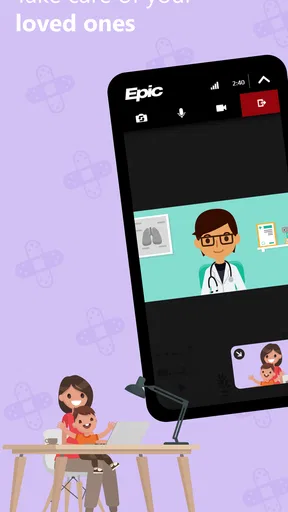
- Send secure messages to your care team.
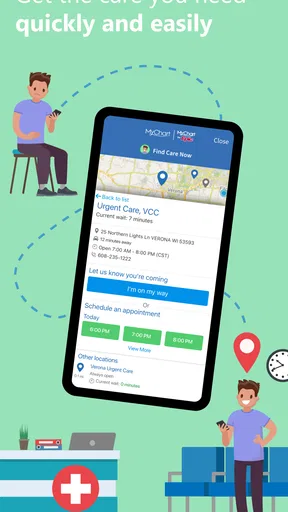
- Manage appointments without calling the clinic.
- Connect records from participating health organizations.
What could be better
- Features vary by health care provider.
- Some results may take time to appear.
- Not every provider supports account connections.
- Messaging is not intended for urgent medical needs.
- Access depends on an internet connection.




