

 Analysis byWeUseApps
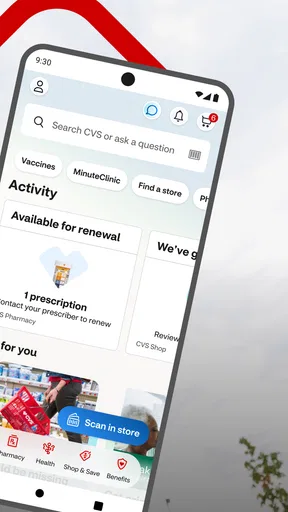
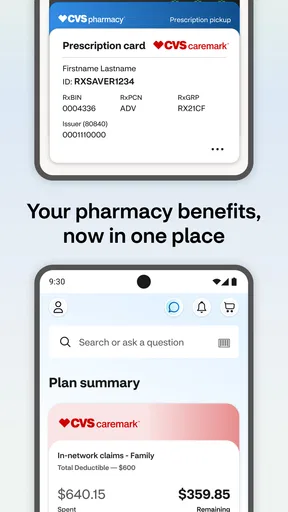
I think of CVS Health as a practical companion to using CVS Pharmacy, rather than as a complete health-management app. Its appeal is that it brings pharmacy tasks, care scheduling, and ExtraCare savings together in one place. If CVS is already where you fill prescriptions or shop, that combination can make routine errands easier to organize. If you rarely use CVS, the app has less to offer.
What free access is worth
CVS Health is a free medical app from CVS Pharmacy. That makes it easy to try without paying for access, and its Everyone content rating means it is presented for a broad audience. The price is a useful starting point, but it is not the same as saying every health service or purchase connected with the app is free: the app helps you access pharmacy and care services, while those services and products may have their own costs.
I like that distinction because it sets a sensible expectation. You can use the app to handle practical steps, such as getting a prescription at the pharmacy, arranging health care, or checking ExtraCare savings, without treating the download itself as a purchase. For a person who already visits CVS, the potential value comes from making those tasks easier to coordinate, not from a promise that medication, appointments, or shopping will cost nothing.
The app has an average rating of 4.5 from around 507,000 ratings, and it has been installed over 10 million times. Those figures suggest it is a familiar option for many CVS customers, though they cannot tell you whether its workflow will suit your own pharmacy habits. I would use popularity as context, not as a substitute for deciding whether CVS is convenient for you.
Where the app can save effort
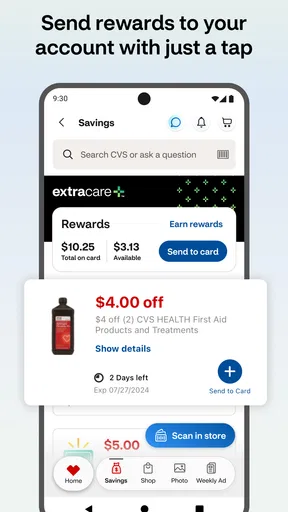
The strongest value is in reducing the small bits of friction around a pharmacy visit. Rather than treating prescriptions, health-care scheduling, and savings as unrelated errands, the app puts those CVS-related tasks under one roof. That can be especially handy when you want to check on a routine pharmacy task and also remember to look for savings before shopping.
One useful habit is to check the app before setting out, rather than waiting until you are standing at the pharmacy counter or preparing to pay. That gives you a chance to review what you meant to do and keep the relevant task in mind. I would still treat the app as a planning aid, not a guarantee that a particular prescription or appointment is ready; the actual pharmacy or care process remains important.
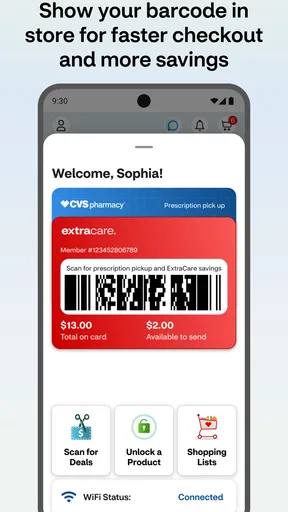
For example, imagine you are picking up a regular prescription after work and also need a few household items. You can use CVS Health to organize the pharmacy part of the trip and look at ExtraCare savings before shopping. The benefit is not that the app eliminates every step, but that it can help you combine errands and avoid remembering separate tasks at the last minute.
There is also value in having health-care scheduling alongside pharmacy access. If you are already using CVS for a pharmacy errand, being able to turn to care scheduling in the same app may be more convenient than switching between unrelated services. That does not make it a replacement for a clinician or a general health record; its practical role is helping you reach CVS services.
Tradeoffs in an all-in-one CVS tool
The same focus that makes the app convenient also limits its usefulness. CVS Health is built around CVS Pharmacy, so its value depends heavily on whether you use that company for prescriptions, care, or shopping. If your regular pharmacy is elsewhere, a dedicated app from that provider is more likely to fit your day-to-day needs. A general health app may also be a better match if your priority is tracking information across multiple providers rather than handling CVS errands.
An all-in-one app can make a broad set of tasks easier to find, but it can also feel less direct than an app devoted to a single job. Someone who only wants to arrange care may not care about shopping savings; someone who only wants to check a pharmacy task may not need the other areas. I would judge it by whether you actually use more than one part of the CVS experience, not by the number of things it brings together.
It is also worth keeping expectations grounded around savings. ExtraCare offers a reason to look for discounts, but the presence of savings features does not mean every basket will be cheaper or that every item you need will have an offer. I would compare what the app shows with the products you planned to buy, rather than adding items just because a saving is displayed. That makes the feature useful without letting it steer your shopping unnecessarily.
For pharmacy tasks, the app is best treated as a convenient route into the process, not as a substitute for checking details when timing matters. If you are dealing with an urgent health concern, the right next step is appropriate medical care, not browsing an app for general convenience. And if a prescription issue needs clarification, contacting the pharmacy directly may be more effective than repeatedly checking a screen.
Who is most likely to get value
I would recommend trying CVS Health if you already fill prescriptions at CVS and would also use its care-scheduling or ExtraCare features. The free download lowers the barrier to testing whether the combined workflow fits you. It is particularly appealing to people who prefer to handle errands on a phone and who benefit from having pharmacy and shopping reminders close together.
It may also suit someone coordinating ordinary household routines: a family member who helps remember pharmacy pickups, a shopper who already checks ExtraCare savings, or a person who wants a single CVS-oriented place to start when arranging care. Those are convenience use cases, not a claim that the app manages another person’s medical decisions or replaces communication with a health professional.
I would skip it, or at least avoid relying on it as your main health app, if CVS is not your pharmacy or if you want a provider-neutral overview of care from different organizations. The app’s identity is its strength for CVS customers and its limitation for everyone else. If you only need a pharmacy’s core service, that pharmacy’s own app may be simpler; if you want broader health tracking, look for a tool designed for that purpose.
Getting started and keeping expectations realistic
CVS Health was released on June 15, 2011, and its current version is 26.10.33. It requires iOS 11 or later. Before relying on it for a task, I would check that your device can run it and that the CVS services you intend to use are relevant to your location and routine. Then I would start with one practical job, such as checking a pharmacy task or arranging care, rather than trying to make it the center of every health decision.
A sensible way to test the value is to use the app during a normal CVS errand. See whether it helps you prepare for a prescription pickup, makes scheduling more convenient, or helps you notice savings you would have used anyway. If it saves you time across several of those activities, keeping it installed makes sense. If you open it only occasionally and still prefer another provider’s tools, there is little reason to force it into your routine.
Because it is free, the decision is less about whether to buy it and more about whether its CVS-specific convenience is worth the space and attention on your phone. I would not interpret “free” as evidence that every connected service has no charge; it simply means you can get the app without paying for the download. That is a clear, low-commitment way to see whether its particular mix of pharmacy, care scheduling, and savings suits you.
My verdict for CVS customers
For people who already rely on CVS, CVS Health is a useful convenience app with a clear purpose: make common CVS-related health and shopping tasks easier to reach. I especially like the practical overlap between pharmacy errands and ExtraCare savings, because it can help turn separate reminders into one planned trip. Its value is strongest when you use several of those services, rather than just installing it and expecting broad health-management tools.
My recommendation is straightforward: try it if CVS is part of your regular routine, and judge it by whether it helps with real tasks you already have. Choose another option if your pharmacy or care providers are elsewhere, or if you need a wider health organizer. With a free download, a 4.5 average rating, and a large established user base, it is an easy app to test—but the best reason to keep it is personal usefulness, not popularity alone.
What we like
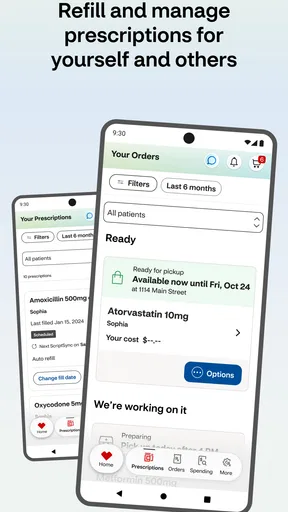
- Refill prescriptions and check their status from your phone.
- Set medication reminders to help you stay on schedule.
- Access digital ExtraCare deals and coupons in one place.
- Find nearby CVS Pharmacy locations and view store hours.
- Use the app to manage eligible health services and appointments.
What could be better
- Some features require a CVS account and sign-in.
- Prescription tools may not support every pharmacy or medication.
- App performance can vary across devices and operating system versions.
- Some services are available only at participating CVS locations.
- You may need to enable notifications for timely medication reminders.




