





 Analysis byWeUseApps
I’d approach Muse from Meta as a productivity experiment rather than a replacement for the tools I already rely on. Its promise is a personal AI agent, which makes it appealing if you want help thinking through tasks and turning a vague request into something more useful. But a name and a broad promise do not tell me how well it will fit a particular routine. My recommendation is to try it with a small, low-stakes task first and judge the results against your own standards.
What the free starting point does—and does not—settle
Muse from Meta is a free productivity app from Meta Platforms, Inc., with in-app purchases listed from $0.99 to $1,049.00 per item. That gives you a clear starting point: you can install it without paying upfront, while some optional purchases may cost substantially more. The range alone does not explain what each purchase provides, so I would not treat the highest figure as a necessary subscription or assume that buying anything is required to use the app.
For me, that distinction matters more than a simple “free” label. Free access is useful for evaluating whether an AI assistant belongs in your daily routine, but the presence of purchases means it is worth checking the in-app purchase details before committing money. If you are testing Muse for occasional brainstorming, begin without spending. Only consider a purchase after you have identified a specific limitation you want it to solve and can see exactly what that purchase offers.
The app has a 4.7 average from around 115,000 ratings, and it has passed 5 million installs. Those figures suggest broad interest, not a guarantee that its approach will suit you. A productivity app earns its place through dependable usefulness in your own tasks; popularity cannot tell you whether its responses match your expectations or whether you will want to use it regularly.
Where an AI agent can earn its place
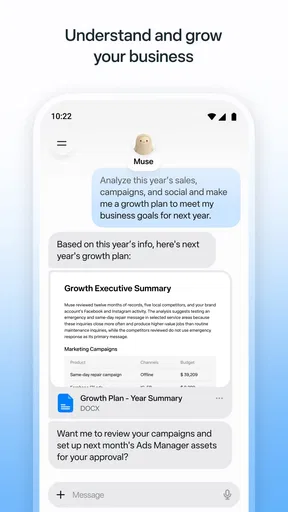
The most persuasive reason to try an AI productivity tool is not that it can answer questions. It is that it may help you move from an unclear intention to a workable next step. I would use Muse for tasks such as organizing a rough plan, rephrasing a message, or exploring options when I know the goal but am stuck on how to start. Those are useful jobs for an assistant because they leave the final decision with me.
Consider a realistic weekday situation: you have several errands, a work deadline, and a message you have been putting off. You could ask an AI assistant to help sort the tasks into a sensible order, then request a draft for the message. The practical value is not that the app magically knows your calendar or handles the errands. It is that a clear prompt may reduce the time spent staring at a blank page or trying to prioritize from scratch. I would still check the plan for conflicts and edit the message so it sounds like me.
A less obvious but helpful habit is to give the assistant constraints, not just a broad request. Instead of asking for “a plan,” explain the deadline, what must be done first, and what you do not want included. Then ask for a short version you can act on. This makes the output easier to judge and reduces the temptation to accept a polished answer that quietly misses your real need. The quality of an AI response depends partly on the quality of the context you provide.
Another useful workflow is to treat the first response as a draft, then challenge it. Ask what assumptions it made, what could go wrong, or which parts are uncertain. That extra turn can expose gaps before you use the output in an important email or decision. It also keeps the tool in the role of a thinking aid instead of an authority. I find that distinction especially important when the task affects another person, a budget, or a deadline.
How it compares with familiar productivity options
Compared with a notes app or a basic to-do list, an AI agent is most valuable when the problem needs interpretation, not just storage. A checklist is better for capturing a known sequence of actions and showing what remains. A notes app is often better for keeping reference material in a form you control. Muse is worth considering when you want to work through wording, options, or a first draft through conversation rather than manually arranging every thought.
That does not make it a universal upgrade. If your routine depends on precise reminders, a carefully maintained calendar, or a predictable task system, choose the dedicated tool that already serves that purpose. An AI assistant can help you think about a task, but I would not substitute a conversational answer for a dependable record of appointments or obligations. The more exact and time-sensitive the job, the more important it is to verify the result in the system you trust.
It is also different from searching the web. Search is a better first choice when you need an identifiable source, current public information, or a way to compare original material. A conversational answer can be easier to work with, but convenience is not the same as evidence. When an answer needs to be cited or checked, I would use source-based research and confirm important claims rather than treating an AI response as proof.
Tradeoffs I would keep in view
The main tradeoff is that AI can make unfinished thinking look finished. A fluent plan may still be impractical, and a confident-sounding draft may not reflect the facts you meant to provide. I would avoid pasting an answer directly into a consequential message or document without checking names, dates, commitments, and tone. This is not a reason to avoid the app; it is a reason to use it as a collaborator whose work needs review.
There is also a practical cost tradeoff. The no-upfront-cost entry point makes experimentation easy, while the listed purchase range means the financial commitment could vary. Before buying, inspect the exact item and ask whether it improves a task you actually do. A high-priced purchase is poor value if you cannot connect it to a repeatable need; a small purchase can still be unnecessary if the free experience already covers your occasional use.
For privacy-conscious work, I would be selective about what I share with any AI assistant. Keep sensitive personal, financial, medical, or workplace details out of prompts unless you have reviewed the app’s current privacy information and are comfortable with the terms. The useful question is not simply whether an assistant can help with a task, but whether the information needed to get that help is appropriate to enter. You can often describe a situation in general terms instead of including identifying details.
Expect some friction if you prefer tools that behave the same way every time. A conversational interface asks you to explain what you need, assess the response, and refine it when it misses. That flexibility can be a strength for open-ended work, but it is less satisfying than a fixed form or a simple button when you want one predictable action. If your goal is to complete a repetitive routine with minimal interaction, a purpose-built app may be the smoother choice.
Who is likely to get real value
I can see Muse appealing to people who frequently face blank-page moments: students outlining an idea, busy professionals shaping a first draft, or anyone who wants to talk through a decision before acting. It is particularly promising when the task is low-risk, the desired result is easy to check, and saving a few minutes of initial effort matters. The best test is to bring it a real task you already have, not invent a complicated challenge just to see what it can do.
It may also suit someone who is curious about AI but reluctant to pay before trying it. Since the app is free to start, you can assess whether the interaction style feels natural and whether the answers are useful enough to return to. I would keep a short mental record of what it helped with and where it required too much correction. After several ordinary uses, that pattern will tell you more than a single impressive demonstration.
I would skip it, or at least keep it secondary, if you need a fully predictable task manager, dislike reviewing generated text, or mainly want verified research with clear sources. It is also a poor fit for anyone who expects an AI assistant to make important choices on their behalf. In those situations, a calendar, checklist, specialist service, or direct source is likely to be more dependable. The right alternative depends on the job: structured tools win for tracking; an AI agent is more compelling for shaping and exploring.
Compatibility and a sensible first test
Muse is rated Teen and requires Android 10 or later, which makes the age guidance and device requirement worth checking before installing. The current version is 13.0.0.4.159. I would use the app store’s current compatibility information to confirm that your device can run it, then begin with a prompt that contains no sensitive details. A simple planning or writing task is enough to learn whether the interaction is useful.
When testing it, compare the result with what you would have done unaided. Did it save time, surface a useful option, or help you make a clearer draft? Did you spend longer correcting it than you would have spent starting from scratch? That is a better measure of value than how impressive the answer sounds. If you do consider an in-app purchase later, make that decision separately from the first trial and check its exact terms in the app.
My verdict: try it before paying
Muse from Meta is worth a cautious try if you want a conversational aid for planning, drafting, and untangling everyday ideas. Its free starting point lowers the risk of finding out whether an AI agent fits your habits, and its productivity focus makes sense for tasks where a useful first pass can save effort. I would not make it the foundation of a system that must track deadlines flawlessly or supply verified facts without checking.
My buy-or-skip advice is straightforward: install it if you have a real, low-stakes task to test; keep using it only if it consistently helps more than it distracts; and do not purchase anything until you know what the specific item adds. Skip it if you want a traditional checklist, a source-first research tool, or a hands-off answer you never need to inspect. Used with those limits in mind, Muse could earn a modest but practical role in a productivity routine without asking you to trust it with every decision.
What we like
- Works with Meta Quest headsets for a streamlined setup.
- Lets you manage headset settings from a phone.
- Provides access to the Meta Quest game library.
- Supports casting headset views to compatible devices.
- Offers account tools for managing connected Meta devices.
What could be better
- Requires a Meta account to use its core features.
- Many features depend on having a Meta Quest headset.
- Casting may not work smoothly on every device or network.
- Some content and features vary by region.
- The app can request broad permissions for connected-device features.




