
 Analysis byWeUseApps
I would choose a family-location app based on the moments when I’d actually open it: checking that someone arrived, coordinating a pickup, or responding when a drive does not go as expected. Life360 is built around those practical safety questions rather than serving as a general-purpose map or social feed. Its appeal is strongest when a family agrees that sharing location is useful and everyone understands when it is happening.
Deciding whether a shared safety circle fits
Life360 is a free lifestyle app from Life360, with optional in-app purchases ranging from $1.49 to $249.99 per item. It is rated for Everyone, and the current version is 26.40.0. The app has been around since April 7, 2010, and its scale is substantial: over 100 million installs, an average rating of 4.8, and around 2.5 million ratings. Those figures suggest broad adoption, but they do not answer the most personal question: will your household find ongoing location sharing reassuring or intrusive?
I would decide that before installing it for a group. A location circle works best when members know who can see their location, agree on the purpose, and are comfortable keeping the arrangement active. It is a poor fit as a covert tracking tool or as a substitute for a direct conversation. If people in the family do not want continuous sharing, a one-time message or a map app used only when meeting up may be more respectful and less distracting.
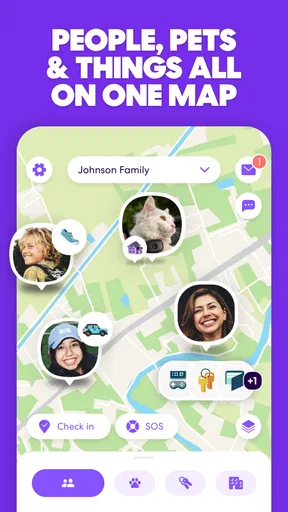
The useful distinction is that Life360 brings several family-safety tasks into one place. Its core idea is not merely “find a phone”; the app’s focus includes location sharing, crash alerts, and driver reports. That can make it more relevant to a household with new drivers, regular school or activity pickups, or relatives who travel by car than to friends who only need to find each other at a concert.
Before relying on it, I would also check the practical basics on each person’s phone: that the app is installed, location sharing is set up as intended, and everyone understands how to use the features the family cares about. A safety app is only useful when people know what to expect from it. It should complement sensible driving, emergency services, and ordinary check-ins—not replace them.
Where it earns a place in daily routines
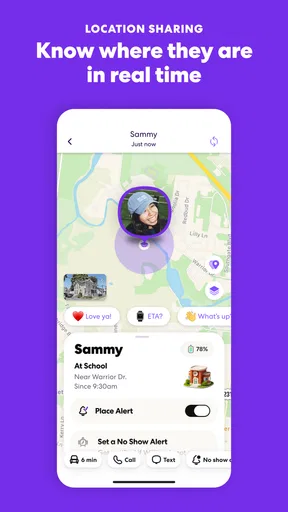
The clearest everyday use is coordinating an arrival without turning every trip into a series of texts. Imagine a parent finishing work while a teenager is driving home from practice. Instead of asking for repeated updates, the parent can check the shared location and use the app’s safety-focused tools as appropriate. That can reduce interruptions for the driver and give the family a common place to look when plans change.
A second useful scenario is a busy pickup. If several adults share responsibility for collecting a child, a family location view can help them coordinate who is closest or whether someone is already on the way. The benefit is not that the app makes decisions for you; it is that fewer people need to send the same “Where are you?” message. I would still agree on a clear pickup plan, because a location dot alone cannot explain a delay or confirm that a child has been handed over safely.
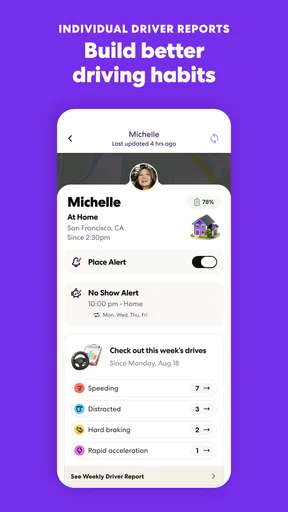
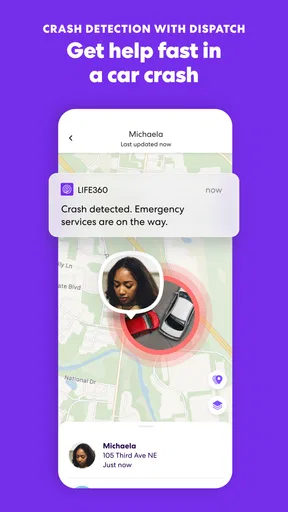
For households with drivers, the combination of crash alerts and driver reports gives the app a more specific role than a basic location-sharing tool. It can make sense when family members want safety information connected to everyday driving, rather than simply seeing a person’s position on a map. I would treat those features as prompts to pay attention, not as guarantees that an incident will always be detected or that every report captures the full context of a drive.
One non-obvious strength is the way a shared circle can reduce coordination overhead across different ages. A parent, an older relative, and a young driver may all have different reasons to check in, but the same shared space can serve them without requiring each person to learn a separate system for every trip. The trade-off is that convenience depends on mutual consent: if one person sees the circle as supervision and another sees it as reassurance, the app can amplify tension rather than solve it.
Another practical tip is to decide in advance what a family will do with an alert. For example, agree who calls first if a drive raises concern, and when to contact someone nearby or emergency services. This keeps the app from becoming a source of panic or a reason for several relatives to call the same driver at once. Especially while someone is behind the wheel, a calm, agreed response is more useful than a flurry of messages.
What it does better than simpler alternatives
Compared with ordinary map sharing, Life360 is oriented toward family safety rather than just reaching a destination together. A general map app may be enough if you only want to share a location temporarily while meeting a friend. Life360 makes more sense when the household wants location sharing to sit alongside driving-related safety features and repeated family routines. The choice is less about which app is universally better and more about whether your needs extend beyond a one-off meetup.
Compared with messaging someone for updates, a shared location can spare the driver from composing replies while moving and can save the person waiting from guessing. But a message remains better when context matters: “I’m stopping for groceries” explains a changed route in a way a map cannot. I see the strongest approach as using the app for situational awareness and direct communication for decisions, exceptions, and anything that needs a human explanation.
It can also be more useful than relying on a phone’s built-in location feature when the household wants a family-oriented safety routine rather than occasional sharing between two people. That said, if your family already uses a built-in service successfully and only needs basic location visibility, switching may add little. A second app is not automatically a better system; it can create another place to check and another habit to maintain.
Life360 is not a replacement for a dedicated emergency service, roadside assistance, or a family’s own safety plan. A location app can help people notice and coordinate, but it cannot guarantee a response, interpret every situation, or ensure that a phone is available. I would be cautious about treating a reassuring screen as proof that everything is fine, just as I would avoid assuming that an alert alone tells the whole story.
Trade-offs, privacy, and the cost of changing habits
The main friction is social, not technical: continuous sharing changes expectations. If parents check the map every few minutes, a teenager may feel monitored even when the original intention was safety. If an adult relative feels pressured to participate, the shared circle may undermine trust. I would discuss boundaries before setup, including when location checks are reasonable and how to handle periods when someone wants privacy.
There is also the everyday burden of remembering that a safety tool is not magic. Each family member needs to use the app consistently enough for the shared view to be meaningful, and people should know how to reach one another without relying on it. Because the app is tied to phones and driving routines, battery, connectivity, and device settings can affect the experience. I would keep normal check-in habits for important journeys instead of assuming the app removes the need for them.
The free starting point makes it possible to explore the basic fit without an upfront purchase, but paid in-app purchases are available. Since the purchase range stretches from $1.49 to $249.99 per item, I would check the current in-app options and what each one includes before paying. Do not assume that every safety feature or benefit is included at no cost, and do not buy a plan merely because a family feels anxious; first identify the exact capability you need and whether it changes your routine.
Switching from another setup has a real, if modest, cost: everyone must agree to use a new shared space, install and configure it, and learn what its alerts mean. If only one person wants the change, the rest of the family may not participate consistently, leaving you with an incomplete picture. I would introduce it with a specific trial purpose—such as coordinating regular drives—and review after a while whether it has reduced messages or added stress.
For privacy-minded households, the right alternative may be selective sharing rather than a permanent family circle. A map-sharing option used only during a trip can be enough for occasional meetups. For a household already comfortable with ongoing visibility and interested in driver-focused safety information, Life360’s broader approach is more compelling. Neither preference is wrong; the useful choice is the one everyone understands and accepts.
My recommendation for the right household
I would recommend Life360 to families who regularly coordinate journeys, have a young or less experienced driver, or want a shared way to stay informed about loved ones’ whereabouts. Its strength is bringing location sharing together with driving-related safety tools, so it can fit into repeated routines rather than being opened only when somebody is lost. The large user community and high average rating are encouraging signs of popularity, though they should not be mistaken for a promise that the app will suit every family.
I would skip it if your need is only occasional navigation, if your household already has a location-sharing arrangement that works, or if members are not comfortable with ongoing visibility. In those cases, a conventional map, a brief message, or temporary sharing may be simpler and better aligned with everyone’s boundaries. I would also avoid choosing it as a way to resolve distrust: tracking cannot replace honest conversations.
Overall, I see Life360 as most valuable when a family agrees on a clear purpose and uses the app as one part of a broader safety routine. Set expectations before sharing, learn what the driving features can and cannot tell you, and decide how the household will respond to alerts. If those steps sound reasonable, it is a practical option to try; if they sound like an unwanted obligation, a lighter, occasional location-sharing method is likely the better choice.
What we like
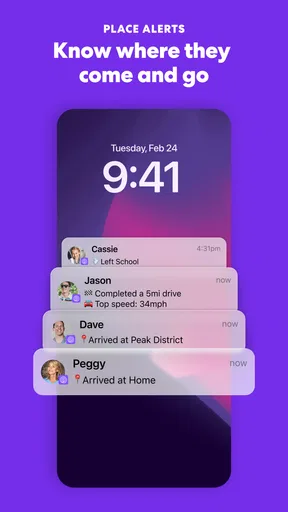
- Location alerts can notify you when family members arrive or leave saved places.
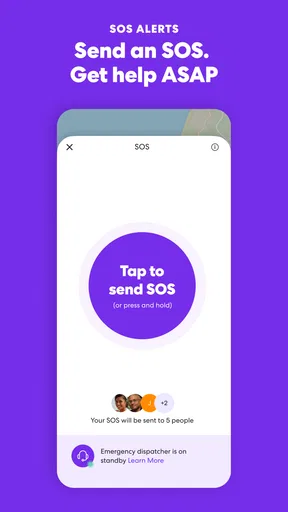
- The SOS feature can share your location with emergency contacts.
- Crash detection may help alert contacts after a serious vehicle collision.
- Location history can help families review recent trips.
- A free plan lets users try core location-sharing features.
What could be better
- Accurate tracking depends on each member's phone and location settings.
- Frequent location updates can use extra battery power.
- Some safety features require a paid subscription.
- Sharing precise location may feel intrusive to some users.
- The app needs internet access to update locations in real time.




