

 Analysis byWeUseApps
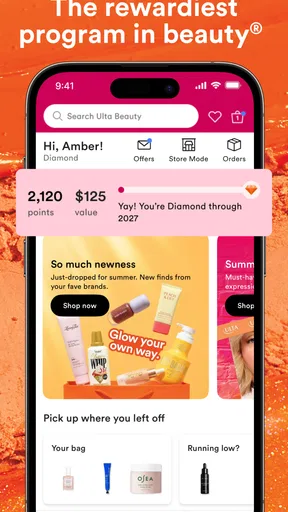
If you’re opening Ulta Beauty for the first time, it helps to think of it as a beauty retailer’s shopping companion rather than a general beauty guide. I’d use it to browse makeup, skincare, haircare, and fragrance, compare options, and narrow down what I might want to buy. The app is free, and its focus makes it most useful when you already have a product or beauty need in mind—even if you haven’t chosen a brand yet.
What you can expect from Ulta Beauty
Ulta Beauty is a beauty app from Ulta Inc., built around shopping rather than tutorials or social content. That distinction matters: if you want step-by-step makeup lessons or a community feed, this isn’t the place I’d start. If you want to explore beauty products in one retailer’s catalog, it has a clearer purpose.
The app has a 4.6 average from around 221,000 ratings, and it has been installed over five million times. It’s marked for everyone and is free to install. Those figures suggest a well-established shopping app, but they don’t guarantee that every part of the experience will suit your habits; the useful question is whether you prefer browsing a retailer’s selection or comparing many retailers at once.
On the store page, the current version is 10.17.1, and the app’s history reaches back to November 8, 2012. It requires iOS or Android version 9 or later. I’d check that your device meets that requirement before troubleshooting an installation problem.
For a first visit, I’d keep the goal modest. Pick one need—perhaps a replacement cleanser, a different lipstick shade, or a fragrance to explore—and use that as your starting point. Browsing without a goal can turn a large beauty catalog into a tiring scroll. A focused search gives you a better chance of deciding whether the app’s selection and product information are useful to you.
How to make the first session feel manageable
After installing, begin with the category that matches what you’re shopping for, then refine your search using details you already know. For skincare, that might be the kind of product you need; for haircare, it could be the product type or concern you’re trying to address. For makeup, start with the item rather than trying to solve your entire routine at once.
I recommend deciding on a few priorities before comparing products. For example, note whether you need a particular shade, texture, or product format. This is more practical than opening several appealing listings and trying to remember why each one caught your eye. It also helps separate “interesting to browse” from “a sensible replacement for what I use now.”
If you’re new to beauty shopping, don’t assume that a familiar category name means two products do the same job. A moisturizer, serum, and cleanser have different roles, while products within one category can still vary in finish, formulation, and intended use. I’d read each listing carefully and treat your own needs—not a product’s placement in the catalog—as the final guide.
Your first useful result: find one product worth considering
A successful first use doesn’t have to end with a purchase. I’d count it as a win if I can identify a short list of plausible options and understand why they might fit my need. Open a product’s details, check the information available there, and compare it with what you already know works for you. If anything important is unclear, pause rather than filling the gap with an assumption.
Here’s a realistic everyday example: you realize before work that your usual hair product is nearly empty. Instead of browsing every beauty category, go straight to haircare and search for the type of product you normally use. Compare a few candidates on the details shown in the app, then decide whether one is a suitable replacement. That quick, specific errand is a better first test than trying to rebuild your whole routine on a small screen.
For a less familiar purchase, such as fragrance, use the app to explore possibilities but be cautious about treating a listing as a substitute for experiencing a scent in person. Descriptions can help you organize your search, but fragrance is personal. I’d use the app to make a shortlist, then choose a way to evaluate the options that matches how confident I need to be before buying.
One useful habit is to compare products against a known reference. If you’re replacing a cleanser, note what you like about the one you already use—such as how it feels or when you use it—before looking at alternatives. This reduces the temptation to choose based only on packaging or a persuasive product name. It’s a small step, but it makes a catalog much easier to navigate thoughtfully.
Where new shoppers can get turned around
The biggest potential confusion is expecting a beauty adviser in your pocket. Ulta Beauty is primarily a retail app, so browsing products is not the same as receiving a personalized diagnosis of your skin or hair. If you have a persistent skin concern, an allergy, or a question about whether an ingredient is appropriate for you, I wouldn’t rely on a shopping interface as a replacement for qualified advice.
Another point to keep in mind is that a wide selection can make comparisons feel less decisive, not more. A long list of options doesn’t automatically tell you which one is right. Narrow the field using your actual requirements, and compare like with like: a replacement for an everyday product should be judged differently from a new item you’re buying to experiment.
It’s also easy to confuse browsing with a completed shopping plan. Seeing an appealing product doesn’t answer whether it fits your budget, routine, or preferences. Before committing, check the current product and purchase details presented in the app and make sure they match what you intended. Retail information can change, so I’d rely on what’s shown at the time of shopping rather than on something remembered from an earlier visit.
If your usual approach is to compare multiple retailers side by side, a single retailer’s app may feel limiting. Ulta’s advantage is having a beauty-focused destination; the trade-off is that it isn’t a neutral overview of every place you could shop. I’d use it when I want to browse Ulta’s range, and use a broader comparison approach when price, availability, or selection across different shops is the main priority.
Who will get the most from it
I can see this app being a good fit for someone who already shops for beauty products and wants a dedicated place to explore makeup, skincare, haircare, and fragrance. It may also suit a beginner who has a clear, small shopping task and wants to learn what options are available without starting from a general web search.
It’s less compelling if you rarely shop for beauty products, already know exactly where you buy everything, or mainly want advice and educational content. It may also be the wrong first stop if your decision depends on testing a shade or scent in person, or if you need professional guidance about a health-related concern. In those cases, another source or a visit to a suitable professional can answer the question more reliably.
Compared with a brand’s own app, a retailer-focused app is useful when you’re open to considering different beauty labels in one shopping context. Compared with a general online marketplace, its beauty-specific focus is more relevant to this kind of browsing, though it still won’t replace testing products yourself. The best choice depends on whether you value a focused beauty catalog or a wider cross-store comparison.
A sensible next step after your first visit
Once you’ve found one product worth considering, make your next session more specific rather than broader. Look for an alternative only if you have a reason: perhaps you want a different type of finish, a product for another part of your routine, or an option that better matches your preferences. This turns the app into a practical shopping tool instead of an endless source of possibilities.
I’d also keep a note of what you already use and what you want to change. That simple reference makes future browsing easier, especially when you return for a replacement after some time has passed. It can stop you from buying something that sounds appealing but doesn’t solve the problem you started with.
My recommendation is to try Ulta Beauty with one clear shopping goal. It is a free, focused beauty retailer app from Ulta Inc., and that focus is its main strength as well as its main limitation. If you want a convenient place to browse beauty products and build a shortlist, it’s worth exploring. If you need independent product comparisons, in-person testing, or personalized professional advice, use it as one part of your decision—not the whole decision.
What we like
- Browse a broad selection of beauty brands in one app.
- Save favorite products for easier shopping later.
- Product ratings help shoppers compare options.
- Beauty services can be booked through the app.
- Store details make it easier to plan an in-person visit.
What could be better
- Some products may be unavailable at your preferred store.
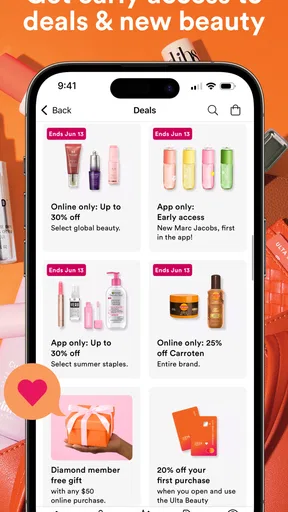
- Prices and promotions can change without notice.
- Product recommendations may not suit every skin type.
- The app requires an account for some shopping features.
- Beauty service availability varies by location.




