
 Analysis byWeUseApps
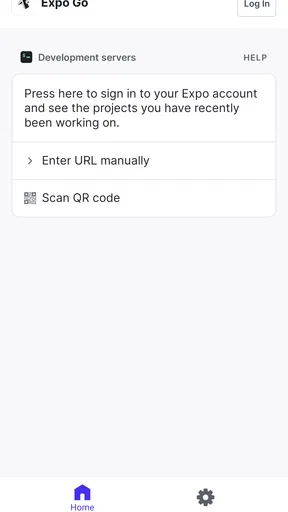
I see Expo Go as a practical testing companion for people building apps with JavaScript and React, rather than a finished app for everyday consumers. Its purpose is to let you open and try projects made with Expo, which makes it useful when you want to check an idea on a phone without first turning that idea into a full app-store release. If you are learning, prototyping, or reviewing a project someone has shared with you, that quick feedback loop can be the difference between a smooth session and a lot of setup.
The distinction matters: Expo Go is the mobile client, while Expo is the broader open-source platform from Expo Project. Installing the client does not, by itself, give you a ready-made app builder or a collection of unrelated tools. You need an Expo project to load, and the experience is most valuable when you are already working in that ecosystem. I would recommend it to curious beginners and active React developers, but not to someone looking for a general-purpose code editor or a library of polished consumer apps.
What the current app is best at
In the app’s libraries-and-demos corner of the catalog, Expo Go fills a focused role: it gives a project a way to run on a real mobile device during development. I find that more useful than judging a mobile interface only in a desktop preview. Touch targets, scrolling, keyboard behavior, and the feel of moving between screens are easier to assess when you can interact with the app as a phone user would.
The appeal is especially clear for small experiments. A learner can make a basic screen, open it on a device, and see whether the layout feels right before building out the rest. A developer can check a change while working through a feature, then adjust the project based on what actually happens on a phone. That makes Expo Go a testing surface, not a substitute for learning React, writing the project, or deciding how an app should behave.
Its audience is reflected in its broad reach: it has more than five million installs and an average rating of 4.3 from around 32,000 ratings. Those figures suggest that it has found a substantial audience, though they do not mean every project will work identically for every user. The app is free, and its age rating is Everyone, which makes it easy to try; the more important requirement is having a project and development workflow that fit Expo.
A useful fit for learning and rapid checks
If you are new to mobile development, I would use Expo Go as a way to shorten the distance between writing code and seeing a result. It can make an early project feel tangible: instead of stopping at a browser view or a screenshot, you can check how the interface reads on the device you actually carry. That is valuable when you are still learning how spacing, text, and navigation choices translate from an idea into a usable screen.
For an experienced developer, the benefit is different. Expo Go can serve as a convenient place to inspect an in-progress app without treating every small adjustment as a release event. I would still keep the project’s development environment organized and make sure the phone is loading the intended project, especially when switching between experiments. The client makes the preview step approachable, but it does not remove the need to understand the code and the project’s requirements.
A realistic use case is a developer making a simple appointment-booking interface for a local service. After changing the form layout, they can load the project on a phone, tap through the fields, and notice whether the keyboard obscures an important button or whether the confirmation screen is easy to read. That kind of check catches problems a static mockup can miss. It is not a guarantee that every device or release condition has been tested, but it gives useful feedback early.
Where it differs from the usual alternatives
Compared with a desktop browser preview, Expo Go puts the interaction on a physical phone, so it is better for noticing the feel of touch and the shape of a mobile layout. Compared with a conventional app from an app store, it is not something I would install expecting a complete service with accounts, content, and a polished standalone purpose. Its value depends on another project being available to open.
It also occupies a different place from a full development setup. A code editor is where you make changes; Expo Go is where you can view a compatible project on a device. An emulator can be useful when you need a controlled virtual device or want to work without reaching for a phone, while a physical-device preview gives a more immediate sense of real-world handling. I would treat these approaches as complementary rather than assuming one makes the others unnecessary.
That trade-off is important for beginners. Expo Go can make testing feel less intimidating, but it cannot replace a computer-based workflow for building and managing a project. If you want to write code entirely on your phone, this is not the tool I would choose. If your goal is to preview a React project made with Expo while learning or iterating, it is much closer to the right fit.
How the current version fits into an established workflow
The current version is 58.0.5. The app was released on December 8, 2015, so it has been part of the Expo ecosystem for years. That history is useful context, but a version number alone does not tell me what changed in a particular update or prove that an older project will behave exactly as before. I prefer to treat the installed client and the project’s own setup as parts of one workflow, rather than assuming that updating one automatically settles every compatibility question.
For someone already using Expo Go, the practical habit is to test the actual project after changes to the development setup, not merely assume that yesterday’s successful preview guarantees today’s result. If a project stops opening or behaves differently, I would first check that I am loading the intended project and that the development environment is in the state I expect. Keeping a small, known-working sample project can also help separate a project-specific issue from a broader setup problem.
The minimum operating-system requirement is 7.0. That gives the app a low stated baseline, but I would still consider the phone’s overall condition and the project being tested before choosing a device for serious work. A device that can install the client is not automatically a complete substitute for testing across the range of phones an app may eventually need to support.
What existing users should keep in mind
If Expo Go is already part of your routine, its strongest contribution remains the ability to make mobile checks feel like a normal development step rather than a special ceremony. I would use that convenience deliberately: preview a screen after a meaningful change, test a short task from beginning to end, and note friction while it is fresh. Looking only at whether a screen launches is less useful than asking whether a person can complete the action the screen is meant to support.
There is also a sensible boundary to the preview. A project that runs inside a development client should not be treated as proof that every final distribution detail is settled. If your goal is to judge the app as a released product, you need to evaluate the complete release workflow and the actual build you intend to deliver. Expo Go helps answer “does this project work on my phone during development?” It is not the same question as “is this finished app ready for every user?”
That distinction can save time. For example, if you are showing a prototype to a colleague, make clear that they are viewing a development project rather than a finished app-store experience. Ask them to try a specific task, such as finding a setting or completing a form, instead of simply asking whether they like the look. Their feedback will then tell you more about the design, while you keep separate any questions about packaging or release readiness.
Remaining gaps and when I would skip it
Expo Go is not the right choice if you do not have an Expo project to open. It is also a poor match if you want a self-contained mobile coding environment, a general app showcase, or a finished consumer utility. In those situations, a code editor, a project-specific testing approach, or the actual standalone app would better match the job. The focused nature of Expo Go is a strength only when your goal fits it.
Another limitation is that a phone preview cannot answer every question about how a project will behave in its final form. It can help you judge a real interface and catch awkward interactions, but a development preview should not be confused with a complete assessment of release behavior. I would plan a separate check for the build and distribution path when a project moves beyond experimentation.
There is a learning curve around the surrounding workflow, too. Someone opening the client without knowing how to start or access a project may find little to do. That is not a reason to avoid it if you are learning React and Expo, but it does mean the app works best alongside a tutorial or an existing project rather than as a standalone first step. Beginners should expect to learn how the preview connects to their work, not just tap through a finished interface.
What I would watch as the platform evolves
Expo Go sits within an open-source platform, so I would pay attention to whether the current client continues to fit the needs of the projects I actually maintain. For an existing user, the most useful question is not whether a version number looks newer, but whether the project still opens smoothly and whether the preview remains representative of the work being built. Checking a project after changes to the development setup is more actionable than relying on assumptions about the app’s evolution.
I would also keep an eye on the boundary between quick device previews and the needs of a mature release process. A tool that is excellent for early feedback does not have to cover every stage of shipping software. As a project becomes more demanding, it is reasonable to add other testing and release steps rather than expecting this one app to do everything. That is a healthy progression, not a failure of Expo Go.
For anyone deciding whether to install it, my advice is straightforward: use it when you have an Expo-based React project and want to inspect that project on a phone. Start with a small change, load the project, and test a complete user task rather than just checking that the first screen appears. If you are looking for a general app with its own everyday function, skip it; if you are learning or building in this ecosystem, Expo Go is a focused, approachable way to bring your work onto a real device.
What we like
- Preview React Native projects on a device without a full native build.
- Scan a QR code to open a project quickly.
- Supports hot reloading during development.
- Works on both Android and iOS devices.
- Useful for testing interfaces on real hardware.
What could be better
- Requires a compatible Expo project to preview apps.
- Some native modules need a development build instead.
- Project loading depends on a stable network connection.
- Preview behavior may differ from a production app.
- It is a developer tool rather than a consumer app.




